Khadas VIM3
No live price yetAffiliate link. As an Amazon Associate I earn from qualifying purchases. Details
Khadas VIM3 review
Researched, not hands-on tested.How we review ›
by SudoPicks Research · editor Paul HR · published 29 Oct 2026 · updated 29 Oct 2026
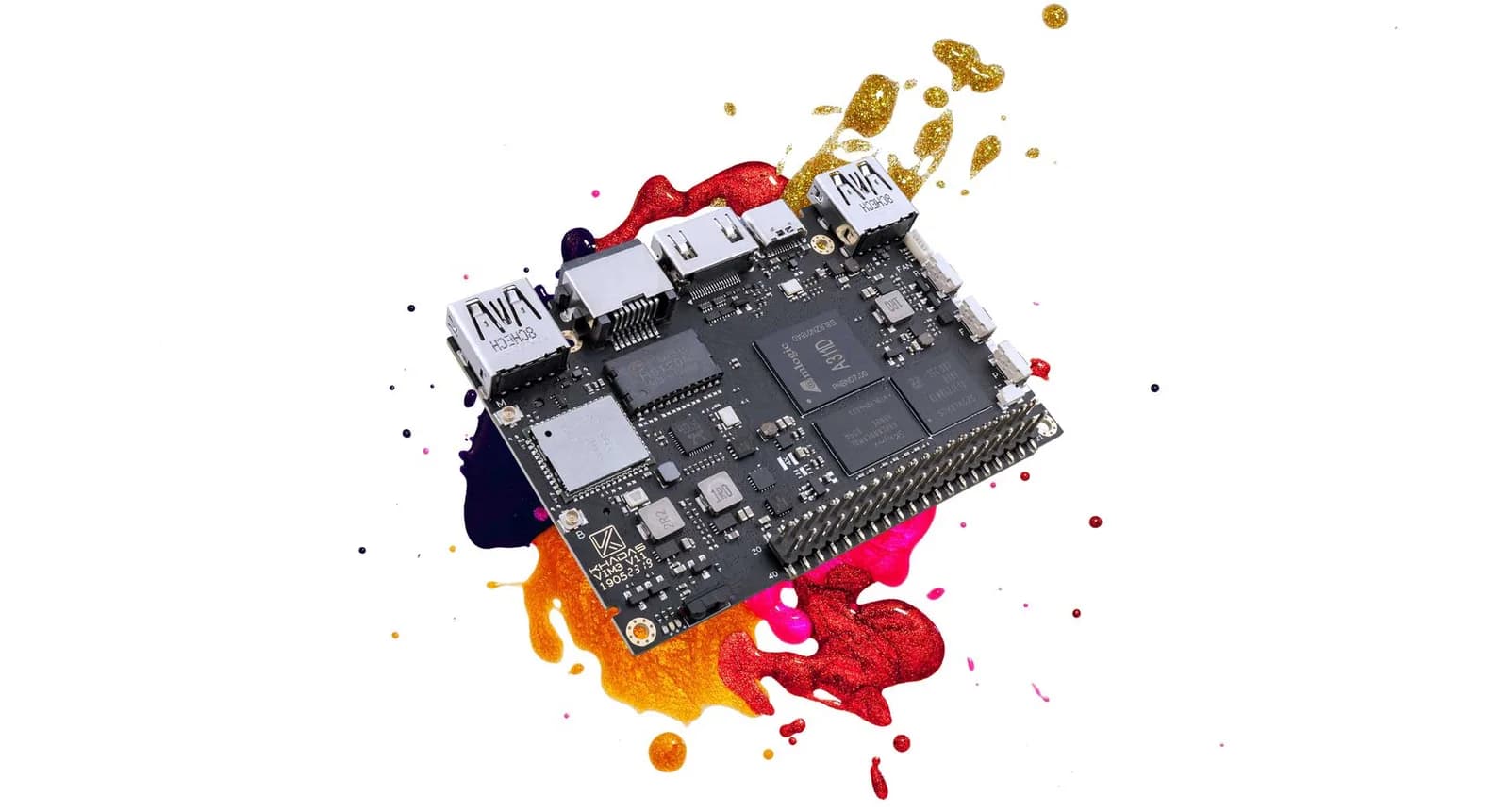
The Khadas VIM3 is for tinkerers who want a six-core Arm board with NVMe support and a 40-pin header. It suits media, display and embedded projects where the NPU and flexible storage matter.
6th of 15 single-board computers we've reviewedAffiliate link. As an Amazon Associate I earn from qualifying purchases. Details
New to single-board computers? What they are and what to look for
A single-board computer, like a Raspberry Pi, is a tiny, cheap computer on one circuit board. People use them to learn coding, build gadgets, and run small home servers.
Do you need a single-board computer? Great for tinkering, learning Linux or electronics, or running things like a home-automation hub or ad blocker. Not a replacement for a normal PC.
What to look for
- A power supply, case and microSD card: they're often sold separately
- 4GB or more of memory for anything beyond simple projects
- How big the community is: more guides and help for popular boards
Unsure about a word? Jargon explained
How the 6.6 adds up
Our single-board computers rubric- Software support30% of score
- Performance25% of score
- Storage15% of score
- I/O and networking15% of score
- Value15% of score
Against the 15 single-board computers we've reviewed
bar = the range of all 15 · dot = this one · better →
- Overall score 6.6/106th of 15
Power use and running costs
Running 24/7 at idle, at 26.32p per kWh (the Ofgem price cap).
- Electricity per year
- £4.15
- 16 kWh
- 3 years, all in
- -
- no price yet
- Against the others
- 7th of 13
- 1st = lowest idle power
- Raspberry Pi Zero 2 W0.5 W£1.15
- Arduino UNO Q 4GB0.5 W£1.15
- Banana Pi BPI-M2 ZERO0.5 W£1.15
- Raspberry Pi 3 Model A+1.1 W£2.54
- Raspberry Pi 3 Model B1.4 W£3.23
- Radxa ROCK 5C1.6 W£3.69
- Khadas VIM3 (this)1.8 W£4.15
- BeagleBoard BeagleBone Black2.7 W£6.23
- Orange Pi 5 Plus2.8 W£6.46
- Raspberry Pi 4 Model B 1GB2.85 W£6.57
- Raspberry Pi 5 4GB3 W£6.92
- Raspberry Pi 4003 W£6.92
- IceWhale ZimaBoard 28.2 W£18.91
- Raspberry Pi Zero 2 W£17.86
- Banana Pi BPI-M2 ZERO£27.39
- Raspberry Pi 3 Model A+£30.47
- Raspberry Pi 3 Model B£42.68
- Arduino UNO Q 4GB£62.77
- Raspberry Pi 4 Model B 1GB£64.01
- Raspberry Pi 400£78.35
- BeagleBoard BeagleBone Black£92.68
- Raspberry Pi 5 4GB£126.35
- IceWhale ZimaBoard 2£345.61
Today's best price, or the typical price when researched. Drives and accessories not included.
Not shown, as no idle figure is published: Raspberry Pi Zero WH, Banana Pi BPI-M2 Berry.
Support and features
| Software updates | No announced end date for updates source |
|---|
- NVMe
- Gigabit Ethernet
- 4GB+ memory
Featured in: Best single-board computers for Home Assistant
Measured by owners
No owner readings yet. If you own one and have a smart plug or power meter, a reading takes a minute and helps everyone else.
Security and compatibility
| Latest firmware or software | December 2025updated in the last year source |
|---|---|
| Known security issues | None found in public advisories. That's a good sign, not a guarantee. |
| Update record | No security advisories naming the VIM3 or its firmware were found; the newest dated build is a December 2025 Android 16 image. |
| Linux | Partly works on Linux. Bluetooth, audio, and NPU work on mainline Linux, but the DSI display and MIPI camera without an ISP do not; Khadas supports only Linux 4.9 BSP for Ubuntu 20.04. source |
Pros and cons
+ pros
- M.2 NVMe socket alongside eMMC and microSD
- Six-core A311D with NPU; owners praise efficiency
- Several official OS images, including mainline Linux
− cons
- Owners report heat and instability without a fan
- Power delivery quirks reported, including bootloops and shutdowns
- RAM stops at 4GB
Price history
Price history appears here once we have tracked this product for a few days.
The full review
Where it fits
The Khadas VIM3 is a single-board computer from Shenzhen Wesion Technology, sold under the Khadas brand. The VIM3 Basic launched in 2019. It pairs an Amlogic A311D with up to 4GB of memory, onboard eMMC and an M.2 socket. That mix points at media boxes, display projects, light servers and embedded builds more than at general desktop use.
Processor and memory
The Amlogic A311D has four Cortex-A73 cores at 2.2GHz and two Cortex-A53 cores at 1.8GHz. It also carries a 5 TOPS NPU. Memory is 2GB or 4GB of LPDDR4/LPDDR4X.
Six cores in a mixed layout give the board room for several services at once. The 4GB ceiling is the limit. With no higher RAM tier, it suits containers and single-purpose workloads better than several memory-hungry virtual machines. Owners describe the performance and efficiency as strong for its power use, which fits the high-clocked A73 cores on paper.
Storage8/10
Storage is a strength. The board offers eMMC 5.1 in 16GB or 32GB, a micro-SD slot and an M.2 2280 socket for NVMe over PCIe 2.0 x1. You can boot and run from fast onboard storage, or keep the OS on eMMC and add an NVMe drive for data. The single PCIe 2.0 lane sets the ceiling for that drive, so it is a sensible fit for a modest SSD rather than a high-end one.
Networking and I/O7/10
Wired networking is Gigabit Ethernet with Wake-on-LAN. Wireless is an AP6398S module with 802.11a/b/g/n/ac 2x2 Wi-Fi and Bluetooth 5.0. A 40-pin GPIO header with 2.54mm pitch handles hardware projects.
The display side is broad. There is HDMI with CEC, a MIPI-DSI display interface and a touch-panel connector. That combination suits a small embedded screen as well as a TV. Power comes in through a 5–12V VIN connector or a USB-C port that accepts 5–20V USB Power Delivery.
Software support6/10
The official OS list includes Mainline Linux, Ubuntu 20.04, LibreELEC, Google AOSP and Fuchsia OS. Armbian support has been announced. No end-of-support date has been announced for the VIM3. The mainline Linux option matters for anyone who wants a standard kernel rather than a vendor one.
Some owner reports show their age. They mention Wi-Fi not working under LibreELEC and no hardware video acceleration for Kodi at the time. These are 2019-era gaps, so check the current state of the image you plan to use before building a media centre around it.
Heat and power
Owners report temperatures reaching 75C and instability without a fan. They also consider the stock heatsink too small. If you plan sustained load, budget for better cooling.
Owners also report power delivery quirks. One report points to a power delivery bug that causes bootloops, noted on the Fuchsia hardware page. A builder reported shutdowns under motor current spikes. With a 5–12V VIN input and USB-C PD both available, choose and test your supply carefully, especially if you drive motors or other loads from the same rail.
Who it suits
The VIM3 suits builders who value the NVMe socket, the display connectors and the choice of operating systems. Based on the owner reports, it works best for people comfortable adding cooling and checking their power setup. It is a weaker fit for anyone who wants minimal fuss.
What owners report
Recurring themes from public owner feedback, summarised in our own words.
- Owners report temperatures reaching 75C and instability without a fan, and find the stock heatsink too small.
- Power delivery quirks appear, including a bootloop bug noted for Fuchsia and shutdowns under motor current spikes.
- Owners praise performance and efficiency as strong for the power the board uses.
- Some 2019 software gaps are reported, such as Wi-Fi not working under LibreELEC and no hardware video acceleration for Kodi.
Who should skip it
- Buyers who want a fanless, cool-running board with no extra cooling
- Anyone needing more than 4GB of RAM
- Builders who can't test and choose their power supply carefully
Full specifications
| Processor (SoC) | Amlogic A311D, four Cortex-A73 cores at 2.2GHz and two Cortex-A53 cores at 1.8GHz, with 5 TOPS NPU |
|---|---|
| Memory | 2GB or 4GB LPDDR4/LPDDR4X |
| Storage options | eMMC 5.1 16GB or 32GB, micro-SD slot, M.2 2280 socket for NVMe (PCIe 2.0 x1) |
| Networking | Gigabit Ethernet with Wake-on-LAN; AP6398S 802.11a/b/g/n/ac 2x2 Wi-Fi and Bluetooth 5.0 |
| GPIO | 40-pin GPIO header, 2.54mm pitch |
| Video outputs | HDMI with CEC, MIPI-DSI display interface, touch-panel connector |
| Power input | VIN connector 5–12V; USB-C port 5–20V USB Power Delivery input |
Sources
- Khadas VIM3
- Khadas VIM3 spec sheet
- Khadas VIM3 hardware docs
- Khadas VIM3 start docs
- It's all about VIM3
- Khadas VIM3 file index
- Powering the VIM3
- Review video: Khadas VIM3 in Linux
- VIM3 thermal with the new heat sink
- Khadas VIM3 Ubuntu 20.04 SD card image overheating
- Power consumption
- Khadas VIM3 Fuchsia hardware page
- Khadas VIM3 kit unboxing review
- Why OEMs are choosing Khadas VIM3