Raspberry Pi 400
~£57.60typical UK price when we researched itAffiliate link. As an Amazon Associate I earn from qualifying purchases. Details
Raspberry Pi 400 review
Researched, not hands-on tested.How we review ›
by SudoPicks Research · editor Paul HR · published 27 Oct 2026 · updated 27 Oct 2026
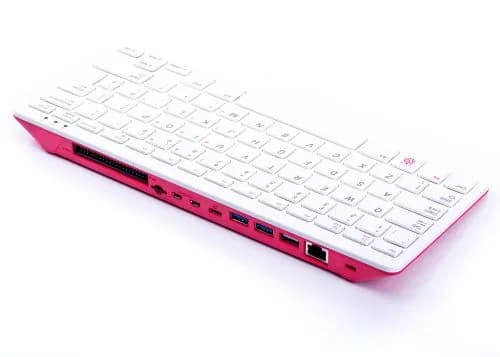
The Raspberry Pi 400 is for anyone who wants a complete, compact Raspberry Pi desktop with the keyboard built in and no assembly. It suits learners, classrooms and homelabbers who want a small terminal or light desktop machine running Raspberry Pi OS.
2nd of 8 single-board computers we've reviewedAffiliate link. As an Amazon Associate I earn from qualifying purchases. Details
New to single-board computers? What they are and what to look for
A single-board computer, like a Raspberry Pi, is a tiny, cheap computer on one circuit board. People use them to learn coding, build gadgets, and run small home servers.
Do you need a single-board computer? Great for tinkering, learning Linux or electronics, or running things like a home-automation hub or ad blocker. Not a replacement for a normal PC.
What to look for
- A power supply, case and microSD card: they're often sold separately
- 4GB or more of memory for anything beyond simple projects
- How big the community is: more guides and help for popular boards
Unsure about a word? Jargon explained
How the 7.2 adds up
Our single-board computers rubric- Software support30% of score
- Performance25% of score
- Storage15% of score
- I/O and networking15% of score
- Value15% of score
Against the 8 single-board computers we've reviewed
bar = the range of all 8 · dot = this one · better →
- Overall score 7.2/102nd of 8
- Price £57.605th cheapest
- Value for money About average5th best of 8
Power use and running costs
Running 24/7 at idle, at 26.32p per kWh (the Ofgem price cap).
- Electricity per year
- £6.92
- 26 kWh
- 3 years, all in
- £78.35
- £57.60 to buy + £20.75 to run
- Against the others
- 6th of 7
- 1st = lowest idle power
- Raspberry Pi Zero 2 W0.5 W£1.15
- Arduino UNO Q 4GB0.5 W£1.15
- Raspberry Pi 3 Model B1.4 W£3.23
- Raspberry Pi 4 Model B 1GB2.85 W£6.57
- Raspberry Pi 5 4GB3 W£6.92
- Raspberry Pi 400 (this)3 W£6.92
- IceWhale ZimaBoard 28.2 W£18.91
- Raspberry Pi Zero 2 W£17.86
- Raspberry Pi 3 Model B£42.68
- Arduino UNO Q 4GB£62.77
- Raspberry Pi 4 Model B 1GB£64.01
- Raspberry Pi 400 (this)£78.35
- Raspberry Pi 5 4GB£126.35
- IceWhale ZimaBoard 2£345.61
Today's best price, or the typical price when researched. Drives and accessories not included.
Not shown, as no idle figure is published: Raspberry Pi Zero WH.
Support and features
| Software updates | No software support end date published; production committed until at least January 2028. source |
|---|
- Gigabit Ethernet
- 4GB+ memory
Featured in: Best single-board computers for Home Assistant
Measured by owners
No owner readings yet. If you own one and have a smart plug or power meter, a reading takes a minute and helps everyone else.
Security and compatibility
| Latest firmware or software | October 2026updated in the last year source |
|---|---|
| Known security issues |
|
| Open firmware | Supported by OpenWrt |
| Update record | The maker's advisory CVE-2026-13199 affects the Pi 5 and Compute Module 5, not the Pi 400, and no maker advisory naming the Pi 400 was found; the Pi OS default-password issue was fixed by removing the default pi account, but the fixed version is unconfirmed. |
| Linux | Works on Linux. Support was added to the mainline Linux kernel in release 5.14 with only a DeviceTree addition and no driver changes; Raspberry Pi OS is Debian-based. source |
Pros and cons
+ pros
- Keyboard and computer in one compact case
- Raspberry Pi OS preinstalled on the SD card
- Gigabit Ethernet and two USB 3.0 ports
− cons
- microSD only, with no M.2 or eMMC
- GPIO access is awkward and needs an adapter
- Keyboard feels cheap and spongy to some owners
Price history
Price history appears here once we have tracked this product for a few days.
The full review
Where it fits
The Raspberry Pi 400 puts a Raspberry Pi inside a keyboard case. It was released on 2 November 2020, and Raspberry Pi OS comes preinstalled on the SD card in the kit. Owners praise the compact all-in-one form factor and the lack of assembly. You connect a display, power it and start.
Raspberry Pi says the board will stay in production until at least January 2028. That helps anyone planning a classroom set or a long-lived desk machine around it, because the hardware stays available for years.
Performance and memory6/10
The Pi 400 uses a Broadcom BCM2711 with four 64-bit Cortex-A72 cores at 1.8 GHz. Memory is 4GB of LPDDR4-3200. With that spec, it suits a browser, a terminal, an editor and a few small services at once. Heavy multitasking or memory-hungry workloads will hit the 4GB ceiling first.
Video output goes through two micro HDMI ports, up to 4Kp60. The board decodes H.265 at 4Kp60 and H.264 at 1080p60, and it supports OpenGL ES 3.1 and Vulkan 1.0. Those specs cover everyday desktop use and media playback. The ports are micro HDMI, not full-size, so check your cables before you plug in a display.
Storage4/10
Storage is the clearest limit. The Pi 400 has a microSD card slot and nothing else: no eMMC, no SSD and no M.2 slot. Your operating system and data live on a card, which fits a learning machine or a light desktop. It is a poor match for anyone wanting fast internal storage, because the board has no slot for it.
Ports and networking7/10
The wired and wireless options are solid for a machine this small. You get Gigabit Ethernet, dual-band 2.4/5 GHz 802.11ac Wi-Fi, and Bluetooth 5.0 with BLE. There are two USB 3.0 ports and one USB 2.0 port. Power arrives at 5V over USB Type-C.
The Gigabit port and the USB 3.0 ports suit a homelab terminal that needs a wired connection and a couple of peripherals. Two video outputs also give a dual-monitor desk setup.
The keyboard and GPIO
The built-in keyboard is the point of the product, and owner opinion is mixed. Reports call it usable and fairly comfortable, but also cheap and spongy. If you type for long stretches, that feel matters more than the spec sheet suggests.
The 40-pin GPIO header sits horizontally on the rear of the case. That keeps the header on board, but owners complain that access is awkward and needs an adapter. If you plan to wire up sensors, HATs or breadboard projects, budget for that extra part. The header is there, but owners find it awkward to reach.
Who it suits
The Pi 400 suits people who want a ready-to-use Raspberry Pi machine with minimal setup. That includes first-time users, teachers and anyone wanting a small terminal or light Linux desktop. It comes with the official Raspberry Pi OS preinstalled, and the long production commitment makes it a safe base for projects that need the same hardware for years.
It is less suited to builders who need fast local storage or frequent GPIO work. The case design and the microSD-only storage steer it towards desktop use more than towards embedded or server projects.
What owners report
Recurring themes from public owner feedback, summarised in our own words.
- Owners like the compact all-in-one design, which needs no assembly.
- The GPIO header is hard to reach on the rear of the case and needs an adapter.
- The keyboard is usable and fairly comfortable, but feels cheap and spongy.
Who should skip it
- Buyers who want M.2, SSD or eMMC storage on the board.
- Makers who will use the GPIO header often and want easy access.
- Anyone who wants a separate bare board to mount in their own case.
Full specifications
| Processor (SoC) | Broadcom BCM2711, quad-core Cortex-A72 64-bit, 1.8 GHz |
|---|---|
| Memory | 4GB LPDDR4-3200 |
| Storage options | MicroSD card slot; no eMMC, SSD or M.2 slot |
| Networking | Gigabit Ethernet; dual-band 2.4/5 GHz 802.11b/g/n/ac Wi-Fi; Bluetooth 5.0 and BLE |
| GPIO | 40-pin horizontal GPIO header on the rear of the case |
| Video outputs | 2 × micro HDMI ports, up to 4Kp60; H.265 4Kp60 decode, H.264 1080p60 decode, OpenGL ES 3.1, Vulkan 1.0 |
| Power input | 5V DC via USB Type-C power input |
Sources
- Raspberry Pi 400 product page
- Raspberry Pi 400 specifications
- Raspberry Pi 400 Personal Computer Kit launch post
- Raspberry Pi 400 product brief
- Raspberry Pi 400 specifications, benchmarks and personal computer kit (magazine)
- Raspberry Pi 400 review (Tom's Hardware)
- Raspberry Pi 400 review (Android Central)
- Raspberry Pi 400 review (Stuff)
- Raspberry Pi 400 benchmarks (sbc.compare)