Arduino UNO Q 4GB (ABX00173)
Price unavailable right nowAffiliate link. As an Amazon Associate I earn from qualifying purchases. Details
Arduino UNO Q 4GB (ABX00173) review
Researched, not hands-on tested.How we review ›
by SudoPicks Research · published 24 Oct 2026 · updated 24 Oct 2026
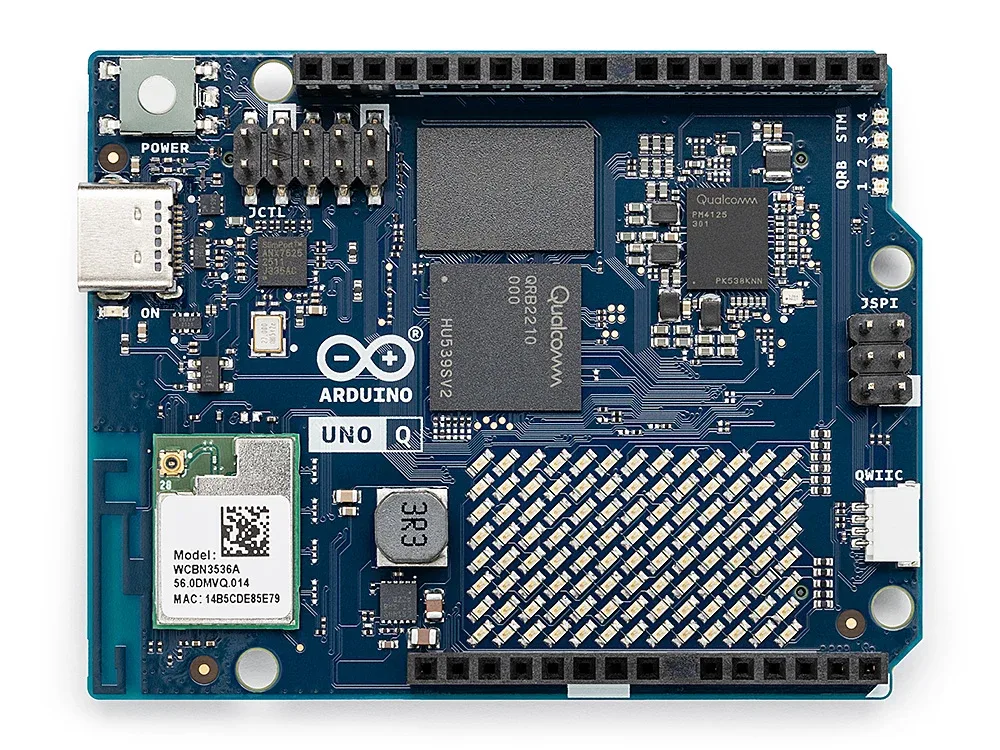
The Arduino UNO Q 4GB suits makers who want Linux and real-time Arduino code on one UNO-format board. It is aimed at projects that mix sensors and actuators with software running on Debian.
6th of 6 single-board computers we've reviewedAffiliate link. As an Amazon Associate I earn from qualifying purchases. Details
New to single-board computers? What they are and what to look for
A single-board computer, like a Raspberry Pi, is a tiny, cheap computer on one circuit board. People use them to learn coding, build gadgets, and run small home servers.
Do you need a single-board computer? Great for tinkering, learning Linux or electronics, or running things like a home-automation hub or ad blocker. Not a replacement for a normal PC.
What to look for
- A power supply, case and microSD card: they're often sold separately
- 4GB or more of memory for anything beyond simple projects
- How big the community is: more guides and help for popular boards
Unsure about a word? Jargon explained
How the 5.1 adds up
Our single-board computers rubric- Software support30% of score
- Performance25% of score
- Storage15% of score
- I/O and networking15% of score
- Value15% of score
Against the 6 single-board computers we've reviewed
bar = the range of all 6 · dot = this one · better →
- Overall score 5.1/106th of 6
- Price £59.314th cheapest
- Value for money 8.6 per £1004th of 6
Power use and running costs
Running 24/7 at idle, at 26.32p per kWh (the Ofgem price cap).
- Electricity per year
- £1.15
- 4 kWh
- 3 years, all in
- £62.77
- £59.31 to buy + £3.46 to run
- Against the others
- 1st of 5
- 1st = lowest idle power
- Arduino UNO Q 4GB (this)0.5 W£1.15
- Raspberry Pi 3 Model B1.4 W£3.23
- Raspberry Pi 4 Model B 1GB2.85 W£6.57
- Raspberry Pi 5 4GB3 W£6.92
- IceWhale ZimaBoard 28.2 W£18.91
- Raspberry Pi 3 Model B£42.68
- Arduino UNO Q 4GB (this)£62.77
- Raspberry Pi 4 Model B 1GB£64.01
- Raspberry Pi 5 4GB£126.35
- IceWhale ZimaBoard 2£345.61
Today's best price, or the typical price when researched. Drives and accessories not included.
Not shown, as no idle figure is published: Raspberry Pi Zero WH.
Running costs and support
| Software updates | No end date announced; no support duration statement found. source |
|---|
- 4GB+ memory
Security and compatibility
| Latest firmware or software | October 2026updated in the last year source |
|---|---|
| Known security issues | None found in public advisories. That's a good sign, not a guarantee. |
| Update record | Latest found item is the Arduino App Lab 0.11 companion app, not board firmware; no advisory naming the UNO Q or its firmware was found, and the lifecycle and cloud-account questions remain unverified. |
| Linux | Works on Linux. Arduino's documentation says the board runs a built-in Debian Linux environment with upstream support; NUT and mainline-kernel support were not verified. source |
Pros and cons
+ pros
- Linux and a real-time MCU on one board
- UNO-compatible headers plus Qwiic connector
- Low power draw reported, about 0.5 W idle
− cons
- No Ethernet port listed
- No SD or M.2 slot listed
- One reviewer found it slower than a Raspberry Pi 5
Price history
Price history appears here once we have tracked this product for a few days.
The full review
Where it fits
The UNO Q 4GB pairs a Qualcomm Dragonwing QRB2210 with a separate STM32U585 microcontroller. The Qualcomm chip has four Cortex-A53 cores at 2.0 GHz and an Adreno 702 GPU. The STM32 is a Cortex-M33 running at up to 160 MHz. The board runs full upstream Debian Linux alongside the real-time MCU, and Arduino App Lab is the main toolchain.
That split is the point of the board. Owners praise the hybrid design for running real-time Arduino code beside Linux. If your project needs both, one board covers it. If you only need a Linux computer, the specification offers less.
Memory and the 4GB model
This version has 4GB of LPDDR4 and 32GB of eMMC. The 2GB model (ABX00162) has 2GB of RAM and 16GB of storage. Owner reports say 2GB is limiting, and the 4GB model was introduced for that reason. With 4GB, the board has more room for Linux services running next to your own code.
On raw speed, the picture is less flattering. One reviewer found it slower than a Raspberry Pi 5 at a similar price. Four Cortex-A53 cores at 2.0 GHz point to modest compute, so it suits light services and control tasks more than heavy workloads.
Storage5/10
Storage is 32GB of onboard eMMC. The datasheet lists no SD card slot and no M.2 slot. What you buy is what you get, so choose the capacity tier with that in mind. You cannot swap the OS between cards, and there is no listed route to a larger drive.
Connectivity and I/O
Wireless is dual-band Wi-Fi 5 (802.11a/b/g/n/ac) and Bluetooth 5.1 on module WCBN3536A. The research lists no Ethernet port, and Gigabit or 2.5GbE speeds are not published. For a board you might leave running as a small server, that makes Wi-Fi the listed way to get on a network.
The board has a single USB-C port with USB 3.1 role switching. It also carries DisplayPort Alt-Mode through an ANX7625 bridge. Full HD (1920x1080) is supported, and 1280x720 is optimal in SBC mode. USB data speed is reduced when DisplayPort is active. If you want a monitor and fast USB devices at once, that shared port is a constraint.
The headers follow the Arduino UNO layout. JDIGITAL (18-pin) and JANALOG (14-pin) run at 3.3 V. JMISC (60-pin) is mixed 1.8 V and 3.3 V. JMEDIA (60-pin) and JCTL (10-pin) are 1.8 V. JSPI (6-pin) and a 4-pin Qwiic connector complete the set. Arduino doesn't publish a total GPIO count. The MPU GPIO runs at 1.8 V and the MCU pins at 3.3 V, so some carriers need level shifting. Check your shields and sensors against those voltages before you buy.
Power
The board takes 5 V over USB-C at up to 3 A. It also accepts 7-24 V DC on VIN, or 5 V on the 5V_SYS pin. The recommended minimum is a 15 W PD supply. Owners report low consumption, around 0.5 W idle and 2-3 W at full power. That figure matters for battery or always-on projects.
One owner-reported quirk affects planning. The MCU cannot run without Linux, and the STM32 cannot be powered alone. If you were hoping to use it as a plain microcontroller board, expect the Linux side to be involved every time.
Software6/10
Upstream Debian is a clear plus for anyone who wants a familiar Linux environment. Arduino App Lab is the main toolchain for combining the two sides. The research gives no detail on community size or long-term kernel support, so check those before committing to a long project.
Verdict
The UNO Q 4GB makes sense when the hybrid design is the reason you want it: Linux and real-time Arduino code on one UNO-format board, with low power draw. Owners describe 2GB of RAM as limiting, and this model carries 4GB. The trade-offs are no listed Ethernet, no storage expansion, a single shared USB-C port and CPU performance that one reviewer placed behind a Raspberry Pi 5. Buy it for the MCU and Linux pairing, not as a general-purpose mini computer.
What owners report
Recurring themes from public owner feedback, summarised in our own words.
- The 2GB model's RAM was seen as limiting, which is why the 4GB version was introduced.
- The STM32 MCU cannot run without Linux and cannot be powered alone.
- One reviewer found it slower than a Raspberry Pi 5 at a similar price.
- Power draw is low, around 0.5 W idle and 2-3 W at full power.
Who should skip it
- Buyers who need wired Ethernet, since none is listed.
- Anyone who wants SD or M.2 storage expansion.
- Users who want the fastest general-purpose Linux board at this price.
Full specifications
| Processor (SoC) | Qualcomm Dragonwing QRB2210, quad-core Arm Cortex-A53 @ 2.0 GHz, 64-bit, Adreno 702 GPU @ 845 MHz, plus separate STM32U585 MCU (Cortex-M33, up to 160 MHz) |
|---|---|
| Memory | 4GB LPDDR4 |
| Storage options | 32GB onboard eMMC; no SD or M.2 slot listed |
| Networking | Dual-band Wi-Fi 5 (802.11a/b/g/n/ac) and Bluetooth 5.1 on module WCBN3536A; no Ethernet port listed |
| GPIO | Arduino UNO-compatible headers: JDIGITAL (18-pin, 3.3 V), JANALOG (14-pin, 3.3 V), JMISC (60-pin, mixed 1.8 V/3.3 V), JMEDIA (60-pin, 1.8 V), JCTL (10-pin, 1.8 V), JSPI (6-pin), Qwiic (4-pin); no total GPIO count published |
| Video outputs | USB-C DisplayPort Alt-Mode via ANX7625 bridge; Full HD (1920x1080) supported, 1280x720 optimal in SBC mode; shared with JMEDIA MIPI-DSI output |
| Power input | USB-C 5 V up to 3 A (5 V/3 A PD); 7-24 V DC on VIN; or 5 V on 5V_SYS pin; recommended minimum 15 W PD supply |
Sources
- UNO Q datasheet ABX00162/ABX00173
- Arduino UNO Q 4GB product page
- Arduino UNO Q 2GB product page
- Arduino UNO Q product page
- Arduino UNO Q power specification
- Jeff Geerling: Arduino UNO Q review
- Tom's Hardware: Arduino UNO Q review
- element14: Arduino UNO Q road test
- iotportal: Arduino UNO Q review
- CNX Software: UNO Q 4GB available at $59
- Arduino forum: UNO Q power consumption
- RS Components UK: UNO Q
- Rapid Online: ABX00173
- Digi-Key: UNO Q
- sbc.compare: Arduino UNO Q 2GB