Banana Pi BPI-M2 ZERO
~£23.93typical UK price when we researched itAffiliate link. As an Amazon Associate I earn from qualifying purchases. Details
Banana Pi BPI-M2 ZERO review
Researched, not hands-on tested.How we review ›
by SudoPicks Research · editor Paul HR · published 29 Oct 2026 · updated 29 Oct 2026
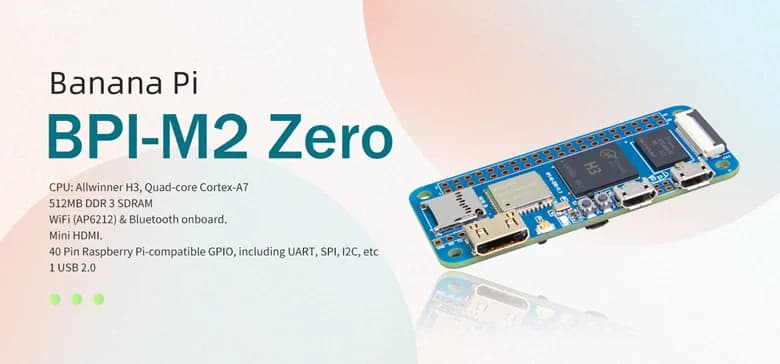
The Banana Pi BPI-M2 ZERO is for people who want a small, wireless board for light, single-purpose jobs. It suits builders who already have Raspberry Pi Zero cases or GPIO accessories to reuse.
14th of 15 single-board computers we've reviewedAffiliate link. As an Amazon Associate I earn from qualifying purchases. Details
New to single-board computers? What they are and what to look for
A single-board computer, like a Raspberry Pi, is a tiny, cheap computer on one circuit board. People use them to learn coding, build gadgets, and run small home servers.
Do you need a single-board computer? Great for tinkering, learning Linux or electronics, or running things like a home-automation hub or ad blocker. Not a replacement for a normal PC.
What to look for
- A power supply, case and microSD card: they're often sold separately
- 4GB or more of memory for anything beyond simple projects
- How big the community is: more guides and help for popular boards
Unsure about a word? Jargon explained
How the 4.6 adds up
Our single-board computers rubric- Software support30% of score
- Performance25% of score
- Storage15% of score
- I/O and networking15% of score
- Value15% of score
Against the 15 single-board computers we've reviewed
bar = the range of all 15 · dot = this one · better →
- Overall score 4.6/1014th of 15
- Price £23.934th cheapest
- Value for money About average5th best of 12
Power use and running costs
Running 24/7 at idle, at 26.32p per kWh (the Ofgem price cap).
- Electricity per year
- £1.15
- 4 kWh
- 3 years, all in
- £27.39
- £23.93 to buy + £3.46 to run
- Against the others
- 3rd of 13
- 1st = lowest idle power
- Raspberry Pi Zero 2 W0.5 W£1.15
- Arduino UNO Q 4GB0.5 W£1.15
- Banana Pi BPI-M2 ZERO (this)0.5 W£1.15
- Raspberry Pi 3 Model A+1.1 W£2.54
- Raspberry Pi 3 Model B1.4 W£3.23
- Radxa ROCK 5C1.6 W£3.69
- Khadas VIM31.8 W£4.15
- BeagleBoard BeagleBone Black2.7 W£6.23
- Orange Pi 5 Plus2.8 W£6.46
- Raspberry Pi 4 Model B 1GB2.85 W£6.57
- Raspberry Pi 5 4GB3 W£6.92
- Raspberry Pi 4003 W£6.92
- IceWhale ZimaBoard 28.2 W£18.91
- Raspberry Pi Zero 2 W£17.86
- Banana Pi BPI-M2 ZERO (this)£27.39
- Raspberry Pi 3 Model A+£30.47
- Raspberry Pi 3 Model B£42.68
- Arduino UNO Q 4GB£62.77
- Raspberry Pi 4 Model B 1GB£64.01
- Raspberry Pi 400£78.35
- BeagleBoard BeagleBone Black£92.68
- Raspberry Pi 5 4GB£126.35
- IceWhale ZimaBoard 2£345.61
Today's best price, or the typical price when researched. Drives and accessories not included.
Not shown, as no idle figure is published: Raspberry Pi Zero WH, Banana Pi BPI-M2 Berry.
Support and features
| Software updates | No end date announced source |
|---|
Measured by owners
No owner readings yet. If you own one and have a smart plug or power meter, a reading takes a minute and helps everyone else.
Security and compatibility
| Latest firmware or software | No release date found |
|---|---|
| Known security issues | None found in public advisories. That's a good sign, not a guarantee. |
| Update record | No maker release date or security advisories were found, so the update and security record is unverified. |
| Linux | Partly works on Linux. Mainline U-Boot and Linux have supported the board since 2019, but Wi-Fi needs a community firmware package and sources disagree on the SoC (H2+ or H3). source |
Pros and cons
+ pros
- Pin-compatible 40-pin GPIO header, matching Raspberry Pi 3
- Onboard 802.11n Wi-Fi
- Owners report Raspberry Pi Zero cases and accessories fit
− cons
- No onboard Ethernet; wired networking only via GPIO
- 512 MB of RAM, shared with the GPU
- microSD only, with a single USB 2.0 OTG port
Price history
Price history appears here once we have tracked this product for a few days.
The full review
Where it fits
The BPI-M2 ZERO is a compact board built around the Allwinner H3, a quad-core Cortex-A7. It carries 512 MB of DDR3 that the GPU shares. That points to fixed-purpose jobs where a GPIO header, wireless networking and a video output matter more than raw capacity.
Owners highlight one practical draw. The board fits Raspberry Pi Zero cases and accessories, with the same GPIO numbering and layout. If you already have that hardware, you can reuse it.
Processor and memory
Four Cortex-A7 cores give the board parallel capacity for light services, such as a small sensor gateway or a script runner that waits on input. The memory is where the limit sits. With 512 MB shared with the GPU, it suits one or two small services better than a stack of containers or a desktop session.
Video handling is covered in the specifications. The board decodes 1080p60 H.264 and encodes 1080p30 H.264. Output goes through a Mini HDMI 1.4 port at 1080p30. For a basic display or a simple video task at 1080p, those figures are workable. The 30-frame output cap rules out smooth 60Hz desktop use.
Storage3/10
Storage is a microSD (TF) card, up to 64 GB. There is no onboard flash, so the operating system and all your data share that one card. The board has no M.2, NVMe or PCIe either. With a 64 GB card ceiling, it suits small systems with modest data needs. It is a weak choice for anything that wants a large local dataset or quick bulk storage.
Networking and ports4/10
Networking is wireless. Onboard Wi-Fi is 802.11n through an AP6212/K016 module on SDIO. There is no onboard Ethernet, and the only way to get wired Ethernet is through the GPIO pins. That makes the board a natural fit for installs that run on Wi-Fi, and an awkward one where a cable is required.
The port count is small. You get one USB 2.0 OTG port, with no USB 3 and no gigabit Ethernet. Because that single port also has to handle any peripheral you attach, plan around it. A hub or a different board makes sense if you need several USB devices at once.
Power comes in over Micro USB at 5V/2A.
GPIO
The 40-pin header is pin-compatible with the Raspberry Pi 3. Owners add that the numbering and layout match the Raspberry Pi Zero. For HATs, sensors and breakout boards built around that pinout, this is the strongest part of the board. It is also the route to wired Ethernet, since the spec sheet lists GPIO as the only way to add it.
Who it suits
The board suits a wireless, headless project that sits in a Zero-style case: a small display controller, a GPIO-driven gadget or a lightweight network node. The basis for that is the Wi-Fi, the Pi 3-compatible header and the case compatibility owners report.
It is a worse match for work that leans on its limits. Those are 512 MB of shared memory, a single microSD card, one USB 2.0 port and no onboard Ethernet. Anyone planning a home server, a NAS or a multi-service lab box should look at boards with more memory and wired networking.
Verdict
The BPI-M2 ZERO is a narrow, practical board. Its quad-core processor, Wi-Fi, 1080p video handling and Pi-compatible GPIO give it clear small-project uses. Its memory, storage and USB limits keep it there.
What owners report
Recurring themes from public owner feedback, summarised in our own words.
- Owners say it fits Raspberry Pi Zero cases and accessories, with the same GPIO numbering and layout.
Who should skip it
- Anyone who needs onboard wired Ethernet or gigabit networking
- Buyers wanting NVMe, M.2 or storage beyond a 64 GB microSD card
- Homelabbers planning several containers or VMs on more than 512 MB of RAM
Full specifications
| Processor (SoC) | Allwinner H3 quad-core Cortex-A7 |
|---|---|
| Memory | 512 MB DDR3, shared with GPU |
| Storage options | microSD (TF) card up to 64 GB; no onboard flash |
| Networking | Onboard Wi-Fi 802.11n via AP6212/K016 (SDIO); no onboard Ethernet |
| GPIO | 40-pin header, pin-compatible with Raspberry Pi 3 |
| Video outputs | Mini HDMI 1.4, 1080p30 output; decodes 1080p60 H.264, encodes 1080p30 H.264 |
| Power input | Micro USB, 5V/2A |
Alternatives
Compare head to head
- Banana Pi BPI-M2 ZERO vs Banana Pi BPI-M2 Berry ›
- Banana Pi BPI-M2 ZERO vs BeagleBoard BeagleBone Black ›
- Banana Pi BPI-M2 ZERO vs Arduino UNO Q 4GB (ABX00173) ›
- Banana Pi BPI-M2 ZERO vs Raspberry Pi Zero WH ›
- Banana Pi BPI-M2 ZERO vs IceWhale ZimaBoard 2 ›
- Banana Pi BPI-M2 ZERO vs Raspberry Pi 3 Model B ›