BeagleBoard BeagleBone Black
~£74typical UK price when we researched itAffiliate link. As an Amazon Associate I earn from qualifying purchases. Details
BeagleBoard BeagleBone Black review
Researched, not hands-on tested.How we review ›
by SudoPicks Research · editor Paul HR · published 29 Oct 2026 · updated 29 Oct 2026
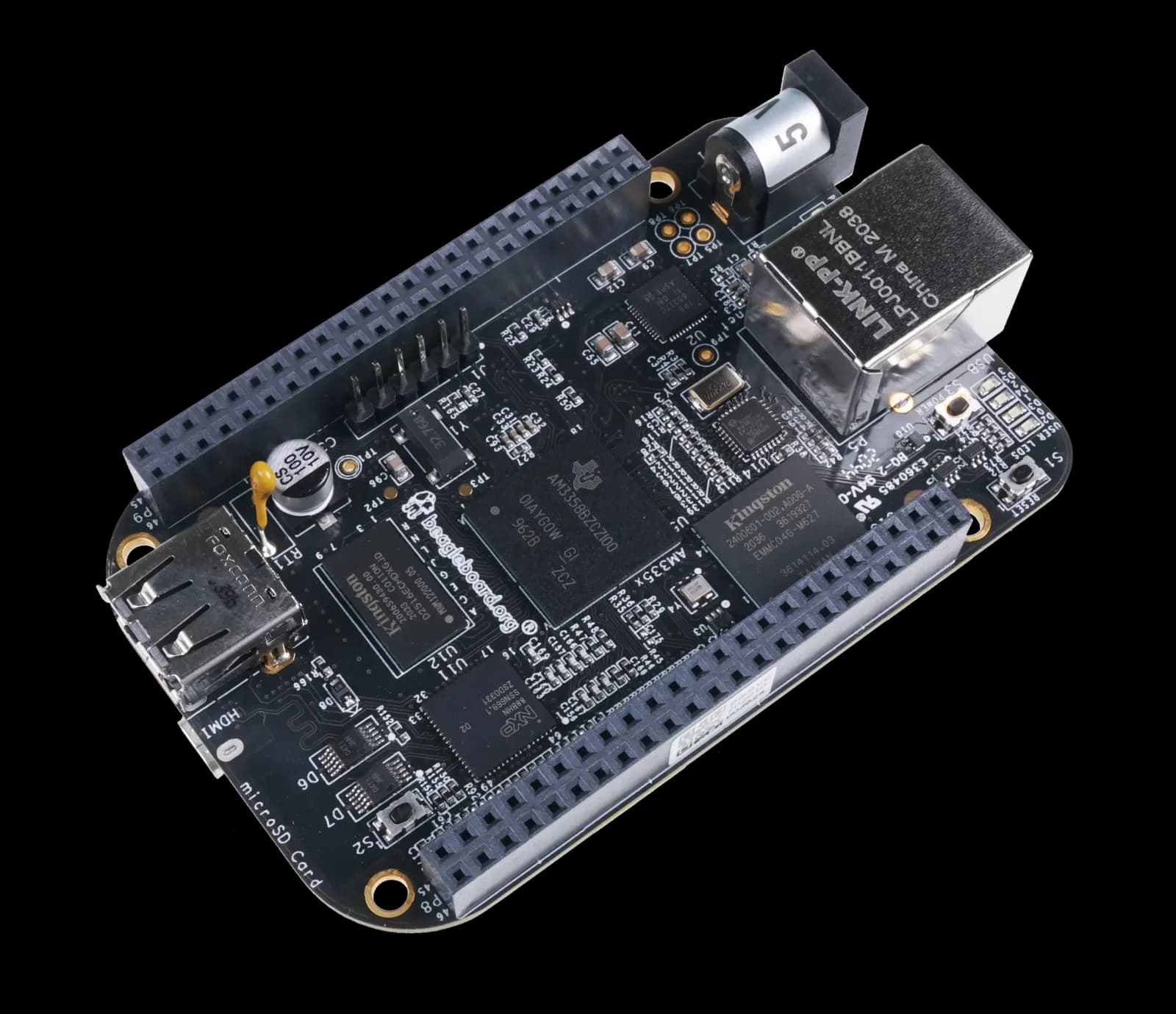
The BeagleBone Black is for people building embedded, hardware-interfacing or low-demand single-purpose projects. It suits those who want onboard eMMC, two large expansion headers and officially listed Debian images.
13th of 15 single-board computers we've reviewedAffiliate link. As an Amazon Associate I earn from qualifying purchases. Details
New to single-board computers? What they are and what to look for
A single-board computer, like a Raspberry Pi, is a tiny, cheap computer on one circuit board. People use them to learn coding, build gadgets, and run small home servers.
Do you need a single-board computer? Great for tinkering, learning Linux or electronics, or running things like a home-automation hub or ad blocker. Not a replacement for a normal PC.
What to look for
- A power supply, case and microSD card: they're often sold separately
- 4GB or more of memory for anything beyond simple projects
- How big the community is: more guides and help for popular boards
Unsure about a word? Jargon explained
How the 5.0 adds up
Our single-board computers rubric- Software support30% of score
- Performance25% of score
- Storage15% of score
- I/O and networking15% of score
- Value15% of score
Against the 15 single-board computers we've reviewed
bar = the range of all 15 · dot = this one · better →
- Overall score 5.0/1013th of 15
- Price £7410th cheapest
- Value for money Poorer value than most11th best of 12
Power use and running costs
Running 24/7 at idle, at 26.32p per kWh (the Ofgem price cap).
- Electricity per year
- £6.23
- 24 kWh
- 3 years, all in
- £92.68
- £74.00 to buy + £18.68 to run
- Against the others
- 8th of 13
- 1st = lowest idle power
- Raspberry Pi Zero 2 W0.5 W£1.15
- Arduino UNO Q 4GB0.5 W£1.15
- Banana Pi BPI-M2 ZERO0.5 W£1.15
- Raspberry Pi 3 Model A+1.1 W£2.54
- Raspberry Pi 3 Model B1.4 W£3.23
- Radxa ROCK 5C1.6 W£3.69
- Khadas VIM31.8 W£4.15
- BeagleBoard BeagleBone Black (this)2.7 W£6.23
- Orange Pi 5 Plus2.8 W£6.46
- Raspberry Pi 4 Model B 1GB2.85 W£6.57
- Raspberry Pi 5 4GB3 W£6.92
- Raspberry Pi 4003 W£6.92
- IceWhale ZimaBoard 28.2 W£18.91
- Raspberry Pi Zero 2 W£17.86
- Banana Pi BPI-M2 ZERO£27.39
- Raspberry Pi 3 Model A+£30.47
- Raspberry Pi 3 Model B£42.68
- Arduino UNO Q 4GB£62.77
- Raspberry Pi 4 Model B 1GB£64.01
- Raspberry Pi 400£78.35
- BeagleBoard BeagleBone Black (this)£92.68
- Raspberry Pi 5 4GB£126.35
- IceWhale ZimaBoard 2£345.61
Today's best price, or the typical price when researched. Drives and accessories not included.
Not shown, as no idle figure is published: Raspberry Pi Zero WH, Banana Pi BPI-M2 Berry.
Support and features
| Software updates | No end-of-support date found; the Amazon listing says guaranteed software updates until unknown. source |
|---|
Measured by owners
No owner readings yet. If you own one and have a smart plug or power meter, a reading takes a minute and helps everyone else.
Security and compatibility
| Latest firmware or software | October 2026updated in the last year source |
|---|---|
| Known security issues |
|
| Open firmware | Supported by OpenWrt |
| Update record | No maker advisories were found, and one kernel CVE affects the board with its fix status unconfirmed. |
| Linux | Partly works on Linux. Mainline kernel support covers almost everything since 6.18, but graphics is not mainline, and Debian/Ubuntu images are provided. source |
Pros and cons
+ pros
- Official Debian 13.7 and 12.15 images with three kernel branches
- Two 46-pin expansion headers plus two 200 MHz PRUs
- 4 GB eMMC onboard alongside a microSD connector
− cons
- Only 512 MB of RAM
- Ethernet is 10/100 and there is no Wi-Fi
- USB host port is limited to 500 mA
Price history
Price history appears here once we have tracked this product for a few days.
The full review
Where it fits
The BeagleBone Black is built around the TI Sitara AM3358: a 1 GHz ARM Cortex-A8 with SGX 3D graphics, NEON and two 200 MHz PRUs. It has 512 MB of DDR3L at 800 MHz. The two 46-pin expansion headers carry LCD, UART, eMMC, ADC, I2C, SPI and PWM signals, which points at embedded and hardware projects rather than desktop use or heavy server work.
Software support7/10
The manufacturer page lists Debian 13.7 and 12.15 images. It also lists three kernel branches: v6.18.x, v6.12.x and v5.10-ti. That gives you a choice of two Debian releases and several kernel lines from the board's own maker, which counts for a lot when you want a supported base for a long-running project.
Performance and memory3/10
The CPU is a 1 GHz Cortex-A8, paired with 512 MB of RAM. The SoC also includes NEON and SGX 3D graphics. One buyer's guide calls 512 MB tight for modern desktop use. With 512 MB of RAM and one Cortex-A8, the board suits a single service, a controller or a gateway better than a stack of containers.
A 2012-era comparison puts it ahead of the Raspberry Pi Model B on performance and power consumption, but says it runs about 5°C hotter.
The two PRUs run at 200 MHz and sit on the same SoC. For projects built around the PWM, SPI and I2C signals on the headers, they are part of the hardware you get.
Storage6/10
The board has 4 GB of 8-bit eMMC onboard and a microSD connector. The 4 GB capacity is small, and the microSD connector is the only other storage listed. Nothing in the specifications offers NVMe or PCIe storage.
I/O and networking5/10
Ethernet is 10/100 Mbit over RJ45. There is no Wi-Fi or Bluetooth on this board, and owners flag the slow Ethernet and missing wireless. A separate Wireless variant swaps Ethernet for 802.11b/g/n and Bluetooth 4.1, but it is a different product with a different connection set.
The USB host port is limited to 500 mA. If you plan to power peripherals from it, check their draw first.
Video comes from HDMI, with stereo audio over HDMI, and there is also an LCD interface. Power arrives through a 2.1 mm barrel jack or mini-USB at 5 V, and a 1 A supply is typical.
A TI forum developer reports that HDMI and LAN stay active in deep sleep mode. That matters if you are designing around low power, because those interfaces will not be off while the board sleeps.
Who it suits
It suits builders who want a documented board with official Debian images, onboard eMMC and generous header options. The 512 MB of RAM and 10/100 Ethernet limit it for anything network-heavy or memory-hungry. Choose it for the headers, the PRUs and the vendor-listed software, not for raw speed.
What owners report
Recurring themes from public owner feedback, summarised in our own words.
- 512 MB of RAM is tight for modern desktop use.
- Ethernet is limited to 10/100, and there is no Wi-Fi.
- A 2012-era comparison credits it with better performance and power use than the Pi Model B, but about 5°C hotter.
- A TI forum developer reports HDMI and LAN stay active in deep sleep.
Who should skip it
- Buyers who need Wi-Fi or Bluetooth on the same board
- Anyone running several containers or VMs that need more than 512 MB of RAM
- Users who need faster than 10/100 Ethernet or high-current USB devices
Full specifications
| Processor (SoC) | TI Sitara AM3358 (AM3358BZCZ100), 1 GHz ARM Cortex-A8, SGX 3D graphics, NEON, 2x 200 MHz PRUs |
|---|---|
| Memory | 512 MB DDR3L 800 MHz |
| Storage options | 4 GB 8-bit eMMC onboard; microSD connector |
| Networking | 10/100 Mbit Ethernet (RJ45). No Wi-Fi or Bluetooth on this board. |
| GPIO | Two 46-pin expansion headers (LCD, UART, eMMC, ADC, I2C, SPI, PWM) |
| Video outputs | HDMI, LCD interface, stereo audio over HDMI |
| Power input | 5 V DC via 2.1 mm barrel jack or mini-USB; a 1 A 5 V supply is typical |
Sources
- BeagleBone Black product page
- BeagleBone Black docs, chapter 4
- BeagleBone Black docs, chapter 6
- BeagleBone Black docs, chapter 9
- BeagleBone Black Wireless
- Amazon UK listing B00MOKUI1U
- Best BeagleBone boards buying guide
- Getting started with BeagleBone Black (Linux.com)
- Radiolocman review
- TI E2E forum deep sleep thread
Alternatives
Compare head to head
- BeagleBoard BeagleBone Black vs Arduino UNO Q 4GB (ABX00173) ›
- BeagleBoard BeagleBone Black vs Banana Pi BPI-M2 ZERO ›
- BeagleBoard BeagleBone Black vs Banana Pi BPI-M2 Berry ›
- BeagleBoard BeagleBone Black vs Raspberry Pi Zero WH ›
- BeagleBoard BeagleBone Black vs IceWhale ZimaBoard 2 ›
- BeagleBoard BeagleBone Black vs Raspberry Pi 3 Model B ›