TP-Link TL-SG3210XHP-M2
~£340typical UK price when we researched itAffiliate link. As an Amazon Associate I earn from qualifying purchases. Details
TP-Link TL-SG3210XHP-M2 review
Researched, not hands-on tested.How we review ›
by SudoPicks Research · editor Paul HR · published 24 Oct 2026 · updated 24 Oct 2026
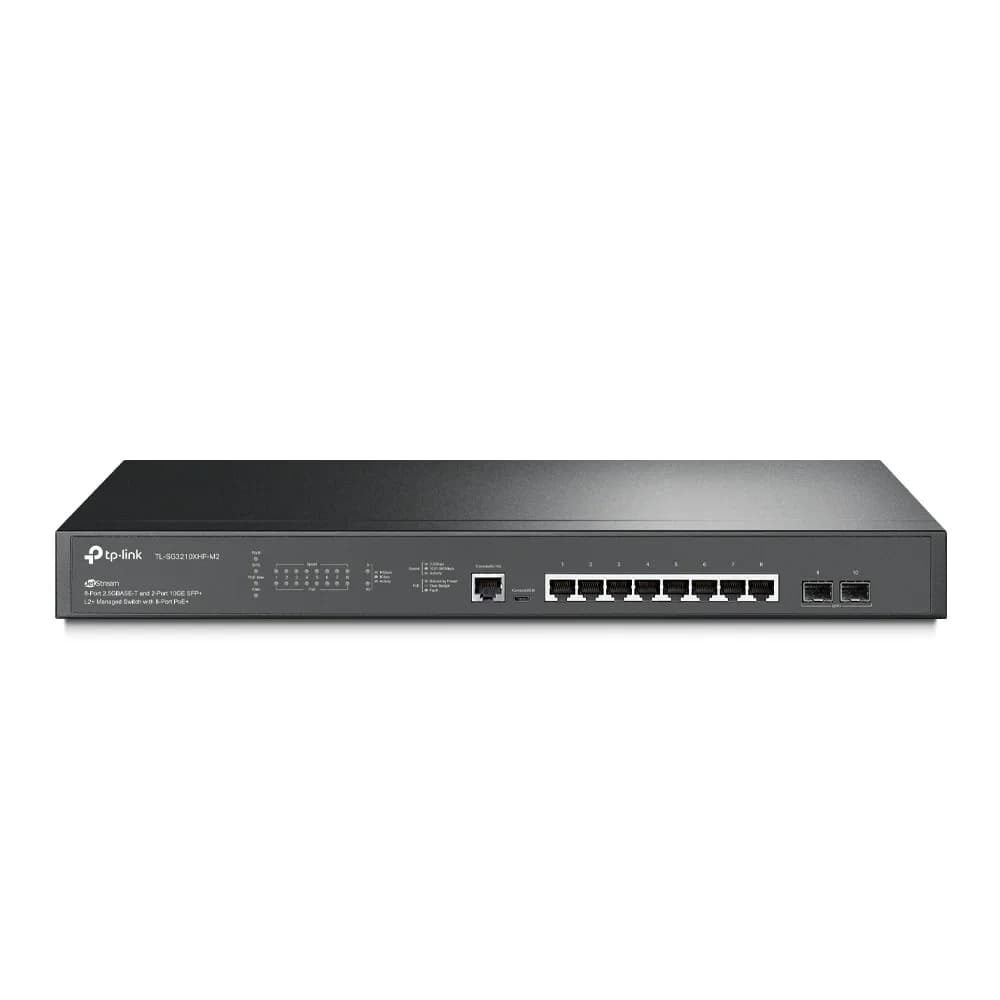
The TL-SG3210XHP-M2 is for people building a small rack-based network who need PoE+ and real managed-switch features. It suits setups with 2.5GbE access points or cameras and 10G SFP+ uplinks.
7th of 25 network switches we've reviewedAffiliate link. As an Amazon Associate I earn from qualifying purchases. Details
New to network switches? What they are and what to look for
A network switch adds more wired Ethernet sockets to your home network, like a power strip does for plugs. You connect it to your router with one cable.
Do you need a network switch? Useful if your router has run out of Ethernet ports, or you want wired connections for a TV, games console, desk or NAS.
What to look for
- Enough ports, with a couple spare
- Gigabit is fine for most homes; 2.5GbE helps with a fast NAS
- Fanless designs are silent; managed switches add features most homes don't need
Unsure about a word? Jargon explained
How the 6.8 adds up
Our network switches rubric- Port speeds30% of score
- Management20% of score
- Port count and uplinks15% of score
- PoE10% of score
- Noise and efficiency15% of score
- Firmware and support10% of score
Against the 25 network switches we've reviewed
bar = the range of all 25 · dot = this one · better →
- Overall score 6.8/107th of 25
- Price £34025th cheapest
- Value for money Poorer value than most24th best of 25
Power use and running costs
Running 24/7 at idle, at 26.32p per kWh (the Ofgem price cap).
- Electricity per year
- £39.75
- 151 kWh
- 3 years, all in
- £459.25
- £340.00 to buy + £119.25 to run
- Against the others
- 16th of 16
- 1st = lowest idle power
- TP-Link TL-SG105S 5-Port Gigabit Desktop Switch1 W£2.31
- Ubiquiti UniFi Flex Mini 2.5G1.3 W£3.00
- NETGEAR GS108 8-Port Gigabit Unmanaged Switch1.5 W£3.46
- Ubiquiti UniFi Switch Flex Mini1.8 W£4.15
- NETGEAR GS308E2.5 W£5.76
- Ubiquiti UniFi Switch Lite 8 PoE3.7 W£8.53
- Zyxel XGS1210-123.95 W£9.11
- NETGEAR MS305 5-Port Multi-Gigabit4 W£9.22
- QNAP QSW-1105-5T4 W£9.22
- TP-Link Easy Smart Switch TL-SG105PE4.52 W£10.42
- TP-Link LS108GP5.53 W£12.75
- MikroTik CRS305-1G-4S+IN10 W£23.06
- MikroTik CRS310-8G+2S+IN10.5 W£24.21
- MikroTik CRS326-24G-2S+RM12 W£27.67
- TP-Link TL-SX100812 W£27.67
- TP-Link TL-SG3210XHP-M2 (this)17.24 W£39.75
Dashed bars use the maker's figure; solid bars were measured by reviewers or owners.
- TP-Link TL-SG105S 5-Port Gigabit Desktop Switch£20.91
- NETGEAR GS108 8-Port Gigabit Unmanaged Switch£35.37
- NETGEAR GS308E£42.26
- Ubiquiti UniFi Switch Flex Mini£45.45
- Ubiquiti UniFi Flex Mini 2.5G£61.98
- TP-Link Easy Smart Switch TL-SG105PE£71.25
- TP-Link LS108GP£78.24
- QNAP QSW-1105-5T£120.81
- Ubiquiti UniFi Switch Lite 8 PoE£136.59
- Zyxel XGS1210-12£152.32
- NETGEAR MS305 5-Port Multi-Gigabit£155.44
- MikroTik CRS305-1G-4S+IN£190.36
- MikroTik CRS310-8G+2S+IN£258.20
- MikroTik CRS326-24G-2S+RM£258.32
- TP-Link TL-SX1008£402.00
- TP-Link TL-SG3210XHP-M2 (this)£459.25
Today's best price, or the typical price when researched. Drives and accessories not included.
Not shown, as no idle figure is published: Zyxel XMG1915-10E, Ubiquiti UniFi Flex 2.5G USW-Flex-2.5G-8, NETGEAR MS108EUP Ultra60 PoE++ Multi-Gig Plus Switch, TP-Link LS1005G 5-Port Gigabit Switch, TP-Link TL-SG108E, TP-Link TL-SG1005LP, NETGEAR GS305v3 5-Port Gigabit Unmanaged Switch, TP-Link TL-SG105-M2, TP-Link TL-SG108S.
Support and features
| Software updates | endedUntil April 2023. Notes show an end-of-sale date of 4/8/2023 for the 2.0 revision and an EOL notice on the V1 page; no published end-of-support date was found. source |
|---|
- VLANs
- PoE
- 2.5GbE
- 10GbE / SFP+
Featured in: Best network switches with VLANs · Best network switches with PoE · Best network switches with 2.5GbE
Security and compatibility
| Latest firmware or software | February 2025no update for over a year source |
|---|---|
| Known security issues |
|
| Update record | TP-Link's notes point to a February 2025 V2 firmware and several CVEs, but fix status is not confirmed for any of them. |
Pros and cons
+ pros
- Eight 2.5GbE PoE+ ports with a 240 W total budget
- L2+ management with VLANs, static routing, ACLs and 802.1X
- Two 10 Gbps SFP+ uplinks
− cons
- Two fans; one owner report calls it too loud for offices
- Cloud management needs a hardware controller or dedicated computer
- Update history and warranty terms aren't stated
Price history
Price history appears here once we have tracked this product for a few days.
The full review
Where it fits
The TL-SG3210XHP-M2 is a 1U rack-mount managed switch measuring 440 x 180 x 44 mm. It has eight 2.5GbE RJ45 ports with PoE+, plus two 10G SFP+ slots. It also has an RJ45 console port and a Micro-USB console port, but neither carries data.
The layout points at small business and advanced home networks: PoE-powered access points or cameras on the copper ports, and a fast link to the rest of the network over SFP+.
Port speeds and uplinksPort speeds 8/10Port count and uplinks 7/10
The RJ45 ports run at 100, 1000 or 2500 Mbps. The two SFP+ slots run at 10 Gbps. There is no 10GbE copper listed, so any 10G link goes through SFP+.
Switching capacity is 80 Gbps, with a 59.52 Mpps forwarding rate and a 16K MAC table. With eight 2.5GbE ports and two 10 Gbps uplinks, it suits a network where access devices need more than gigabit and the uplink should not be the bottleneck. Ten data ports in total is a limit, though. If you need many more wired devices, you will need a second switch.
Management8/10
This is an L2+ managed switch. Management is through a web interface, the Omada app, or cloud, hardware and software controllers. Listed features include 802.1Q VLANs, static routing, ACLs and 802.1X.
Static routing is listed as a feature, but the specifications don't say how far the routing goes. If you plan to route traffic between VLANs on the switch itself, check TP-Link's documentation first.
One condition applies to cloud management: it requires a hardware controller or a dedicated computer on the same network. Plan for that if you want the Omada cloud workflow.
PoE
All eight RJ45 ports supply PoE under 802.3af/at, at up to 30 W per port. The total budget is 240 W. Eight ports at 30 W each would come to exactly 240 W, so the budget covers every port at its maximum.
The budget is a shared total. When demand goes over it, the switch shuts ports down based on priority. That behaviour is worth planning around if you add high-draw devices later.
Owners praise the 240 W budget and the feature set. Given the 30 W per-port limit and that 802.3at rating, it suits access points, cameras and phones better than anything needing more power per port. There's no higher PoE standard listed.
Noise and cooling3/10
The switch has two fans and is not fanless. That is the main weakness. One review source says the fan is noisy enough to hinder deployment in an office.
That is a single report, so treat it as one data point rather than a settled fact. Even so, with two fans listed in the specification, a comms cupboard, garage or dedicated rack room is a safer home than a desk or an open-plan office.
Firmware and supportPort speeds 8/10Port count and uplinks 7/10Firmware and support 5/10
The available specifications don't give a firmware update history or warranty length. That leaves this area unproven on paper. Check the warranty terms with your retailer before buying, and look at TP-Link's support downloads for the current firmware.
Check you are reading the right sheet for this exact model number before relying on any figure.
Who it suits
This switch suits someone who wants PoE+ on 2.5GbE ports, VLANs and 10G SFP+ uplinks in one rack unit. The Omada options give several ways to manage it, from the web interface to a controller.
It suits less well if you need silence or want cloud management without a controller or dedicated computer on the network. The fan noise report is the thing to weigh most carefully against the PoE budget and feature list.
What owners report
Recurring themes from public owner feedback, summarised in our own words.
- Owners praise the 240 W PoE budget and the feature set for the money.
Who should skip it
- Buyers who need a silent or fanless switch for an office or desk
- Anyone needing more than ten data ports on one switch
- Buyers wanting cloud management without a hardware controller or dedicated computer
Full specifications
| Ports | 8x 2.5GbE RJ45 PoE+ ports, 2x 10G SFP+ slots, plus one RJ45 and one Micro-USB console port (not data ports) |
|---|---|
| Port speeds | RJ45 ports 100/1000/2500 Mbps; SFP+ slots 10 Gbps |
| Management | L2+ managed; web management, Omada app, cloud or hardware/software controllers; 802.1Q VLAN, static routing, ACLs, 802.1X |
| PoE budget | 240 W total PoE budget; 8 PoE+ ports (802.3af/at); 30 W per port |
| Uplinks (SFP/SFP+) | 2x 10 Gbps SFP+ |
| Switching capacity | 80 Gbps switching capacity; 59.52 Mpps forwarding rate; 16K MAC table |
| Cooling | Two fans (Fan Quantity: 2), not fanless |
Sources
- TL-SG3210XHP-M2 UK product page
- TL-SG3210XHP-M2 US support downloads
- SG3210XHP-M2 (UN) datasheet (newer model)
- TL-SG3210XHP-M2 datasheet (2024, mixed-model table)
- TL-SG3428 and TL-SG3210XHP-M2 installation guide (2020)
- Omada US TL-SG3210XHP-M2 page
- TL-SG3210XHP-M2 manual spec summary
- TP-Link TL-SG3210XHP-M2 review (TechRadar)
- TP-Link TL-SG3210XHP-M2 review (ITPro)
- TL-SG3210XHP-M2 at B&H Photo
- TL-SG3210XHP-M2 at Teledynamics
Alternatives
Compare head to head
- TP-Link TL-SG3210XHP-M2 vs NETGEAR MS108EUP Ultra60 PoE++ Multi-Gig Plus Switch ›
- TP-Link TL-SG3210XHP-M2 vs Ubiquiti UniFi Flex 2.5G USW-Flex-2.5G-8 ›
- TP-Link TL-SG3210XHP-M2 vs Zyxel XGS1210-12 ›
- TP-Link TL-SG3210XHP-M2 vs MikroTik CRS310-8G+2S+IN ›
- TP-Link TL-SG3210XHP-M2 vs Ubiquiti UniFi Flex Mini 2.5G ›
- TP-Link TL-SG3210XHP-M2 vs TP-Link Easy Smart Switch TL-SG105PE ›