MikroTik CRS305-1G-4S+IN
~£121.19typical UK price when we researched itAffiliate link. As an Amazon Associate I earn from qualifying purchases. Details
MikroTik CRS305-1G-4S+IN review
Researched, not hands-on tested.How we review ›
by SudoPicks Research · published 24 Oct 2026 · updated 24 Oct 2026
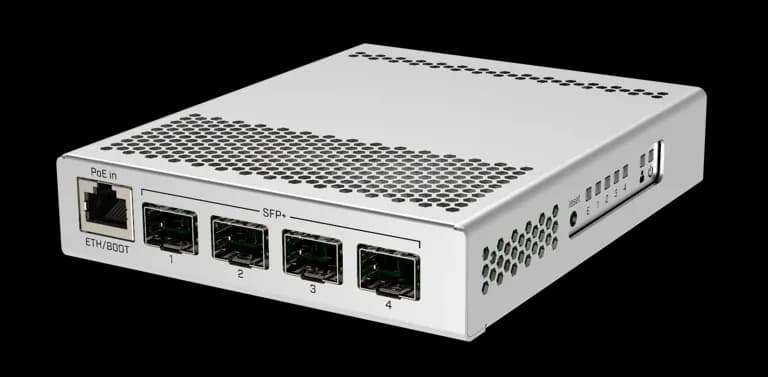
The MikroTik CRS305-1G-4S+IN is for homelabbers and sysadmins who need a few 10G SFP+ links on a small, silent switch. It suits anyone who wants to link a server, NAS or workstation at 10G and is happy to configure RouterOS or SwitchOS.
1st of 25 network switches we've reviewedAffiliate link. As an Amazon Associate I earn from qualifying purchases. Details
New to network switches? What they are and what to look for
A network switch adds more wired Ethernet sockets to your home network, like a power strip does for plugs. You connect it to your router with one cable.
Do you need a network switch? Useful if your router has run out of Ethernet ports, or you want wired connections for a TV, games console, desk or NAS.
What to look for
- Enough ports, with a couple spare
- Gigabit is fine for most homes; 2.5GbE helps with a fast NAS
- Fanless designs are silent; managed switches add features most homes don't need
Unsure about a word? Jargon explained
How the 7.8 adds up
Our network switches rubric- Port speeds30% of score
- Management20% of score
- Port count and uplinks15% of score
- PoE10% of score
- Noise and efficiency15% of score
- Firmware and support10% of score
Against the 25 network switches we've reviewed
bar = the range of all 25 · dot = this one · better →
- Overall score 7.8/101st of 25
- Price £121.1916th cheapest
- Value for money About average14th best of 25
Power use and running costs
Running 24/7 at idle, at 26.32p per kWh (the Ofgem price cap).
- Electricity per year
- £23.06
- 88 kWh
- 3 years, all in
- £190.36
- £121.19 to buy + £69.17 to run
- Against the others
- 12th of 16
- 1st = lowest idle power
- TP-Link TL-SG105S 5-Port Gigabit Desktop Switch1 W£2.31
- Ubiquiti UniFi Flex Mini 2.5G1.3 W£3.00
- NETGEAR GS108 8-Port Gigabit Unmanaged Switch1.5 W£3.46
- Ubiquiti UniFi Switch Flex Mini1.8 W£4.15
- NETGEAR GS308E2.5 W£5.76
- Ubiquiti UniFi Switch Lite 8 PoE3.7 W£8.53
- Zyxel XGS1210-123.95 W£9.11
- NETGEAR MS305 5-Port Multi-Gigabit4 W£9.22
- QNAP QSW-1105-5T4 W£9.22
- TP-Link Easy Smart Switch TL-SG105PE4.52 W£10.42
- TP-Link LS108GP5.53 W£12.75
- MikroTik CRS305-1G-4S+IN (this)10 W£23.06
- MikroTik CRS310-8G+2S+IN10.5 W£24.21
- MikroTik CRS326-24G-2S+RM12 W£27.67
- TP-Link TL-SX100812 W£27.67
- TP-Link TL-SG3210XHP-M217.24 W£39.75
Dashed bars use the maker's figure; solid bars were measured by reviewers or owners.
- TP-Link TL-SG105S 5-Port Gigabit Desktop Switch£20.91
- NETGEAR GS108 8-Port Gigabit Unmanaged Switch£35.37
- NETGEAR GS308E£42.26
- Ubiquiti UniFi Switch Flex Mini£45.45
- Ubiquiti UniFi Flex Mini 2.5G£61.98
- TP-Link Easy Smart Switch TL-SG105PE£71.25
- TP-Link LS108GP£78.24
- QNAP QSW-1105-5T£120.81
- Ubiquiti UniFi Switch Lite 8 PoE£136.59
- Zyxel XGS1210-12£152.32
- NETGEAR MS305 5-Port Multi-Gigabit£155.44
- MikroTik CRS305-1G-4S+IN (this)£190.36
- MikroTik CRS310-8G+2S+IN£258.20
- MikroTik CRS326-24G-2S+RM£258.32
- TP-Link TL-SX1008£402.00
- TP-Link TL-SG3210XHP-M2£459.25
Today's best price, or the typical price when researched. Drives and accessories not included.
Not shown, as no idle figure is published: Zyxel XMG1915-10E, Ubiquiti UniFi Flex 2.5G USW-Flex-2.5G-8, NETGEAR MS108EUP Ultra60 PoE++ Multi-Gig Plus Switch, TP-Link LS1005G 5-Port Gigabit Switch, TP-Link TL-SG108E, TP-Link TL-SG1005LP, NETGEAR GS305v3 5-Port Gigabit Unmanaged Switch, TP-Link TL-SG105-M2, TP-Link TL-SG108S.
Support and features
| Software updates | Free updates for the life of the product or at least five years from purchase; no end date announced source |
|---|
- 10GbE / SFP+
- Fanless
Featured in: Best network switches that are silent
Security and compatibility
| Latest firmware or software | No release date found |
|---|---|
| Known security issues |
|
| Update record | Sources conflict on whether the CVE-2026-84411 fix starts at 7.23 or 7.24, the latest release date is not found, and the fix status of most advisories is unconfirmed. |
Pros and cons
+ pros
- Four SFP+ cages with up to 10 Gbit per port
- Fanless metal case; owners praise silent, low-power running
- Choice of RouterOS or SwitchOS via dual boot
− cons
- Only five ports, and SFP+ modules are not included
- Owners report weak routing for gigabit internet
- Copper SFP+ modules reportedly run hot in the fanless case
Price history
Price history appears here once we have tracked this product for a few days.
The full review
Where it fits
The CRS305-1G-4S+IN has four SFP+ cages and one 10/100/1000 Ethernet port. The SFP+ cages support up to 10 Gbit per port, and 1.25 Gbit SFP modules are also supported. Modules are not included, so you buy those separately. With five ports in total, it suits a small job: linking a few 10G devices together, with the single copper port for a Gigabit connection.
Port speeds and switchingPort speeds 9/10Port count and uplinks 6/10
MikroTik lists 82 Gbps switching capacity and 41 Gbps non-blocking throughput. The port mix is Gigabit copper plus 10G SFP+. That makes it a fit for a setup where a server, NAS or workstation connects over a 10G SFP+ link, because those are the ports that carry the speed. The only copper port is Gigabit, so any copper device that needs more than that depends on an SFP+ module. Owners report that copper 10GBASE-T SFP+ modules run hot in the fanless case, so that route needs thought. Fibre or DAC-style links are not discussed, so check module choice before you buy.
Management9/10
The switch dual boots between RouterOS and SwitchOS, and you select which one runs. You configure it through WebFig or WinBox. RouterOS supports Layer 3 features, while SwitchOS is switch-only. That choice suits people who are comfortable with MikroTik's tools. If you want a plain unmanaged switch with no setup, the management layer here is more than you need.
Routing performance
The manufacturer's routing test, using 25 IP filter rules and 512-byte packets, gives about 270 Mbps. Owners also complain about weak routing for gigabit internet. Based on that figure and those reports, the Layer 3 support in RouterOS is better treated as a feature for light use. It is not a basis for routing a full gigabit connection. If you plan to use it as a switch, SwitchOS is the switch-only option.
Power, noise and heat8/10
The case is metal, passive and fanless. Owners praise it as silent and low power. MikroTik lists maximum consumption of 18 W, or 10 W without attachments. The tested ambient range is -40 °C to 70 °C. The heat complaint applies to specific modules: owners say copper 10GBASE-T SFP+ modules run hot in this fanless case. Because the case has no fan, the choice of module matters for temperature.
PoE
This is not a PoE-output switch. MikroTik publishes no PoE output budget. It does accept PoE input (802.3af/at) on its Gigabit port, with a 12–57 V input range. That means you can power the switch itself over that port if you have a suitable source. It will not power other devices according to the published specs.
Software supportPort speeds 9/10Port count and uplinks 6/10Firmware and support 7/10
MikroTik offers free software updates for the life of the product or at least five years from purchase. For a device that you configure and then leave running, that gives a clear support position.
Who it suits
It suits a homelab or small office that wants a handful of 10G SFP+ links in a silent, low-power box, and is willing to learn RouterOS or SwitchOS. Owner praise centres on its silence and low power draw. The complaints centre on routing speed and module heat. If you need many ports, PoE output, or a router for a fast internet connection, the specifications and owner reports point elsewhere.
What owners report
Recurring themes from public owner feedback, summarised in our own words.
- Owners praise it as silent and low power.
- Copper 10GBASE-T SFP+ modules reportedly run hot in the fanless case.
- Routing performance is described as weak for gigabit internet.
Who should skip it
- Buyers who need PoE output to power cameras or access points
- Anyone who wants to route a gigabit internet connection
- Buyers who need many ports or copper multi-gig without SFP+ modules
Full specifications
| Ports | Four SFP+ ports plus one 10/100/1000 Ethernet port |
|---|---|
| Port speeds | Gigabit copper port; SFP+ cages support up to 10 Gbit per port; 1.25 Gbit SFP modules also supported |
| Management | RouterOS or SwitchOS selectable via dual boot; configurable through WebFig or WinBox |
| PoE budget | No published PoE output budget; accepts PoE (802.3af/at) input on its Gigabit port with 12–57 V input; maximum consumption 18 W, or 10 W without attachments |
| Uplinks (SFP/SFP+) | Four SFP+ cages; modules not included |
| Switching capacity | 82 Gbps switching capacity; 41 Gbps non-blocking throughput |
| Cooling | Passive, fanless, metal case |
Alternatives
Compare head to head
- MikroTik CRS305-1G-4S+IN vs Zyxel XMG1915-10E ›
- MikroTik CRS305-1G-4S+IN vs MikroTik CRS326-24G-2S+RM ›
- MikroTik CRS305-1G-4S+IN vs MikroTik CRS310-8G+2S+IN ›
- MikroTik CRS305-1G-4S+IN vs Ubiquiti UniFi Flex 2.5G USW-Flex-2.5G-8 ›
- MikroTik CRS305-1G-4S+IN vs Zyxel XGS1210-12 ›
- MikroTik CRS305-1G-4S+IN vs TP-Link TL-SG3210XHP-M2 ›