TP-Link TL-SG105S 5-Port Gigabit Desktop Switch
Price unavailable right nowAffiliate link. As an Amazon Associate I earn from qualifying purchases. Details
TP-Link TL-SG105S 5-Port Gigabit Desktop Switch review
Researched, not hands-on tested.How we review ›
by SudoPicks Research · published 24 Oct 2026 · updated 24 Oct 2026
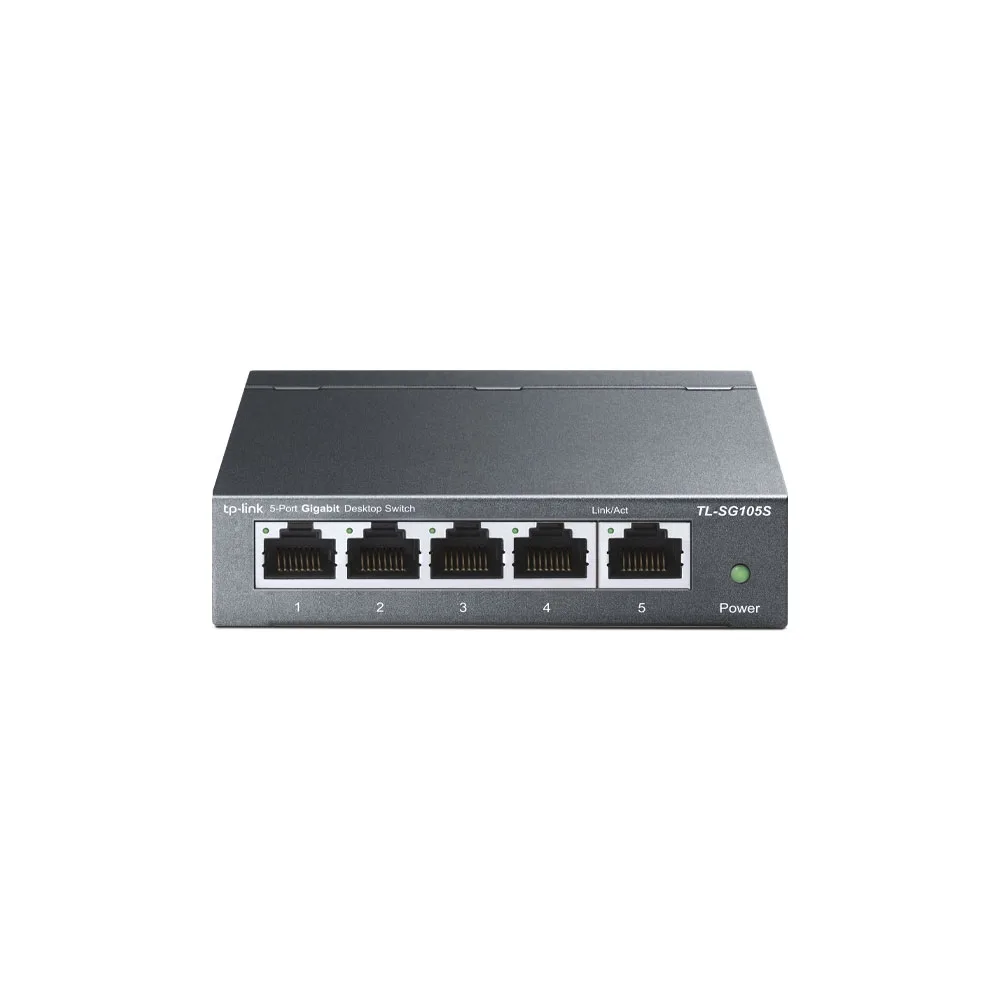
The TL-SG105S is for anyone who needs four or five extra wired gigabit ports without any setup. It suits desks, benches and small home networks where traffic does not need segmenting on the switch.
joint 5th of 10 network switches we've reviewedAffiliate link. As an Amazon Associate I earn from qualifying purchases. Details
New to network switches? What they are and what to look for
A network switch adds more wired Ethernet sockets to your home network, like a power strip does for plugs. You connect it to your router with one cable.
Do you need a network switch? Useful if your router has run out of Ethernet ports, or you want wired connections for a TV, games console, desk or NAS.
What to look for
- Enough ports, with a couple spare
- Gigabit is fine for most homes; 2.5GbE helps with a fast NAS
- Fanless designs are silent; managed switches add features most homes don't need
Unsure about a word? Jargon explained
How the 6.1 adds up
Our network switches rubric- Port speeds30% of score
- Management20% of score
- Port count and uplinks15% of score
- PoE10% of score
- Noise and efficiency15% of score
- Firmware and support10% of score
Against the 10 network switches we've reviewed
bar = the range of all 10 · dot = this one · better →
- Overall score 6.1/10joint 5th of 10
- Price £13.992nd cheapest
- Value for money 43.6 per £1002nd of 10
Power use and running costs
Running 24/7 at idle, at 26.32p per kWh (the Ofgem price cap).
- Electricity per year
- £2.31
- 9 kWh
- 3 years, all in
- £20.91
- £13.99 to buy + £6.92 to run
- Against the others
- 1st of 6
- 1st = lowest idle power
- TP-Link TL-SG105S 5-Port Gigabit Desktop Switch (this)1 W£2.31
- Ubiquiti UniFi Flex Mini 2.5G1.3 W£3.00
- NETGEAR GS108 8-Port Gigabit Unmanaged Switch1.5 W£3.46
- Ubiquiti UniFi Switch Flex Mini1.8 W£4.15
- TP-Link Easy Smart Switch TL-SG105PE4.52 W£10.42
- TP-Link LS108GP5.53 W£12.75
Dashed bars use the maker's figure; solid bars were measured by reviewers or owners.
- TP-Link TL-SG105S 5-Port Gigabit Desktop Switch (this)£20.91
- NETGEAR GS108 8-Port Gigabit Unmanaged Switch£35.37
- Ubiquiti UniFi Switch Flex Mini£45.45
- Ubiquiti UniFi Flex Mini 2.5G£61.98
- TP-Link Easy Smart Switch TL-SG105PE£71.25
- TP-Link LS108GP£78.24
Today's best price, or the typical price when researched. Drives and accessories not included.
Not shown, as no idle figure is published: TP-Link LS1005G 5-Port Gigabit Switch, TP-Link TL-SG1005LP, NETGEAR GS305v3 5-Port Gigabit Unmanaged Switch, TP-Link TL-SG108S.
Running costs and support
| Software updates | endedUntil September 2024. TP-Link's US end-of-life list gives an end-of-support date of 9/21/2024 for the latest listed hardware version (3.6); no separate software-update end date was found. source |
|---|
- Fanless
Featured in: Best network switches that are silent
Security and compatibility
| Latest firmware or software | No release date found |
|---|---|
| Known security issues | None found in public advisories. That's a good sign, not a guarantee. |
| Update record | No security advisories naming the TL-SG105S or its firmware were found; related TP-Link switch CVEs were found but do not apply to this model per the notes, and the firmware release date could not be determined. |
Pros and cons
+ pros
- Fanless design with a 3.1 W maximum power draw
- Plug-and-play with no configuration needed
- Metal casing with desktop or wall-mount options
− cons
- Gigabit only, with no SFP or SFP+ uplink listed
- Manufacturer page does not list VLAN support
- No PoE on any port
Price history
Price history appears here once we have tracked this product for a few days.
The full review
Where it fits
The TL-SG105S is an unmanaged five-port gigabit desktop switch from TP-Link. It has five 10/100/1000 Mbps RJ45 ports with auto-negotiation and Auto-MDI/MDIX. TP-Link lists a switching capacity of 10 Gbit/s. It needs no configuration, so it suits adding wired ports to a desk, a workbench or a small homelab.
Don't confuse it with the TL-SG105S-M2. That is a separate five-port 2.5G Multi-Gigabit model with its own product page.
Port speedsPort speeds 6/10Port count and uplinks 5/10
Every port is gigabit and nothing faster is listed. The research shows no 2.5GbE or 10GbE ports on this model. It also shows no SFP or SFP+ uplink on the manufacturer page. All five ports are copper RJ45.
If you want 2.5G ports, the TL-SG105S-M2 named above is a separate model, not a variant of this one.
Management and features6/10
The switch is unmanaged. You plug it in and it works, with no web interface to configure. That suits buyers who want a switch they never have to touch.
The feature list includes 802.1p/DSCP QoS and IGMP snooping. The manufacturer page does not list VLAN support. With no VLANs listed, this is not the switch for splitting IoT, lab and main traffic on the switch itself. You would need to do that elsewhere in the network.
Ports and uplinksPort speeds 6/10Port count and uplinks 5/10
Five ports is the whole count. If one connects to your router or another switch, four remain for devices. No SFP or SFP+ uplink is listed, so the switch has no dedicated fibre or high-speed uplink port on the manufacturer page.
That makes it a good fit for a small cluster of devices: a PC, a NAS, a printer and a Raspberry Pi, for example. It is a poor fit for anything that needs to grow into a larger lab.
Power, noise and build9/10
The design is fanless, so the switch makes no fan noise. TP-Link gives a maximum power draw of 3.1 W. The casing is metal, and the listing mentions both desktop and wall-mounting options. With those specs, it suits a quiet room, a bedroom desk or a spot where a fan would be noticed.
There is no PoE. Any device that needs power over Ethernet, such as an access point or camera, needs its own power supply or a separate injector.
Firmware, versions and supportPort speeds 6/10Port count and uplinks 5/10Firmware and support 5/10
TP-Link lists two hardware versions, V1.10 and V4. The research does not say how they differ. Check which version a listing is selling before you buy.
Firmware update history was not checked, so this review can't say how often the switch is updated, and the research gives no further detail.
The Amazon US listing states a three-year manufacturer warranty. That is not confirmed for the UK, so read the warranty terms on the UK listing before buying.
Owner feedback
The Amazon UK listing shows an aggregate owner rating of 4.7 out of 5 stars, with 141,174 shown alongside it. The research holds no recurring written themes from owners. This review can't say what buyers praise or complain about beyond that rating.
Who it suits
This is a basic switch for people who want more gigabit ports and nothing else. Its fanless build and 3.1 W maximum draw follow directly from the specs, and they make it easy to leave running on a desk. Its limits are just as clear from the specs: no PoE, no SFP uplink, no listed VLAN support and no ports faster than gigabit. If those limits are a problem for your network, look at a managed or multi-gigabit model.
Who should skip it
- Buyers who need VLANs to segment traffic on the switch
- Anyone powering access points or cameras over Ethernet
- Buyers who want 2.5GbE ports or an SFP uplink
Full specifications
| Ports | 5× 10/100/1000 Mbps Auto-Negotiation RJ45 ports supporting Auto-MDI/MDIX |
|---|---|
| Port speeds | 10/100/1000 Mbps, auto-negotiation, auto-MDI/MDIX |
| Management | Unmanaged |
| PoE budget | No |
| Switching capacity | 10 Gbit/s switching capacity |
| Cooling | Durable metal casing, desktop/wall-mounting options, and a fanless design |
Sources
- TP-Link TL-SG105S product page
- TP-Link TL-SG105S older product page (search snippet)
- TP-Link TL-SG105S-M2 product page
- Amazon UK TL-SG105S listing
- Amazon US TL-SG105S listing
- PriceSpy TL-SG105S
- PriceRunner TL-SG105S comparison
- Tradeinn TL-SG105S listing
- Gaming PC Guru review of TL-SG105 (non-S sibling)
- eBay.de TL-SG105S listing
Compare head to head
- TP-Link TL-SG105S 5-Port Gigabit Desktop Switch vs TP-Link TL-SG1005LP ›
- TP-Link TL-SG105S 5-Port Gigabit Desktop Switch vs Ubiquiti UniFi Switch Flex Mini ›
- TP-Link TL-SG105S 5-Port Gigabit Desktop Switch vs NETGEAR GS305v3 5-Port Gigabit Unmanaged Switch ›
- TP-Link TL-SG105S 5-Port Gigabit Desktop Switch vs TP-Link LS108GP ›
- TP-Link TL-SG105S 5-Port Gigabit Desktop Switch vs TP-Link LS1005G 5-Port Gigabit Switch ›
- TP-Link TL-SG105S 5-Port Gigabit Desktop Switch vs TP-Link TL-SG108S ›