TP-Link Easy Smart Switch TL-SG105PE
No live price yetAffiliate link. As an Amazon Associate I earn from qualifying purchases. Details
TP-Link Easy Smart Switch TL-SG105PE review
Researched, not hands-on tested.How we review ›
by SudoPicks Research · published 24 Oct 2026 · updated 24 Oct 2026
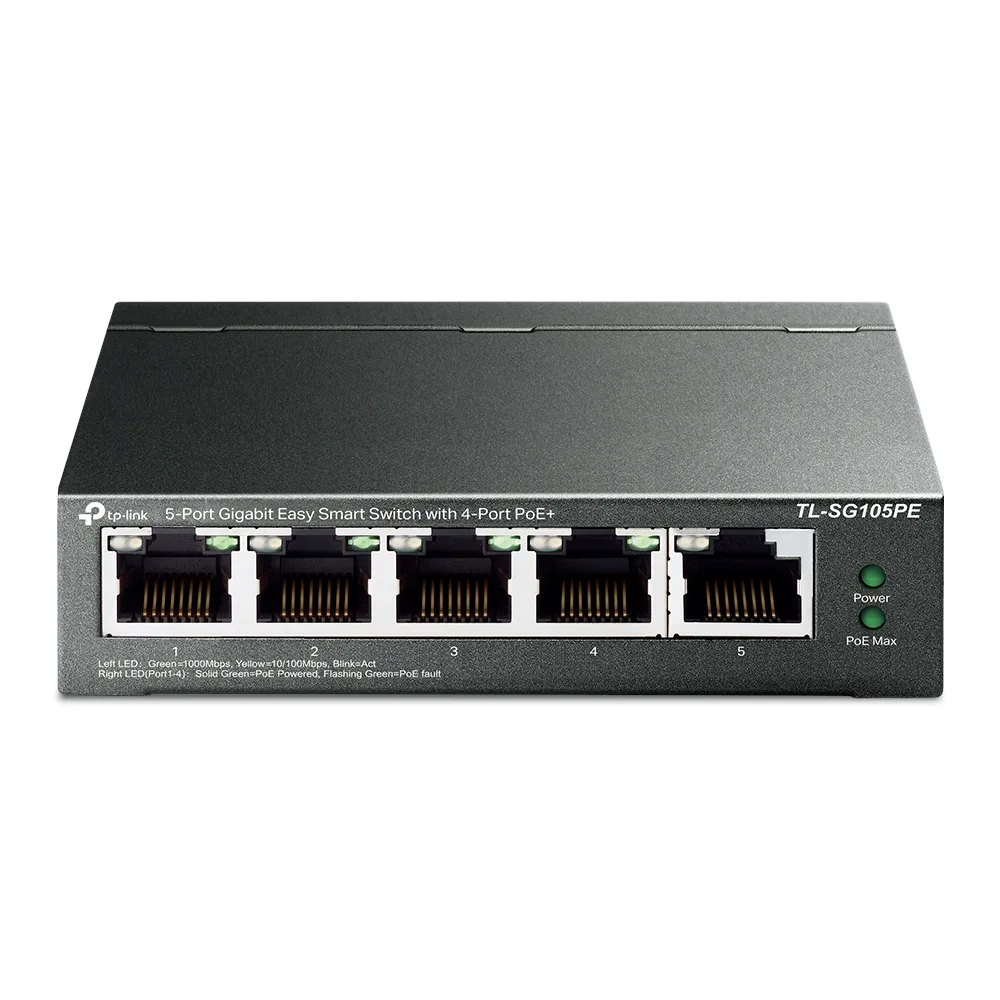
This TP-Link switch suits a small home or office network that needs a few PoE devices such as access points or cameras. It adds VLANs, QoS and IGMP snooping to a five-port gigabit layout without a fan.
joint 9th of 25 network switches we've reviewedAffiliate link. As an Amazon Associate I earn from qualifying purchases. Details
New to network switches? What they are and what to look for
A network switch adds more wired Ethernet sockets to your home network, like a power strip does for plugs. You connect it to your router with one cable.
Do you need a network switch? Useful if your router has run out of Ethernet ports, or you want wired connections for a TV, games console, desk or NAS.
What to look for
- Enough ports, with a couple spare
- Gigabit is fine for most homes; 2.5GbE helps with a fast NAS
- Fanless designs are silent; managed switches add features most homes don't need
Unsure about a word? Jargon explained
How the 6.3 adds up
Our network switches rubric- Port speeds30% of score
- Management20% of score
- Port count and uplinks15% of score
- PoE10% of score
- Noise and efficiency15% of score
- Firmware and support10% of score
Against the 25 network switches we've reviewed
bar = the range of all 25 · dot = this one · better →
- Overall score 6.3/10joint 9th of 25
- Price £39.999th cheapest
- Value for money Better value than most9th best of 25
Power use and running costs
Running 24/7 at idle, at 26.32p per kWh (the Ofgem price cap).
- Electricity per year
- £10.42
- 40 kWh
- 3 years, all in
- £71.25
- £39.99 to buy + £31.26 to run
- Against the others
- 10th of 16
- 1st = lowest idle power
- TP-Link TL-SG105S 5-Port Gigabit Desktop Switch1 W£2.31
- Ubiquiti UniFi Flex Mini 2.5G1.3 W£3.00
- NETGEAR GS108 8-Port Gigabit Unmanaged Switch1.5 W£3.46
- Ubiquiti UniFi Switch Flex Mini1.8 W£4.15
- NETGEAR GS308E2.5 W£5.76
- Ubiquiti UniFi Switch Lite 8 PoE3.7 W£8.53
- Zyxel XGS1210-123.95 W£9.11
- NETGEAR MS305 5-Port Multi-Gigabit4 W£9.22
- QNAP QSW-1105-5T4 W£9.22
- TP-Link Easy Smart Switch TL-SG105PE (this)4.52 W£10.42
- TP-Link LS108GP5.53 W£12.75
- MikroTik CRS305-1G-4S+IN10 W£23.06
- MikroTik CRS310-8G+2S+IN10.5 W£24.21
- MikroTik CRS326-24G-2S+RM12 W£27.67
- TP-Link TL-SX100812 W£27.67
- TP-Link TL-SG3210XHP-M217.24 W£39.75
Dashed bars use the maker's figure; solid bars were measured by reviewers or owners.
- TP-Link TL-SG105S 5-Port Gigabit Desktop Switch£20.91
- NETGEAR GS108 8-Port Gigabit Unmanaged Switch£35.37
- NETGEAR GS308E£42.26
- Ubiquiti UniFi Switch Flex Mini£45.45
- Ubiquiti UniFi Flex Mini 2.5G£61.98
- TP-Link Easy Smart Switch TL-SG105PE (this)£71.25
- TP-Link LS108GP£78.24
- QNAP QSW-1105-5T£120.81
- Ubiquiti UniFi Switch Lite 8 PoE£136.59
- Zyxel XGS1210-12£152.32
- NETGEAR MS305 5-Port Multi-Gigabit£155.44
- MikroTik CRS305-1G-4S+IN£190.36
- MikroTik CRS310-8G+2S+IN£258.20
- MikroTik CRS326-24G-2S+RM£258.32
- TP-Link TL-SX1008£402.00
- TP-Link TL-SG3210XHP-M2£459.25
Today's best price, or the typical price when researched. Drives and accessories not included.
Not shown, as no idle figure is published: Zyxel XMG1915-10E, Ubiquiti UniFi Flex 2.5G USW-Flex-2.5G-8, NETGEAR MS108EUP Ultra60 PoE++ Multi-Gig Plus Switch, TP-Link LS1005G 5-Port Gigabit Switch, TP-Link TL-SG108E, TP-Link TL-SG1005LP, NETGEAR GS305v3 5-Port Gigabit Unmanaged Switch, TP-Link TL-SG105-M2, TP-Link TL-SG108S.
Running costs and support
| Software updates | No end-of-support date announced; most recent firmware found is a V2 build from 2023-02-20. source |
|---|
- VLANs
- PoE
- Fanless
Featured in: Best network switches with VLANs · Best network switches with PoE · Best network switches that are silent
Security and compatibility
| Latest firmware or software | February 2023no update for over two years source |
|---|---|
| Known security issues |
|
| Update record | The notes show firmware builds through February 2023 and one 2023 authentication bypass fixed in build 20221208. |
Pros and cons
+ pros
- Fanless metal casing, so no fan noise
- VLANs, QoS and IGMP snooping in a web UI
- Four PoE+ ports at up to 30 W each
− cons
- Gigabit only; no 2.5GbE or 10GbE ports listed
- No SFP/SFP+ uplink confirmed
- 65 W total PoE budget is shared across four ports
Price history
Price history appears here once we have tracked this product for a few days.
The full review
Where it fits
The TL-SG105PE is a five-port gigabit switch from TP-Link, sold as the 5-Port Gigabit Easy Smart Switch with 4-Port PoE+. Ports 1 to 4 supply PoE+ and port 5 is a plain RJ45 port. That layout suits a small setup with a handful of powered devices and one uplink or wired client.
The manufacturer's datasheet lists 10 Gbps switching capacity, a 7.44 Mpps forwarding rate and a 2K MAC table. With five gigabit ports, those figures are in line with the port count. The MAC table size suggests a small network rather than a large one.
Port speeds and uplinksPort speeds 6/10Port count and uplinks 5/10
Every port runs at 10/100/1000 Mbps. The research lists no 2.5GbE or 10GbE ports. If your devices or your link to a router or NAS need more than gigabit, this model does not offer it.
Uplinks are limited too. No SFP or SFP+ uplink is confirmed for this model. One reviewer mentions a single uplink, but that is unverified, so treat the five RJ45 ports as the whole connection set. With only five ports and four of them PoE+, adding a PoE camera, an access point and a couple of wired devices will use the ports quickly.
Management7/10
This is a smart switch, not an unmanaged one. You configure it through a web-based interface or TP-Link's Easy Smart Configuration Utility. The listed features are port-based VLANs, tag-based VLANs, MTU VLANs, QoS, IGMP snooping and PoE Auto Recovery.
For a small network, port-based and tag-based VLANs are enough to separate cameras, IoT devices or guest traffic from the main LAN. Because the feature list stops at VLANs, QoS and IGMP snooping, it fits basic segmentation more than complex routing or layered policy. The research does not mention a controller-managed mode, so plan on configuring it directly.
PoE Auto Recovery is listed as a feature. The research does not explain how it behaves, so check TP-Link's documentation before relying on it for unattended recovery of stuck devices.
PoE budget
The four PoE+ ports follow 802.3af/at, with up to 30 W per port. The total PoE budget is 65 W. That budget caps what all four ports can draw together. Four devices drawing the full 30 W each would exceed it, so the total is the figure to watch, not the per-port limit. The research does not list individual device draws, so check yours against the limit.
One reviewer warns of thermal throttling under high PoE budgets. This comes from a single source and no other report in the research backs it up. If you plan to run close to the 65 W limit continuously, it is a reason to check placement and ventilation.
Noise and build8/10
The manufacturer describes a fanless design with a metal casing. With no fan, the switch has no fan noise, which matters for a desk, a cupboard or a living space. The manufacturer describes it as passively cooled, and the single reviewer's thermal throttling warning above relates to heavy PoE use.
Firmware and supportPort speeds 6/10Port count and uplinks 5/10Firmware and support 5/10
TP-Link provides support download pages for both V1 and V2 hardware, including a V2.46 download page. The earliest date in the research is 2020-07-01 from a V1 firmware page. That is not a confirmed launch date, and the research gives no release date for the product. TP-Link's warranty terms are not in the research, so check them with the seller. The research also holds no owner feedback themes, so there is little long-term reliability evidence to draw on.
Verdict
This switch fits buyers who want a quiet, fanless PoE+ switch with VLAN and QoS controls for a small network. Its limits come straight from the specifications: gigabit-only ports, no confirmed SFP uplink and a shared 65 W PoE budget. If your devices fit inside those limits, the feature set matches what the listed specifications describe. If they don't, this switch's listed specifications will not cover your needs.
Who should skip it
- Buyers who need 2.5GbE, 10GbE or SFP+ uplinks
- People powering several high-draw PoE devices near 65 W
- Anyone wanting controller-managed or full L3 switching
Full specifications
| Ports | 5 RJ45 ports (10/100/1000 Mbps), of which 4 are PoE+ (ports 1-4) |
|---|---|
| Port speeds | 10/100/1000 Mbps on all ports; no 2.5GbE or 10GbE ports listed |
| Management | Web-based UI and Easy Smart Configuration Utility; VLANs (port-based, tag-based, MTU), QoS, IGMP snooping, PoE Auto Recovery |
| PoE budget | 65 W total PoE budget, up to 30 W per port under 802.3af/at |
| Switching capacity | 10 Gbps switching capacity, 7.44 Mpps packet forwarding rate, 2K MAC table |
| Cooling | Fanless design with metal casing |
Sources
- TP-Link TL-SG105PE product page (US)
- TP-Link TL-SG105PE PoE switch page (US)
- TL-SG105PE V1 datasheet
- TL-SG108PE / TL-SG105PE installation guide (2024)
- TL-SG105PE support download (AU), V2 firmware
- TL-SG105PE support download (Baltic), V1 firmware
- TL-SG105PE V2.46 support download
- TL-SG105PE power database entry
- Amazon UK listing B08DVFMCK4
- Amazon UK listing B08D73YD5S
- PriceSpy TL-SG105PE
- Currys TL-SG105PE
- B&H Photo TL-SG105PE with owner reviews
- minipcreviewer TL-SG105PE review
Alternatives
Compare head to head
- TP-Link Easy Smart Switch TL-SG105PE vs Ubiquiti UniFi Flex Mini 2.5G ›
- TP-Link Easy Smart Switch TL-SG105PE vs NETGEAR GS108 8-Port Gigabit Unmanaged Switch ›
- TP-Link Easy Smart Switch TL-SG105PE vs TP-Link LS1005G 5-Port Gigabit Switch ›
- TP-Link Easy Smart Switch TL-SG105PE vs TP-Link TL-SG108E ›
- TP-Link Easy Smart Switch TL-SG105PE vs NETGEAR GS308E ›
- TP-Link Easy Smart Switch TL-SG105PE vs TP-Link TL-SG1005LP ›