NETGEAR GS305v3 5-Port Gigabit Unmanaged Switch
No live price yetAffiliate link. As an Amazon Associate I earn from qualifying purchases. Details
NETGEAR GS305v3 5-Port Gigabit Unmanaged Switch review
Researched, not hands-on tested.How we review ›
by SudoPicks Research · published 24 Oct 2026 · updated 24 Oct 2026
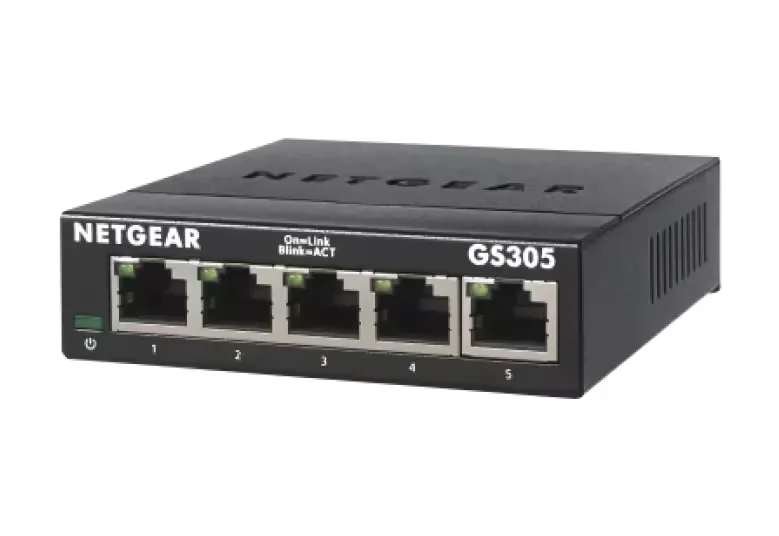
The GS305v3 is for anyone who needs a few extra wired Gigabit ports with no setup. It suits a desk, a media cabinet or a small office where silence matters.
joint 19th of 25 network switches we've reviewedAffiliate link. As an Amazon Associate I earn from qualifying purchases. Details
New to network switches? What they are and what to look for
A network switch adds more wired Ethernet sockets to your home network, like a power strip does for plugs. You connect it to your router with one cable.
Do you need a network switch? Useful if your router has run out of Ethernet ports, or you want wired connections for a TV, games console, desk or NAS.
What to look for
- Enough ports, with a couple spare
- Gigabit is fine for most homes; 2.5GbE helps with a fast NAS
- Fanless designs are silent; managed switches add features most homes don't need
Unsure about a word? Jargon explained
How the 6.0 adds up
Our network switches rubric- Port speeds30% of score
- Management20% of score
- Port count and uplinks15% of score
- PoE10% of score
- Noise and efficiency15% of score
- Firmware and support10% of score
Against the 25 network switches we've reviewed
bar = the range of all 25 · dot = this one · better →
- Overall score 6.0/10joint 19th of 25
- Price £13.992nd cheapest
- Value for money Better value than most3rd best of 25
Running costs and support
| Power draw | 2.34W under load (manufacturer's figure, source) |
|---|---|
| Software updates | No NETGEAR update end date found; a reseller listing shows EOL since 4/13/2026, but that is not a NETGEAR support end date. |
- Fanless
Featured in: Best network switches that are silent
Security and compatibility
| Latest firmware or software | No release date found |
|---|---|
| Known security issues | None found in public advisories. That's a good sign, not a guarantee. |
| Update record | No firmware releases, CVEs, or cloud-account requirements were found for the GS305v3; the notes found only sibling GS305E records, which do not apply. |
Pros and cons
+ pros
- Fanless and silent, as owners report
- Plug-and-play with no software or configuration
- Listed maximum draw of 2.34W, with 802.3az support
− cons
- Unmanaged, so no VLAN or QoS
- Only five ports and no SFP uplink
- Gigabit only, with no 2.5GbE or 10GbE
Price history
Price history appears here once we have tracked this product for a few days.
The full review
Where it fits
The GS305v3 is a five-port unmanaged Gigabit switch from NETGEAR. All five ports run at 10/100/1000Mbps and support Auto Uplink. That makes it a switch for adding a few wired connections to a desk, a TV cabinet or a small cupboard, and not much more.
Port speedsPort speeds 6/10Port count and uplinks 5/10
Every port is Gigabit. NETGEAR lists no 2.5GbE or 10GbE port, and no SFP or SFP+ uplink. Switching is listed as non-blocking with 10 Gbps of bandwidth. The other figures are jumbo frame support up to 9,216 bytes, a 2K MAC table and a 128 KB packet buffer.
With Gigabit on every port, it suits devices that connect at Gigabit or below: a PC, a games console, a printer, a NAS, a streaming box. If you want a faster link to a server or a NAS, the listed specifications offer no route to it on this model.
Management5/10
The switch is unmanaged. NETGEAR describes setup as plug-and-play, with no software to install and no configuration needed. You connect cables and power it on.
Owners praise that simplicity. The flip side shows up in owner complaints too: there are no management features, so no VLAN or QoS. For a homelab that segments traffic or prioritises it, this switch does not fit. For a flat network where every device just needs a port, it asks nothing of you.
Port count and PoEPort speeds 6/10Port count and uplinks 5/10
Five ports is the whole count. Owners list the small port count as a complaint. One port will often go to the uplink to your router, which leaves four for devices. Auto Uplink is listed, so the port assignment is flexible.
There is no PoE here, and the PoE budget is listed as not applicable. NETGEAR sells PoE versions as separate models, the GS305P and GS305PP, with a 63W or 83W budget. If you need to power access points or cameras over the cable, those are the models to look at, not this one.
Noise and power9/10
The switch is fanless. Owners consistently praise the silent operation, which makes it easy to place in a bedroom, an office or a living space. It supports Energy Efficient Ethernet (IEEE 802.3az). Maximum power consumption is listed at 2.34W, and it runs from a 5V/0.7A adapter. NETGEAR lists an MTBF of 3,670,230 hours.
With no fan and a listed maximum draw of 2.34W, it suits a device that stays on all day without being noticed.
Warranty and supportPort speeds 6/10Port count and uplinks 5/10Firmware and support 6/10
The warranty is 3 years in most regions and 1 year in China. Technical support is listed as 90 days free from the date of purchase. The research lists no firmware update history for this model. The 3-year warranty is the more useful of the two commitments here, since the free support window is short.
Who it suits
The GS305v3 does a small job quietly. Owners like the silence and the lack of setup. They dislike the port count and the missing management features, and both follow directly from the spec sheet: five ports, unmanaged, Gigabit only, no SFP uplink and no PoE. It is a fit if those limits match your needs. If you want VLANs or more than five ports, this model does not offer them.
What owners report
Recurring themes from public owner feedback, summarised in our own words.
- Owners praise the silent, fanless operation.
- Owners like the plug-and-play setup with nothing to configure.
- Some owners find five ports too few.
- Some owners miss management features such as VLAN and QoS.
Who should skip it
- Homelabbers who need VLANs, QoS or other management features
- Buyers who need PoE to power access points or cameras
- Anyone who needs more than five ports, SFP uplinks or links faster than Gigabit
Full specifications
| Ports | 5 |
|---|---|
| Port speeds | Gigabit (5 x 10/100/1000Mbps ports, Auto Uplink) |
| Management | Unmanaged |
| PoE budget | Not applicable (PoE budget N/A) |
| Switching capacity | Non-blocking bandwidth 10 Gbps |
| Cooling | Fanless |
Sources
- NETGEAR GS305 unmanaged switch (US product page)
- NETGEAR GS305 UK product page
- 300 Series Gigabit datasheet
- 300 Series Unmanaged PoE datasheet
- Gigabit Unmanaged Essentials Switch datasheet
- Amazon UK listing NETGEAR GS305
- Broadband Buyer GS305 specifications
- Network Warehouse GS305
- Newegg GS305-300PAS
- NETGEAR GS305 tested and reviewed
- MiniPCReviewer GS305 review
- MiniPCReviewer GS305 review (second article)
- eBay owner review NETGEAR GS305
- Staples GS305v3 reviews
Alternatives
Compare head to head
- NETGEAR GS305v3 5-Port Gigabit Unmanaged Switch vs TP-Link LS108GP ›
- NETGEAR GS305v3 5-Port Gigabit Unmanaged Switch vs TP-Link TL-SG105-M2 ›
- NETGEAR GS305v3 5-Port Gigabit Unmanaged Switch vs TP-Link TL-SG1005LP ›
- NETGEAR GS305v3 5-Port Gigabit Unmanaged Switch vs Ubiquiti UniFi Switch Flex Mini ›
- NETGEAR GS305v3 5-Port Gigabit Unmanaged Switch vs TP-Link TL-SG105S 5-Port Gigabit Desktop Switch ›
- NETGEAR GS305v3 5-Port Gigabit Unmanaged Switch vs NETGEAR MS305 5-Port Multi-Gigabit (2.5G) Unmanaged Switch ›