Skip to content
sudopicks
esc

Raspberry Pi 3 Model A+ vs Raspberry Pi 400

Researched, not hands-on tested.How we review ›

all judged against single-board computers at a similar price

The Raspberry Pi 400 scores 7.2/10 overall, ahead of the Raspberry Pi 3 Model A+ at 6.5/10.

The Raspberry Pi 400 leads on performance, I/O and networking and value.

They score the same on software support and storage.

Raspberry Pi 3 Model A+

Raspberry Pi 3 Model A+

6.5/10verdict: good, not the best

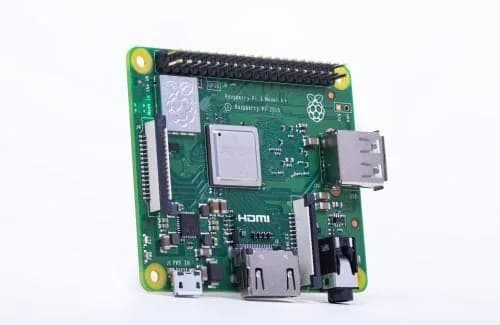
The Raspberry Pi 3 Model A+ is for people who want a small, low-power board for a single, light job. It suits wireless projects that use the 40-pin GPIO header, a display or a camera. It is a poor fit for anyone who needs wired networking, several USB devices or much memory.

Typically about £22.86 in the UK when we researched itCheck price at Amazon UK (opens in a new tab, affiliate link)

Affiliate link. As an Amazon Associate I earn from qualifying purchases. Details
Raspberry Pi 400

Raspberry Pi 400

7.2/10verdict: buy

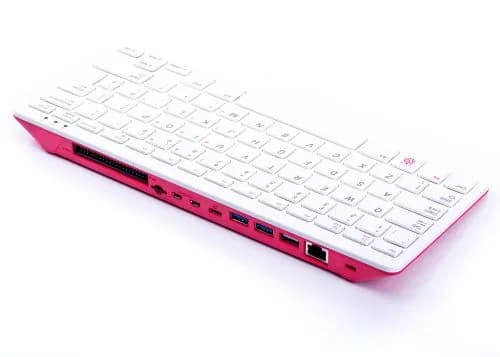
The Raspberry Pi 400 is for anyone who wants a complete, compact Raspberry Pi desktop with the keyboard built in and no assembly. It suits learners, classrooms and homelabbers who want a small terminal or light desktop machine running Raspberry Pi OS. It is a weaker fit for anyone who needs easy GPIO access or fast internal storage.

Typically about £57.60 in the UK when we researched itCheck price at Amazon UK (opens in a new tab, affiliate link)

Affiliate link. As an Amazon Associate I earn from qualifying purchases. Details

Scores, criterion by criterion

CriterionWeightRaspberry Pi 3 Model A+Raspberry Pi 400
Software support30%10/1010/10
Performance25%5/106/10
Storage15%4/104/10
I/O and networking15%5/107/10
Value15%6/107/10
Overall6.5/107.2/10

Specifications

SpecRaspberry Pi 3 Model A+Raspberry Pi 400
Processor (SoC)Broadcom BCM2837B0, quad-core Cortex-A53 64-bit SoC at 1.4 GHzBroadcom BCM2711, quad-core Cortex-A72 64-bit, 1.8 GHz
Memory512MB LPDDR2 SDRAM4GB LPDDR4-3200
Storage optionsMicro SD card slot for OS and data; no onboard eMMC or M.2/NVMe connector found in sourcesMicroSD card slot; no eMMC, SSD or M.2 slot
Networking2.4GHz and 5GHz 802.11b/g/n/ac wireless LAN, Bluetooth 4.2/BLE; no Ethernet portGigabit Ethernet; dual-band 2.4/5 GHz 802.11b/g/n/ac Wi-Fi; Bluetooth 5.0 and BLE
GPIOExtended 40-pin GPIO header40-pin horizontal GPIO header on the rear of the case
Video outputsOne full-size HDMI port, DSI display port, CSI camera port, 4-pole stereo/composite port2 × micro HDMI ports, up to 4Kp60; H.265 4Kp60 decode, H.264 1080p60 decode, OpenGL ES 3.1, Vulkan 1.0
Power input5V/2.5A DC via micro USB, or 5V DC via GPIO header5V DC via USB Type-C power input

Strengths and weaknesses

Raspberry Pi 3 Model A+

  • + Compact board with low idle power draw
  • + Dual-band Wi-Fi and Bluetooth 4.2 built in
  • + Extended 40-pin GPIO header plus HDMI, DSI and CSI ports
  • − No Ethernet port; wireless networking only
  • − Single USB 2.0 port limits peripherals
  • − 512MB RAM and micro SD only

Skip it if:

  • Anyone who needs a wired Ethernet connection for a server or network appliance
  • Buyers who plan to run heavier apps or several services at once
  • People who need more than one USB port or storage beyond a micro SD card
Read the full Raspberry Pi 3 Model A+ review ›

Raspberry Pi 400

  • + Keyboard and computer in one compact case
  • + Raspberry Pi OS preinstalled on the SD card
  • + Gigabit Ethernet and two USB 3.0 ports
  • − microSD only, with no M.2 or eMMC
  • − GPIO access is awkward and needs an adapter
  • − Keyboard feels cheap and spongy to some owners

Skip it if:

  • Buyers who want M.2, SSD or eMMC storage on the board.
  • Makers who will use the GPIO header often and want easy access.
  • Anyone who wants a separate bare board to mount in their own case.
Read the full Raspberry Pi 400 review ›

More comparisons

Compare all single-board computers · Best single-board computers