MSI PRO MP251 E14L
~£68.99typical UK price when we researched itAffiliate link. As an Amazon Associate I earn from qualifying purchases. Details
MSI PRO MP251 E14L review
Researched, not hands-on tested.How we review ›
by SudoPicks Research · editor Paul HR · published 2 Nov 2026 · updated 2 Nov 2026
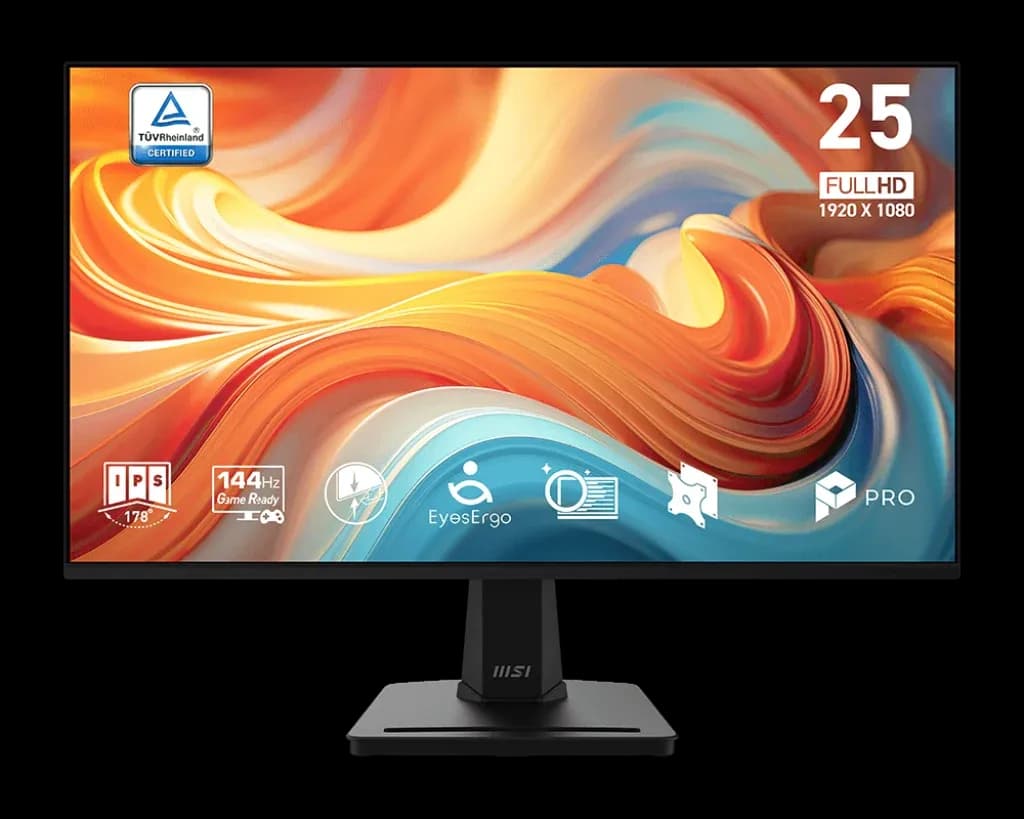
The MSI PRO MP251 E14L is a 24.5 inch 1080p IPS monitor with a 144Hz refresh rate. It suits buyers who want a fast second or main screen and will connect it over HDMI.
11th of 12 monitors we've reviewedAffiliate link. As an Amazon Associate I earn from qualifying purchases. Details
New to monitors? What they are and what to look for
A screen for a desktop computer, or a second screen for a laptop.
Do you need a monitor? A bigger second screen makes laptop work much more comfortable.
What to look for
- 27 inches at 1440p is a sweet spot for desks
- USB-C with power delivery can charge a laptop with one cable
- A height-adjustable stand for comfort
Unsure about a word? Jargon explained
How the 4.9 adds up
Our monitors rubric- Sharpness for text20% of score
- Panel quality25% of score
- Connectivity and docking20% of score
- Ergonomics15% of score
- Refresh rate and motion10% of score
- Build and warranty10% of score
Against the 12 monitors we've reviewed
bar = the range of all 12 · dot = this one · better →
- Overall score 4.9/1011th of 12
- Price £68.993rd cheapest
- Value for money Better value than most4th best of 12
Support and features
Pros and cons
+ pros
- 144Hz refresh with FreeSync range of 48-144Hz
- IPS panel with 99% sRGB coverage
- Three-year warranty
− cons
- Only HDMI 1.4b and VGA inputs
- Tilt-only stand with no height adjustment
- About 90 PPI is soft for text
Price history
Price history appears here once we have tracked this product for a few days.
The full review
Where it fits
The PRO MP251 E14L is a 24.5 inch, 1920 x 1080 IPS monitor from MSI. Its headline feature is a 144Hz refresh rate. It has two inputs, a tilt-only stand and no HDR. The pitch is simple: a fast, flat, anti-glare IPS screen.
Owners say the same thing. The recurring theme is value for money, with buyers describing it as a competitive price and a bargain.
Panel and picture7/10
The panel is IPS with 178° horizontal and vertical viewing angles. MSI lists sRGB coverage at 99%, Adobe RGB at 80.5% and DCI-P3 at 77.9%. Static contrast is 1500:1 and SDR brightness is 300 cd/m². The panel is flat with an anti-glare coating.
Colour depth is listed as 8-bit, achieved as 6-bit plus FRC. HDR is not supported. With 99% sRGB coverage, it suits general desktop work, web and video in standard colour. The Adobe RGB and DCI-P3 figures show it is not aimed at wide-gamut or colour-critical work.
Motion and refresh rate9/10
This is the strongest part of the specification. The monitor runs at 144Hz, with Adaptive-Sync and FreeSync across a 48-144Hz range. MSI quotes 1ms MPRT and 4ms GtG response times. A reviewer's reported average input lag is about 5ms.
One detail matters for setup. The HDMI port is version 1.4b, and MSI lists FHD at 144Hz over it. You can reach the full refresh rate over HDMI at the native resolution. Check that your graphics output and cable support it before buying.
Sharpness3/10
The pixel pitch is 0.2832 mm by 0.2802 mm, which works out to roughly 90 PPI. That is a modest pixel density for a 24.5 inch screen. Text will look less crisp than on a higher-resolution panel of similar size. For terminals, code and long documents, that is the main trade-off against the high refresh rate. It suits games and general use more than text-heavy work.
Connections
The monitor has one HDMI 1.4b port and one D-Sub (VGA) port. No USB-C, DisplayPort, USB hub, Ethernet or daisy-chain ports are listed. That rules it out as a single-cable laptop dock. A laptop without HDMI will need an adapter.
The VGA port may help if you have older hardware to connect, such as a legacy server or a spare machine. For a homelab, that could be useful. It is still a single digital input, so switching between machines means swapping cables or adding a switch.
Stand and mounting
The stand tilts from -5° to 20°. There is no height, swivel or pivot adjustment. Your eye line is set by your desk and the tilt alone. If that is a problem, the monitor supports VESA 100 x 100 mm mounting, so an arm or a riser is the way to fix it. Portrait use depends on a VESA arm, since the stand does not pivot.
Warranty and support6/10
MSI lists a 3-year warranty. Firmware updates are listed as not supported, so there is no update path to rely on if you hit a display quirk. The warranty is the support the specification offers. Dead-pixel policy details are not part of the specification.
Verdict
The MP251 E14L puts its emphasis on refresh rate and an IPS panel with good sRGB coverage. It offers little in inputs, stand adjustment or pixel density. Buyers who want smooth motion on a straightforward HDMI connection get what the spec sheet promises. Buyers who want a sharp text display, a dock-style connection or an adjustable stand should look at other monitors, or plan to add a VESA arm.
What owners report
Recurring themes from public owner feedback, summarised in our own words.
- Owners praise it as good value, calling it a competitive price and a bargain.
Who should skip it
- Anyone who wants USB-C or DisplayPort connections, or one-cable laptop docking
- Developers and writers who want sharp text from a higher pixel density
- Buyers who need height, swivel or pivot adjustment without adding a VESA arm
Full specifications
| Screen size | 24.5 inch |
|---|---|
| Resolution | 1920 x 1080 (FHD), 16:9 |
| Panel type | IPS, flat, anti-glare, 8-bit (6-bit + FRC), 178° / 178° viewing angles |
| Refresh rate | 144Hz; Adaptive-Sync / FreeSync 48-144Hz; 1ms MPRT / 4ms GtG |
| Inputs and USB-C | 1 x HDMI 1.4b (FHD@144Hz), 1 x D-Sub (VGA) |
| Stand adjustment | Tilt -5° to 20°; no height, swivel or pivot adjustment; VESA 100 x 100 mm |
| HDR | Not supported (HDR SUPPORT: N/A); 300 cd/m² SDR brightness |
Alternatives
Compare head to head
- MSI PRO MP251 E14L vs Acer EK271 G 27 inch LCD Monitor ›
- MSI PRO MP251 E14L vs Yodoit PTM15 ›
- MSI PRO MP251 E14L vs ARZOPA Z1FC 16.1 inch Portable Monitor ›
- MSI PRO MP251 E14L vs AOC 24B3HA2 ›
- MSI PRO MP251 E14L vs CORSAIR XENEON EDGE 14.5" LCD Touchscreen ›
- MSI PRO MP251 E14L vs Dell Pro 27 Plus FHD USB-C Monitor - P2725HE ›