Lemorele TC94L USB-C Docking Station
~£27.99typical UK price when we researched itAffiliate link. As an Amazon Associate I earn from qualifying purchases. Details
Lemorele TC94L USB-C Docking Station review
Researched, not hands-on tested.How we review ›
by SudoPicks Research · editor Paul HR · published 27 Oct 2026 · updated 27 Oct 2026
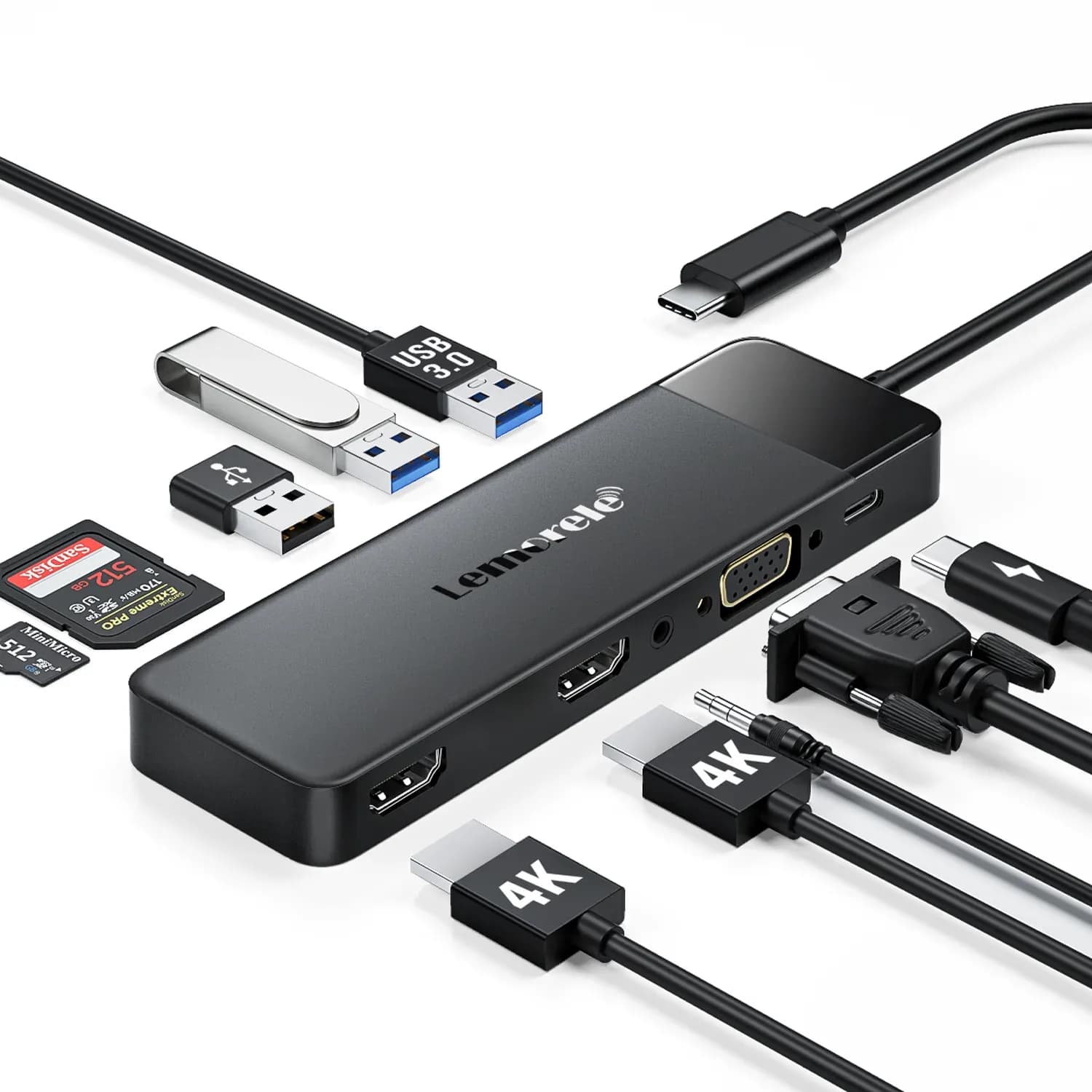
The Lemorele TC94L is for people who want to run two 1080p monitors from one USB-C laptop port. It suits home working with documents, email and browser windows rather than high-resolution displays or fast storage.
5th of 5 docking stations we've reviewedAffiliate link. As an Amazon Associate I earn from qualifying purchases. Details
New to docking stations? What they are and what to look for
A docking station connects your laptop to your monitors, keyboard, network and charger with one cable.
Do you need a docking station? Worth it if you plug your laptop into the same desk every day and are tired of unplugging five cables.
What to look for
- Enough charging power for your laptop (check its charger's watts)
- Support for the number of screens you want on your laptop (Macs differ)
- Ethernet, and its own power supply for all-day use
Unsure about a word? Jargon explained
How the 4.2 adds up
Our docking stations rubric- Displays25% of score
- Charging and power20% of score
- Ports and bandwidth20% of score
- Compatibility and reliability20% of score
- Ethernet and value15% of score
Against the 5 docking stations we've reviewed
bar = the range of all 5 · dot = this one · better →
- Overall score 4.2/105th of 5
- Price £27.99cheapest
- Value for money Better value than most2nd best of 4
Support and features
| Software updates | No end date announced; manufacturer lists a 1-year warranty and driver download source |
|---|
Compatibility
| Linux | Not confirmed. No Linux support is stated for the TC94L; the maker's compatibility list omits Linux and the searches were limited. source |
|---|
Pros and cons
+ pros
- Two HDMI ports plus VGA for extra screens
- Dual 1080p at 60Hz listed
- Owners mostly rate value for money positively
− cons
- No Ethernet port
- 4K limited to 30Hz
- Only one 5Gbps USB-A port
Price history
Price history appears here once we have tracked this product for a few days.
The full review
Where it fits
The TC94L is a single-cable USB-C dock for adding screens and a handful of basic ports. It connects through one USB-C port with USB-C 3.0 data. The host device must support DisplayPort Alt Mode. Video is native over that connection, using an LT8712EXI chipset. It is a simple dock, and its specifications show where the limits are.
Displays5/10
The dock has two HDMI 2.0 ports and one VGA port. Listed modes are 4K@30Hz on HDMI, dual HDMI at 1080p@60Hz, and VGA up to 1080p@60Hz. Two 1080p screens at 60Hz is the practical sweet spot. That suits documents, email and browser windows, and owners are positive about it for dual-monitor home working.
The 4K figure is a ceiling at 30Hz. With a 4K display, the spec sheet says macOS tops out at 4K@30Hz and Windows at 1080p@60Hz. With that cap, it is a poor match for anyone who wants a high-resolution main screen.
Mac owners need extra care. A listing for a sibling model says macOS supports only mirror mode because of a macOS limitation. That note comes from the sibling listing, but it is a reason to check before buying if you want two separate desktops on a Mac.
Charging and power4/10
The USB-C PD input accepts up to 85W and is for charging only. Lemorele's list of outputs says up to 100W. The dock does not come with a power adapter. Your laptop charger plugs into the dock's PD pass-through port, so the dock relies on that charger rather than having its own supply.
Compare your laptop charger's rating with the 85W figure before you rely on it. Owner reports on charging are mixed, and some say the dock does not charge their laptop sufficiently. If your laptop draws a lot under load, that is the area to look at first.
Ports and data speed4/10
The port list is short:
One USB-A 3.0 port runs at 5Gbps. Two USB-A 2.0 ports run at 480Mbps. There is a combined TF/SD slot pair, which cannot be used at the same time and is listed at 20MB/s. A 3.5mm audio output sits alongside them. The only USB-C port listed is the PD input.
With one 5Gbps port and two USB 2.0 ports, it fits a keyboard, mouse and a single faster device such as a flash drive. It is not built for several fast drives at once. The 20MB/s card reader is slow for moving large photo or video files.
No Ethernet4/10
The TC94L has no Ethernet port. If your laptop lacks a wired connection and you want one from the dock, this model does not provide it. That matters for sysadmins and homelabbers who want a stable wired link from a single cable.
Owner feedback and support
Value for money has 31 mentions: 24 positive and 7 negative. Durability is the weak spot. There are 14 mentions, only 2 positive and 12 negative, though they come from a single source. Charging reports are mixed.
Lemorele lists a 1-year warranty and a driver download page for the TC94L. The warranty offers some cover given the durability reports.
Who it suits
It suits someone with a USB-C laptop that supports DisplayPort Alt Mode, a charger rated within the 85W limit, and a plan for two 1080p monitors. It is a weaker fit for Mac users who want extended desktops, for people who need fast data or Ethernet, and for anyone who wants 4K at a smooth refresh rate.
What owners report
Recurring themes from public owner feedback, summarised in our own words.
- Owners generally say it offers good value for money.
- Reports on laptop charging are mixed, with some saying it does not charge their laptop sufficiently.
- Some owners are positive about it for dual-monitor home working.
Who should skip it
- Buyers who need wired Ethernet from the dock
- Mac users who want two separate extended desktops
- Anyone wanting 4K at 60Hz or fast USB and card transfers
Full specifications
| Connects with | USB-C (Type-C) x1, USB-C 3.0 data with PD input; device must support DisplayPort Alt Mode |
|---|---|
| External displays | Two HDMI 2.0 ports and one VGA port; HDMI 4K@30Hz, dual HDMI 1080p@60Hz, VGA up to 1080p@60Hz |
| Laptop charging | USB-C PD input up to 85W (charging only); manufacturer outputs list says up to 100W |
| Ports | 2x HDMI 2.0, 1x VGA, 1x USB-A 3.0 (5Gbps), 2x USB-A 2.0 (480Mbps), 1x TF/SD slot pair (not simultaneous, 20MB/s), 1x 3.5mm audio out, 1x USB-C PD input |
| Ethernet | None on the TC94L |
| Power supply | Laptop charger connects through the dock's PD pass-through port; power adapter not included |
Sources
- Lemorele TC94L product page (manufacturer)
- Lemorele all docking stations (manufacturer)
- Amazon.co.uk listing B0C5ZY5WMV (snippet only)
- Amazon.com listing B0C5ZY5WMV
- Amazon.com listing B0C3CQJWZM
- Amazon.ca listing B0DLMTYDVY
- Walmart reviews (related model)
- Manuals.plus TC94 display modes manual
- Dan Char blog review of TC46 (sibling model)
Alternatives
Compare head to head
- Lemorele TC94L USB-C Docking Station vs UGREEN Revodok Pro 210 10-in-1 USB-C Hub ›
- Lemorele TC94L USB-C Docking Station vs UGREEN Revodok Pro 207 ›
- Lemorele TC94L USB-C Docking Station vs UGREEN Revodok Max 213 Thunderbolt 4 Dock ›
- Lemorele TC94L USB-C Docking Station vs CalDigit TS4 Thunderbolt 4 Dock ›