UGREEN Revodok Max 213 Thunderbolt 4 Dock
~£249.99typical UK price when we researched itAffiliate link. As an Amazon Associate I earn from qualifying purchases. Details
UGREEN Revodok Max 213 Thunderbolt 4 Dock review
Researched, not hands-on tested.How we review ›
by SudoPicks Research · editor Paul HR · published 27 Oct 2026 · updated 27 Oct 2026
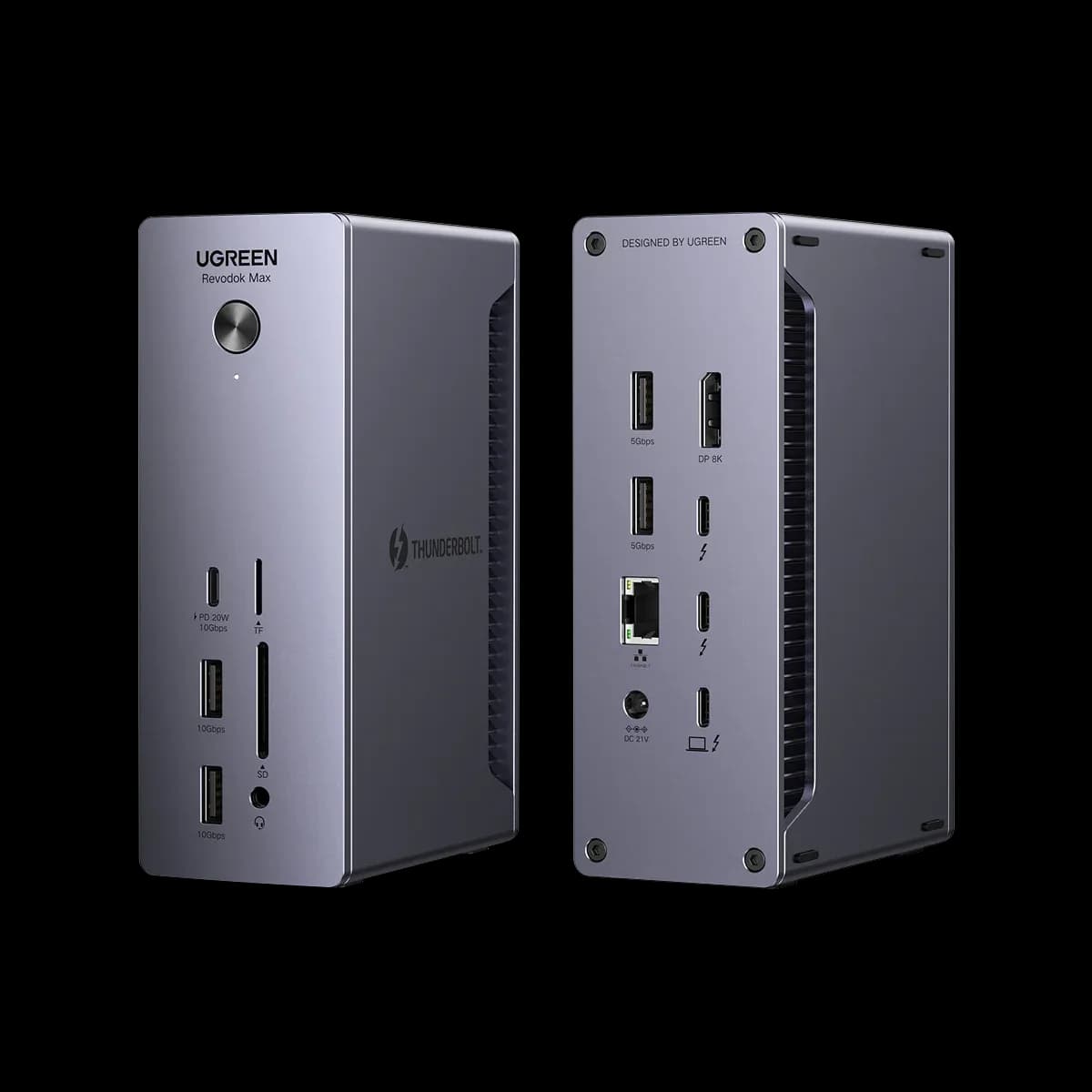
The UGREEN Revodok Max 213 is a Thunderbolt 4 dock for people who want one cable to handle charging, displays, wired networking and storage at a desk. It suits Windows laptops and Pro, Max, Ultra or Intel Macs that need two 4K screens.
2nd of 5 docking stations we've reviewedAffiliate link. As an Amazon Associate I earn from qualifying purchases. Details
New to docking stations? What they are and what to look for
A docking station connects your laptop to your monitors, keyboard, network and charger with one cable.
Do you need a docking station? Worth it if you plug your laptop into the same desk every day and are tired of unplugging five cables.
What to look for
- Enough charging power for your laptop (check its charger's watts)
- Support for the number of screens you want on your laptop (Macs differ)
- Ethernet, and its own power supply for all-day use
Unsure about a word? Jargon explained
How the 7.0 adds up
Our docking stations rubric- Displays25% of score
- Charging and power20% of score
- Ports and bandwidth20% of score
- Compatibility and reliability20% of score
- Ethernet and value15% of score
Against the 5 docking stations we've reviewed
bar = the range of all 5 · dot = this one · better →
- Overall score 7.0/102nd of 5
- Price £249.993rd cheapest
- Value for money Poorer value than most3rd best of 4
Support and features
| Software updates | No end-of-support date announced; Amazon UK lists software updates as unknown and the maker advertises a 24-month warranty. source |
|---|
Compatibility
| Linux | Not confirmed. UGREEN does not officially support Linux for the Max 213; independent sources suggest it works as a plain Thunderbolt 4 dock with no extra drivers, but no kernel-level verification was found. source |
|---|
Pros and cons
+ pros
- Dual 4K@60Hz on Windows with 2.5GbE
- 90W charging from its own 180W adapter
- Sturdy build and a broad mix of fast ports
− cons
- Owners report noise and heat, with conflicting cooling claims
- Base M1/M2/M3 Macs get only one display
- Owners call the price steep
Price history
Price history appears here once we have tracked this product for a few days.
The full review
Where it fits
The Revodok Max 213 is a Thunderbolt 4 dock released in December 2023. It connects to the laptop over a single 40Gbps Thunderbolt 4 host cable and runs from an external 180W GaN adapter rated at 21V and 8.57A. That makes it a desk dock: one cable carries power, video, network and data.
Displays7/10
On Windows, the dock supports dual 4K at 60Hz or a single 8K at 30Hz. Video comes from one DisplayPort 1.4 output plus Thunderbolt display output.
Mac owners need to check the chip first. Base M1, M2 and M3 Macs support a single 4K@60Hz display through this dock. Pro, Max and Ultra chips and Intel Macs can drive dual displays. A buyer with a base MacBook Air who wants two monitors will not get them here. Windows users and higher-tier Mac users get the full dual-screen setup.
Charging and power7/10
The dock delivers 90W to the laptop through the Thunderbolt 4 upstream port. The front USB-C port offers 20W for a phone or small accessory. Because the dock has its own 180W adapter, it does not draw its supply from the laptop.
Docking-stations.info says 90W is enough for most laptops but may fall short for demanding 16-inch workstations under heavy load. If you run a large mobile workstation flat out, that ceiling matters. For thin-and-light and typical work laptops, 90W is a sensible figure. UGREEN doesn't list idle or load power draw for the dock.
Ports and bandwidth8/10
The port count is where the dock does most of its work. The UK page lists three Thunderbolt 4 ports: one upstream and two downstream. Store listings vary, though. The EU and CA store pages list two Thunderbolt 4 ports, while the AE page lists three, so check the listing you are buying from.
Beyond Thunderbolt, you get one DisplayPort 1.4 output and a front USB-C port at 10Gbps. There are two USB-A ports at 10Gbps and two more at 5Gbps. An SD/TF 4.0 card reader and a 3.5mm audio jack complete the set. With 10Gbps on the faster USB ports and a 40Gbps host link, it suits fast external drives and several peripherals at once. Two 5Gbps USB-A ports are enough for keyboards, mice and other slower devices.
Ethernet7/10
The RJ45 port runs at 2.5GbE. That suits a desk on a faster-than-gigabit wired network, such as a home lab or a small office with a 2.5GbE switch.
Build, noise and heat
Owners praise the build as sturdy and tank-like. The complaints are about noise and heat. Owner claims about cooling conflict, with some describing it as passive and others pointing to upgraded cooling. A buyer who sits the dock close to their ear or in a closed cabinet should weigh those reports.
Price and support
Owners call the price steep. Others see it as good value against the CalDigit TS4 for similar Thunderbolt 4 features. UGREEN gives a 24-month warranty with 24-hour customer service and lifetime technical support. That support offer adds weight to the purchase, since a dock sits at the centre of a desk setup.
Who it suits
The dock suits a Windows laptop or a higher-tier Mac that needs two 4K screens, wired 2.5GbE and a wide set of fast ports from one cable. With 90W delivery and its own adapter, it covers most work laptops. With a 90W ceiling, it is a poorer match for heavy 16-inch workstations. With a single-display limit on base M-series Macs, it is a poorer match for those machines if you want multiple screens. Owner reports of noise and heat count against it for quiet desks.
What owners report
Recurring themes from public owner feedback, summarised in our own words.
- Owners describe the build as sturdy and tank-like.
- The price is seen as steep, though some call it good value against the CalDigit TS4 for similar Thunderbolt 4 features.
- Some owners report noise and heat, and claims about the cooling design conflict.
Who should skip it
- Base M1, M2 or M3 Mac owners who want more than one external display
- Owners of demanding 16-inch workstations that need more than 90W under heavy load
- Buyers who need a completely silent dock on a desk or in a cabinet
Full specifications
| Connects with | Thunderbolt 4 host (USB-C), 40Gbps |
|---|---|
| External displays | One DisplayPort 1.4 output plus Thunderbolt display output; dual 4K@60Hz or single 8K@30Hz on Windows |
| Laptop charging | 90W to laptop over the Thunderbolt 4 upstream port; 20W on the front USB-C port |
| Ports | 3 TB4 (one upstream, two downstream), 1 DisplayPort 1.4, 1 USB-C 10Gbps/20W, 2 USB-A 10Gbps, 2 USB-A 5Gbps, 2.5GbE, SD/TF 4.0 card reader, 3.5mm audio, 180W DC-in |
| Ethernet | 2.5GbE RJ45 |
| Power supply | External 180W GaN adapter (21V 8.57A) |
Sources
- UGREEN Revodok Max 213 (AE store)
- UGREEN Revodok Max 213 (CA store)
- UGREEN Revodok Max 213 (EU store)
- UGREEN Revodok series
- UGREEN Revodok Max 213 UK shop
- Amazon UK Revodok Max 213 Thunderbolt 4 Dock
- Amazon UK Revodok Max 213 (Space Grey variant)
- TechRadar Revodok Max 213 review
- Windows Central Revodok Max 213 review
- Android Central Revodok Max 213 review
- TechReviewer Revodok Max 213 test
- Docking-stations.info Revodok Max 213 review
- The Gadgeteer Revodok Max 213 review
- Mighty Gadget Revodok Max 213 review
- Byrdpilot Revodok Max 213 problems (unverified blog)
- Tech Advisor Revodok Max 213 review
Alternatives
Compare head to head
- UGREEN Revodok Max 213 Thunderbolt 4 Dock vs CalDigit TS4 Thunderbolt 4 Dock ›
- UGREEN Revodok Max 213 Thunderbolt 4 Dock vs UGREEN Revodok Pro 210 10-in-1 USB-C Hub ›
- UGREEN Revodok Max 213 Thunderbolt 4 Dock vs UGREEN Revodok Pro 207 ›
- UGREEN Revodok Max 213 Thunderbolt 4 Dock vs Lemorele TC94L USB-C Docking Station ›