Anker Nano 13-in-1 Laptop Docking Station (A83C3)
~£99.99typical UK price when we researched itAffiliate link. As an Amazon Associate I earn from qualifying purchases. Details
Anker Nano 13-in-1 Laptop Docking Station (A83C3) review
Researched, not hands-on tested.How we review ›
by SudoPicks Research · editor Paul HR · published 29 Oct 2026 · updated 29 Oct 2026
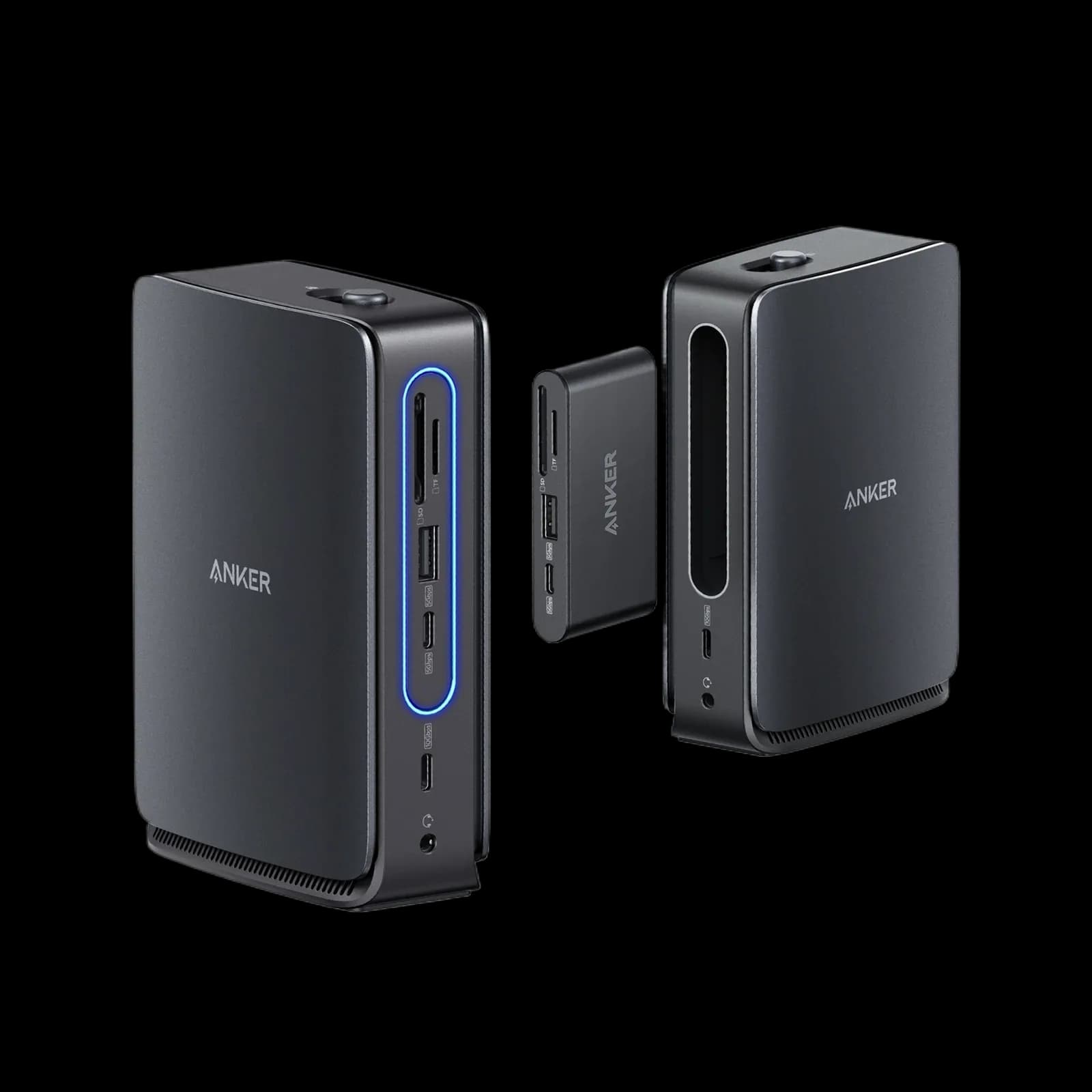
The Anker Nano 13-in-1 suits Windows laptop owners who want a compact dock with a detachable travel hub. It handles up to three external displays and 100W charging from its own power supply.
8th of 9 docking stations we've reviewedAffiliate link. As an Amazon Associate I earn from qualifying purchases. Details
New to docking stations? What they are and what to look for
A docking station connects your laptop to your monitors, keyboard, network and charger with one cable.
Do you need a docking station? Worth it if you plug your laptop into the same desk every day and are tired of unplugging five cables.
What to look for
- Enough charging power for your laptop (check its charger's watts)
- Support for the number of screens you want on your laptop (Macs differ)
- Ethernet, and its own power supply for all-day use
Unsure about a word? Jargon explained
How the 5.1 adds up
Our docking stations rubric- Displays25% of score
- Charging and power20% of score
- Ports and bandwidth20% of score
- Compatibility and reliability20% of score
- Ethernet and value15% of score
Against the 9 docking stations we've reviewed
bar = the range of all 9 · dot = this one · better →
- Overall score 5.1/108th of 9
- Price £99.993rd cheapest
- Value for money Better value than most3rd best of 7
Support and features
| Software updates | No end-of-support date announced; Anker offers firmware upgrade packages, but the search was limited. source |
|---|
Compatibility
| Linux | Doesn't work on Linux. Anker states the dock is not compatible with Linux devices and lists only Windows, macOS and ChromeOS as supported; no Linux driver or software was found. source |
|---|
Pros and cons
+ pros
- Detachable hub doubles as a travel hub
- Own 140W adapter and 100W power to the laptop
- Three external displays at 4K@60Hz
− cons
- macOS mirrors displays rather than extending them
- Anker's US page says Linux is not compatible
- Gigabit Ethernet and 480Mbps USB-A ports only
Price history
Price history appears here once we have tracked this product for a few days.
The full review
Where it fits
This is a compact dock with a twist: the hub section detaches. The removable hub adds a USB-C PD-in, a 5Gbps USB-C port, a USB-A port and one HDMI output. Owners single out the detachable hub as useful for travel, and they also like the small footprint on a desk.
It connects through one USB-C upstream port rated at 10Gbps. The laptop needs DP Alt Mode and Power Delivery, and Anker lists Windows 10/11 and macOS 13.5 or later as supported. This is not a Thunderbolt dock.
Displays5/10
The dock offers two HDMI outputs and one DisplayPort output, each rated for 4K@60Hz, for up to three external displays. Running two 4K screens at 60Hz requires DSC, so check that your laptop supports it before you plan a dual-4K setup. Anker says the removable hub adds another HDMI output.
Video goes out natively through HDMI and DisplayPort. There is no DisplayLink and no Thunderbolt. The laptop therefore needs DP Alt Mode for the dock to work with it.
Mac owners need to read this section twice. External displays on macOS mirror rather than extend, and owners flag this as a recurring complaint. If you want separate desktops on several screens from a Mac, this dock does not deliver that. On Windows, the three-output layout is the main draw.
Charging and power6/10
The dock has its own supply, with a 140W DC-IN adapter included, and passes up to 100W to the laptop. That covers laptops that charge at 100W or less.
Owners report slow charging, so check your laptop's charging needs against that feedback. The dock also needs a laptop connection to power its ports and the blue light strip, so it is not a standalone charging hub. Anker supplies a USB 3.2 Gen 2 cable and recommends using it.
Ports and bandwidth6/10
Beyond the display outputs, the dock has a 100W USB-C PD port, the USB-C upstream port, a 10Gbps USB-C port, two USB-A ports, an SD slot, a TF/microSD slot and a 3.5mm audio in/out jack. The 10Gbps USB-C port suits fast external drives. The two USB-A ports run at 480Mbps, so they suit keyboards, mice and receivers better than storage.
The upstream connection to the laptop is a single USB-C port rated at 10Gbps. Buyers with several fast peripherals should keep that rating in mind alongside the 480Mbps USB-A ports.
Anker also warns that the hub may block adjacent ports on some laptops. Check the layout of your laptop's side ports before buying.
Ethernet4/10
There is a single Gigabit Ethernet port on the dock. Buyers who want a faster wired connection should note that Gigabit is the only Ethernet option listed.
Compatibility and reliability4/10
Anker's US page states the dock is not compatible with Linux devices. That rules it out for Linux laptops on the manufacturer's word. Anker's own support site also carries an article on monitor flicker when casting from this dock, so display flicker is a known issue to read up on before you commit.
Owners also describe the dock as expensive. Separately, owners flag that macOS mirrors rather than extends, which matters because Mac buyers cannot use the three outputs as extended desktops.
Verdict
The Anker Nano 13-in-1 works best on a Windows laptop with DP Alt Mode and 100W charging. The detachable hub and small footprint suit people who move between desk and travel. The mirroring-only behaviour on macOS, the Linux warning, the Gigabit port and the 480Mbps USB-A ports narrow its appeal. Check your laptop's specifications first, and treat it as a Windows-first dock.
What owners report
Recurring themes from public owner feedback, summarised in our own words.
- Owners like the detachable hub as a travel hub.
- The compact design and small footprint get praise.
- Owners report slow charging.
- Owners call it expensive and dislike that macOS mirrors rather than extends.
Who should skip it
- Mac users who need extended desktops across external screens
- Linux laptop users, given Anker's stated incompatibility
- Buyers who need Thunderbolt, multi-gigabit Ethernet or fast USB-A ports
Full specifications
| Connects with | USB-C upstream port rated 10Gbps; laptop needs DP Alt Mode and Power Delivery; Windows 10/11 and macOS 13.5 or later |
|---|---|
| External displays | Up to three external displays: 2× HDMI (4K@60Hz) and 1× DisplayPort (4K@60Hz); dual 4K@60Hz requires DSC; removable hub adds one HDMI |
| Laptop charging | 100W max to laptop |
| Ports | 1× USB-C 100W PD, 1× USB-C upstream, 1× USB-C 10Gbps, 2× USB-A 480Mbps, 2× HDMI, 1× DisplayPort, 1× Gigabit Ethernet, 1× 3.5mm audio in/out; SD and TF/microSD slots; hub adds USB-C PD-in, USB-C 5Gbps, USB-A |
| Display tech | Native video through HDMI and DisplayPort only; no DisplayLink or Thunderbolt |
| Power supply | Own supply; 140W DC-IN adapter included |
Alternatives
Compare head to head
- Anker Nano 13-in-1 Laptop Docking Station (A83C3) vs Anker 568 USB-C Docking Station (11-in-1, USB4) ›
- Anker Nano 13-in-1 Laptop Docking Station (A83C3) vs UGREEN Revodok Pro 210 10-in-1 USB-C Hub ›
- Anker Nano 13-in-1 Laptop Docking Station (A83C3) vs UGREEN Revodok Pro 207 ›
- Anker Nano 13-in-1 Laptop Docking Station (A83C3) vs Anker Prime Charging Docking Station (14-in-1, Dual Display, 160W) ›
- Anker Nano 13-in-1 Laptop Docking Station (A83C3) vs Lenovo ThinkPad Hybrid USB-C with USB-A Dock ›
- Anker Nano 13-in-1 Laptop Docking Station (A83C3) vs Lemorele TC94L USB-C Docking Station ›