TP-Link TL-WA3001
~£89.99typical UK price when we researched itAffiliate link. As an Amazon Associate I earn from qualifying purchases. Details
TP-Link TL-WA3001 review
Researched, not hands-on tested.How we review ›
by SudoPicks Research · editor Paul HR · published 29 Oct 2026 · updated 29 Oct 2026
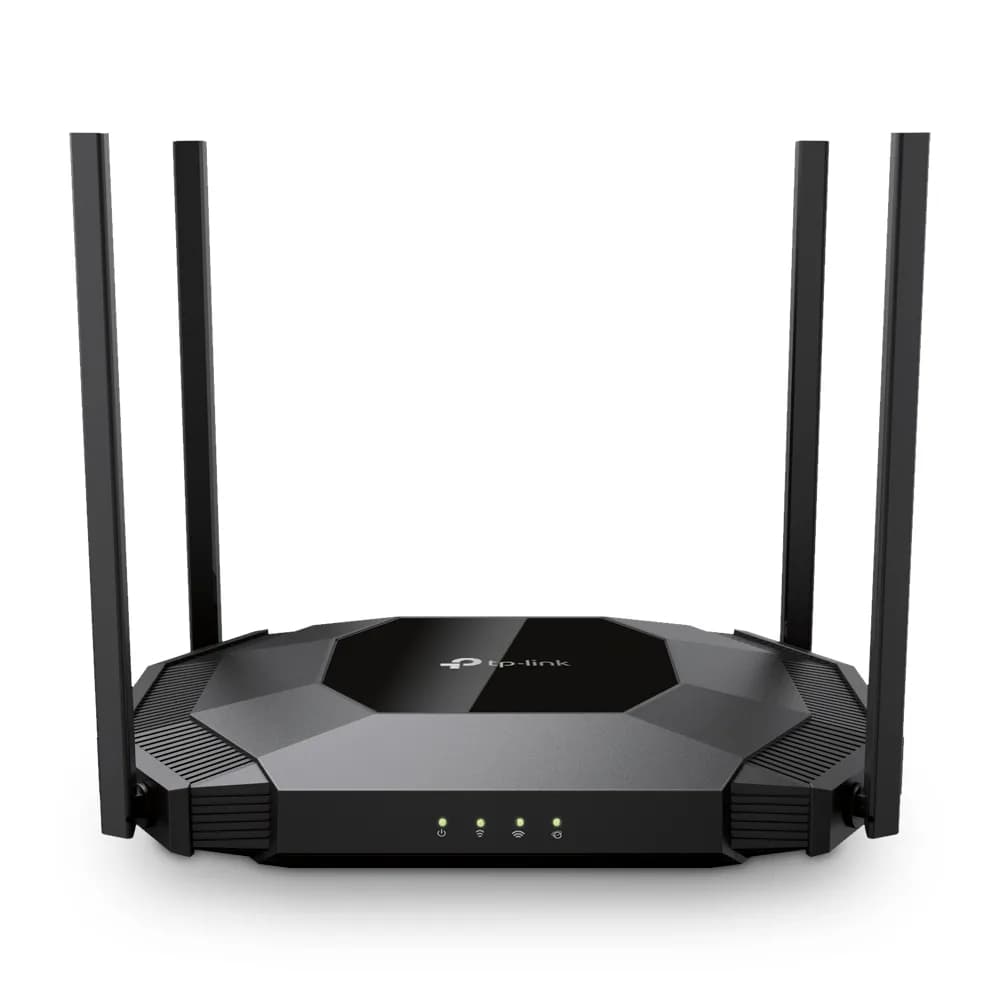
The TL-WA3001 is for homelabbers and small-office admins who want a Wi-Fi 6 access point managed from a local web interface. It suits setups that need separate SSIDs mapped to VLANs on both bands.
joint 8th of 15 Wi-Fi access points we've reviewedAffiliate link. As an Amazon Associate I earn from qualifying purchases. Details
New to Wi-Fi access points? What they are and what to look for
An access point is a Wi-Fi transmitter that connects to your network with a cable, usually mounted on a ceiling or wall. Several of them give fast, even Wi-Fi throughout a building.
Do you need a Wi-Fi access point? Worth it if you can run Ethernet cables to where you need Wi-Fi. If you can't, a mesh router system is easier.
What to look for
- Wi-Fi 6 or newer
- Power over Ethernet (PoE), so it doesn't need a plug socket
- Whether it can be managed without the maker's cloud account
Unsure about a word? Jargon explained
How the 5.8 adds up
Our Wi-Fi access points rubric- Wi-Fi standard and bands25% of score
- Uplink and power20% of score
- Management20% of score
- Software and security20% of score
- Value15% of score
Against the 15 Wi-Fi access points we've reviewed
bar = the range of all 15 · dot = this one · better →
- Overall score 5.8/10joint 8th of 15
- Price £89.9913th cheapest
- Value for money Poorer value than most13th best of 15
Support and features
| Software updates | No end-of-support date announced; latest firmware dated 2025-07-30 source |
|---|
- Works without the cloud
Measured by owners
No owner readings yet. If you own one and have a smart plug or power meter, a reading takes a minute and helps everyone else.
Security and compatibility
| Latest firmware or software | July 2025no update for over a year source |
|---|---|
| Known security issues | None found in public advisories. That's a good sign, not a guarantee. |
| Update record | Latest firmware found is TL-WA3001(US) V1.60 build 20250620, published 2025-07-23; no advisory naming this model was found, though the search was limited. |
Pros and cons
+ pros
- Up to four VLAN-tagged SSIDs per band
- Standalone web UI; EasyMesh controller is not cloud-based
- WPA3, WPA-Enterprise and WPA2-Enterprise supported
− cons
- Single gigabit port only
- Passive PoE is the only PoE type listed
- No 6 GHz band
Price history
Price history appears here once we have tracked this product for a few days.
The full review
Where it fits
The TL-WA3001 is a Wi-Fi 6 (802.11ax) access point in the AX3000 class. It has one Ethernet port, four external antennas and a standalone web interface. It is backward compatible with 802.11a/b/g/n/ac clients. The feature set points to a homelab or small office where the admin wants VLAN-tagged SSIDs and local control.
Wi-Fi and radios
The radios are dual-band. The 2.4 GHz band runs at up to 574 Mbps and the 5 GHz band at up to 2402 Mbps. There is no 6 GHz band, so this is a Wi-Fi 6 design rather than a 6E one. Wi-Fi Multimedia (WMM) and QoS support are both listed. Those matter if voice or video traffic shares the air with bulk transfers.
The four antennas are external. The unit is 240 mm wide, 165 mm deep and 43.6 mm high. It can sit on a desk or go on a wall. It is rated for 0 to 40 °C and 10 to 90% relative humidity, which makes it an indoor device.
Uplink and power4/10
There is one gigabit Ethernet port, and it supports passive PoE. The box includes both an AC adapter and a PoE adapter, along with an RJ-45 cable. The external supply is rated at 48V. A DC-in jack is also fitted, so the unit can be powered locally or through the PoE adapter.
The 5 GHz rate of 2402 Mbps is higher than the gigabit port. On paper, the wired link is the narrower of the two. With a single port, every SSID and VLAN also reaches the network through that one connection. The listed PoE type is passive only, so the included adapter is the powering route the specifications describe.
Management and VLANs7/10
Management is the strongest part of the specification. The device supports Access Point, Client, Range Extender and Multi-SSID (VLAN) modes. It handles up to four separate SSIDs and VLANs on each band. That gives a homelab a clear way to split trusted, IoT and guest networks from one access point.
The interface is a standalone web UI over HTTP or HTTPS, with app management as well. Firmware 1.1.0 added EasyMesh in Controller Mode when the unit runs in AP mode. TP-Link states this is not a cloud controller. Because the VLAN SSIDs and the web UI are both local, it fits a network where the admin wants configuration to stay on-site. DHCP server and client functions are listed. IPv4 and IPv6 are supported.
Physical controls include an on/off switch, a reset button and a WPS push button.
Security and firmware6/10
The security list covers WPA, WPA2 and WPA3. WPA-Enterprise and WPA2-Enterprise are also listed, and so is SNMP. The Enterprise options matter if the access point will authenticate against a central service. Multiple SSIDs are supported. Firmware 1.1.0 added EasyMesh, and the manufacturer has a support and firmware page for the model. Guest isolation is not listed in the specifications, so check the web UI options if that feature matters for a guest VLAN.
Compliance certificates listed are FCC and RoHS.
Verdict
The TL-WA3001 suits a buyer who wants Wi-Fi 6 with VLAN-tagged SSIDs and a local web UI. The case for it rests on its management features and WPA3 support. The limits are plain from the specifications: one gigabit port, passive PoE only and no 6 GHz band. If those fit the network, it covers the job on its own terms. If the plan includes a multi-gigabit uplink or 6 GHz clients, the specifications point elsewhere.
Who should skip it
- Buyers who need a 2.5GbE or faster uplink
- Buyers who want 6 GHz or Wi-Fi 6E clients
- Buyers whose switch supplies only a PoE type other than passive
Full specifications
| Wi-Fi standard | Wi-Fi 6 (802.11ax), backward compatible with 802.11a/b/g/n/ac |
|---|---|
| Bands and speed class | Dual-band: 2.4 GHz at 574 Mbps and 5 GHz at 2402 Mbps (AX3000 class) |
| Uplink port | 1 Gigabit Ethernet port (supports passive PoE) |
| Power (PoE class) | Passive PoE; external supply rated 48V/0.5A |
| Management | Standalone web UI (HTTP/HTTPS) plus app management; no cloud requirement stated |
| Mounting | Wall or desktop |
✓ Specs checked against the maker's data sheet.
Sources
- TP-Link TL-WA3001 product page (US)
- TP-Link TL-WA3001 product page (AU)
- TL-WA3001 EU&US datasheet V1.20
- TL-WA3001 support and firmware (AU)
- TL-WA3001 on Amazon UK (B0DLKYWHPR)
- TL-WA3001 at Ballicom
- TL-WA3001 on Newegg
- Icecat data sheet: TP-Link TL-WA3001 wireless access point 2402 Mbit/s Black Power over Ethernet (PoE)
Alternatives
Compare head to head
- TP-Link TL-WA3001 vs TP-Link TL-WA1201 ›
- TP-Link TL-WA3001 vs NETGEAR WAX210 AX1800 Dual-band Access Point ›
- TP-Link TL-WA3001 vs TP-Link EAP225-Outdoor ›
- TP-Link TL-WA3001 vs TP-Link Omada EAP225 ›
- TP-Link TL-WA3001 vs HPE Networking Instant On Access Point AP22 ›
- TP-Link TL-WA3001 vs TP-Link Omada EAP653 AX3000 Ceiling Mount Wi-Fi 6 Access Point ›