TP-Link EAP610
~£86.39typical UK price when we researched itAffiliate link. As an Amazon Associate I earn from qualifying purchases. Details
TP-Link EAP610 review
Researched, not hands-on tested.How we review ›
by SudoPicks Research · editor Paul HR · published 27 Oct 2026 · updated 27 Oct 2026
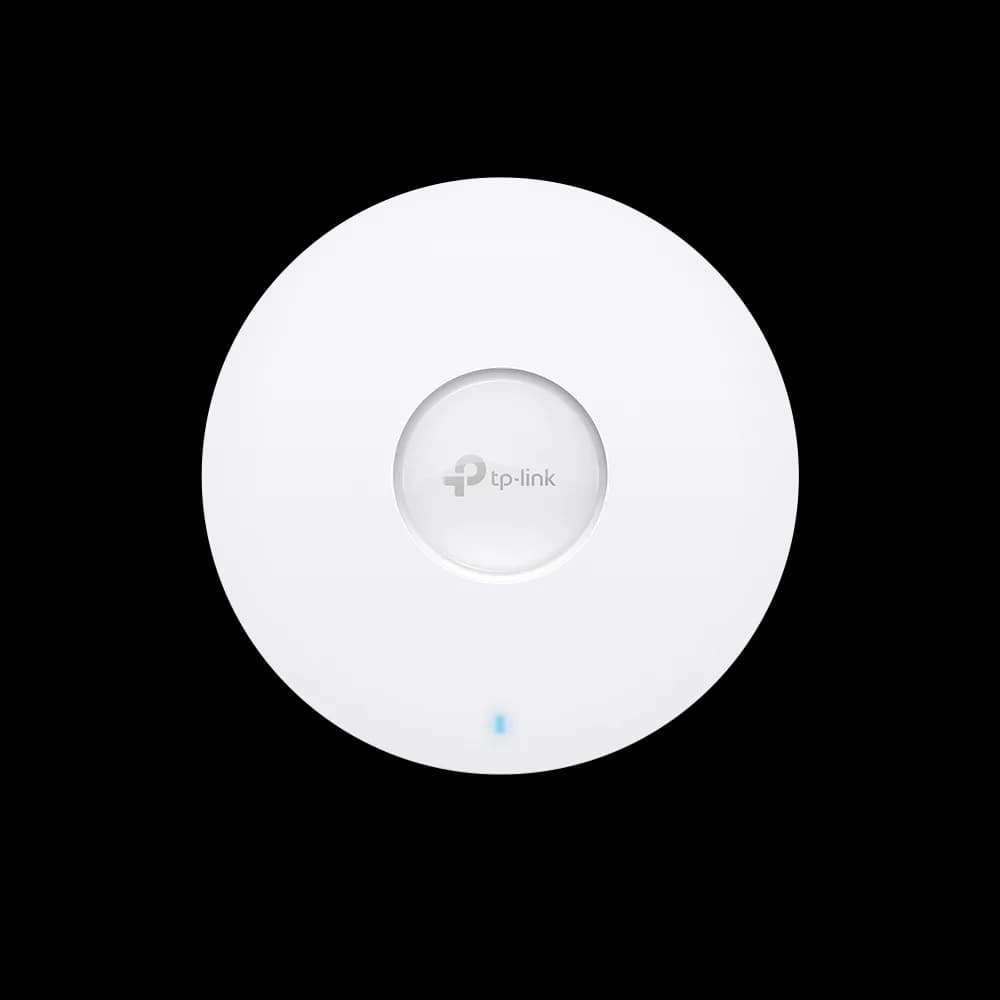
The TP-Link EAP610 is a ceiling or wall-mounted Wi-Fi 6 access point for homelabbers and small offices that want VLAN support and controller management. It suits people already running, or planning to run, an Omada controller.
3rd of 9 Wi-Fi access points we've reviewedAffiliate link. As an Amazon Associate I earn from qualifying purchases. Details
New to Wi-Fi access points? What they are and what to look for
An access point is a Wi-Fi transmitter that connects to your network with a cable, usually mounted on a ceiling or wall. Several of them give fast, even Wi-Fi throughout a building.
Do you need a Wi-Fi access point? Worth it if you can run Ethernet cables to where you need Wi-Fi. If you can't, a mesh router system is easier.
What to look for
- Wi-Fi 6 or newer
- Power over Ethernet (PoE), so it doesn't need a plug socket
- Whether it can be managed without the maker's cloud account
Unsure about a word? Jargon explained
How the 6.4 adds up
Our Wi-Fi access points rubric- Wi-Fi standard and bands25% of score
- Uplink and power20% of score
- Management20% of score
- Software and security20% of score
- Value15% of score
Against the 9 Wi-Fi access points we've reviewed
bar = the range of all 9 · dot = this one · better →
- Overall score 6.4/103rd of 9
- Price £86.398th cheapest
- Value for money Poorer value than most8th best of 9
Support and features
| Power draw | 14.2W under load (manufacturer's figure, source) |
|---|---|
| Software updates | No end-of-support date found for the EAP610. |
- Works without the cloud
Measured by owners
No owner readings yet. If you own one and have a smart plug or power meter, a reading takes a minute and helps everyone else.
Security and compatibility
| Latest firmware or software | September 2025no update for over a year source |
|---|---|
| Known security issues |
|
| Maker's cloud account | Not needed: it can be run entirely locally |
| Update record | Advisories were found for EAP610 Omada firmware, but the notes do not confirm which fixes shipped; the most recent release date found is for the Outdoor variant, as the V4 date format is ambiguous. |
Pros and cons
+ pros
- Local web UI or Omada controller management
- WPA3, client isolation, ACL and VLAN support
- 802.3at PoE+, passive PoE or 12 V DC power
− cons
- Gigabit uplink only
- Dual-band; no 6 GHz
- Cloud controller not supported on V3 hardware
Price history
Price history appears here once we have tracked this product for a few days.
The full review
Where it fits
The EAP610 is a ceiling or wall-mounted access point. A mounting kit is included, and the antennas are internal. It is a Wi-Fi 6 (802.11ax) unit and stays backward compatible with 802.11ac, n, g, b and a clients. It has one Ethernet port and no other network interfaces.
That makes it a simple building block. You run a cable to it, power it over that cable, and manage it locally or through Omada. It suits a home with a structured cabling run, a small office, or a homelab where you want the VLAN support the specifications list.
Wi-Fi 6 on two bands6/10
The radios are AX1800 class. The 2.4 GHz band is rated at 574 Mbps and the 5 GHz band at 1201 Mbps, for a listed maximum of 1775 Mbit/s. There is no 6 GHz band, and the specifications list no Wi-Fi 7. The unit supports Multi-User MIMO and OFDMA.
Day-to-day wireless features are well covered. Band steering, Airtime Fairness, automatic channel selection and scanning, rate limiting and QoS are all listed. Transmit power under CE rules is below 20 dBm EIRP on 2.4 GHz and below 23 dBm EIRP on 5 GHz.
Uplink and power6/10
The single RJ-45 port runs at 10/100/1000 Mbit/s. It is Gigabit, not 2.5GbE. The combined 1775 Mbit/s maximum wireless rate is higher than that 1000 Mbit/s port speed, so the wired link is the lower of the two listed figures. That is a stated limit of the design.
Power options are flexible. The EAP610 takes 802.3at PoE+, 48 V passive PoE, or a 12 V / 1.5 A DC input. A standard PoE+ switch can therefore feed it without a proprietary injector, and the DC jack gives a fallback where there is no PoE. Maximum consumption is listed as 13.7 W over PoE and 12.3 W on DC for the EU model.
Management7/10
The EAP610 offers several ways to manage it. You can run it standalone through a local web UI over HTTP or HTTPS. You can also adopt it into Omada, using the OC200 or OC300 hardware controllers, the software controller, or the cloud controller through the web UI or the Omada app.
VLAN support is listed. Syslog is listed too, which helps if you collect logs centrally. Firmware is upgradeable.
One caveat concerns hardware versions. The cloud controller is not supported on V3. Owners flag this, so check the hardware revision before you buy if you intend to use cloud management. TP-Link's outdoor model page also says mesh and seamless roaming need an Omada SDN controller. The EAP610 lists mesh networking under its Fit AP mode features, so a multi-AP setup points towards running a controller rather than standalone units.
Security7/10
WPA, WPA2 and WPA3 are all supported, each with an Enterprise option. Wireless isolation between clients is listed, which is the feature you want for a guest network. MAC address filtering and access control lists are also listed.
The specifications do not give a firmware release history, so there is no basis here for judging update cadence. What the specifications do show is a full set of modern authentication options with no feature flagged as locked behind a licence.
Range and walls
Owner feedback on coverage is consistent. The 5 GHz band is weaker than 2.4 GHz and struggles through thick brick walls. The 5 GHz band carries the higher 1201 Mbps rate, while owners report 2.4 GHz coping better with solid walls.
The practical reading is that placement matters. A ceiling mount in an open central spot suits the unit's design. Owners with thick brick between rooms should expect to rely on 2.4 GHz in distant rooms, or plan for more than one access point.
Verdict
The EAP610 is a sensible Wi-Fi 6 access point for people who value management options over headline speed. Local web UI, Omada controller support, VLAN capability and WPA3 give it a solid feature set. The Gigabit port and dual-band radios are its limits. If you can live with those and your hardware revision supports the controller setup you want, it fits a wired-backhaul home or small office well.
What owners report
Recurring themes from public owner feedback, summarised in our own words.
- Owners report the 5 GHz band is weaker than 2.4 GHz and struggles through thick brick walls.
- Cloud controller support depends on hardware version, and V3 units are not supported.
Who should skip it
- Buyers who want a 6 GHz band or Wi-Fi 7.
- Anyone who needs a multi-gig uplink from the access point.
- Owners of thick-walled homes who expect one unit to cover every room on 5 GHz.
Full specifications
| Wi-Fi standard | Wi-Fi 6 (802.11ax), backward compatible with 802.11ac/n/g/b/a |
|---|---|
| Bands and speed class | Dual-band 2.4 GHz and 5 GHz, AX1800 class (574 Mbps on 2.4 GHz + 1201 Mbps on 5 GHz) |
| Uplink port | 1× Gigabit Ethernet (RJ-45) port, supports 802.3at PoE and passive PoE |
| Power (PoE class) | 802.3at PoE+, 48 V passive PoE, 12 V / 1.5 A DC input |
| Management | Local web UI (HTTP/HTTPS) or Omada cloud controller via web UI or Omada app; Omada hardware controllers OC200/OC300 and software controller; cloud controller not supported on V3 |
| Mounting | Ceiling or wall mount with mounting kit included |
✓ Specs checked against the maker's data sheet.
Sources
- TP-Link EAP610 V2 ceiling mount AP (US)
- TP-Link EAP610 Omada SDN AP (US)
- TP-Link EAP610 V2 (SA)
- TP-Link EAP610 Omada SDN AP (Baltic)
- TP-Link EAP610 Outdoor (Norway)
- EAP610 Outdoor datasheet
- Amazon UK listing EAP610
- Windows Central EAP610 V2 review
- HomeTechHacker EAP610 review
- Review-Rating EAP610 V2
- Amazon US review of EAP610 outdoor
- PlayDJ EAP610 review
- Slickdeals EAP610 deal
- Slickdeals Prime deal EAP610
- TP-Link Community forum topic 563160
- discomp.cz EAP610
- Icecat data sheet: TP-Link Omada AX1800 Wireless Dual Band Ceiling Mount Access Point