UGREEN Revodok Pro 207
No live price yetAffiliate link. As an Amazon Associate I earn from qualifying purchases. Details
UGREEN Revodok Pro 207 review
Researched, not hands-on tested.How we review ›
by SudoPicks Research · editor Paul HR · published 27 Oct 2026 · updated 27 Oct 2026
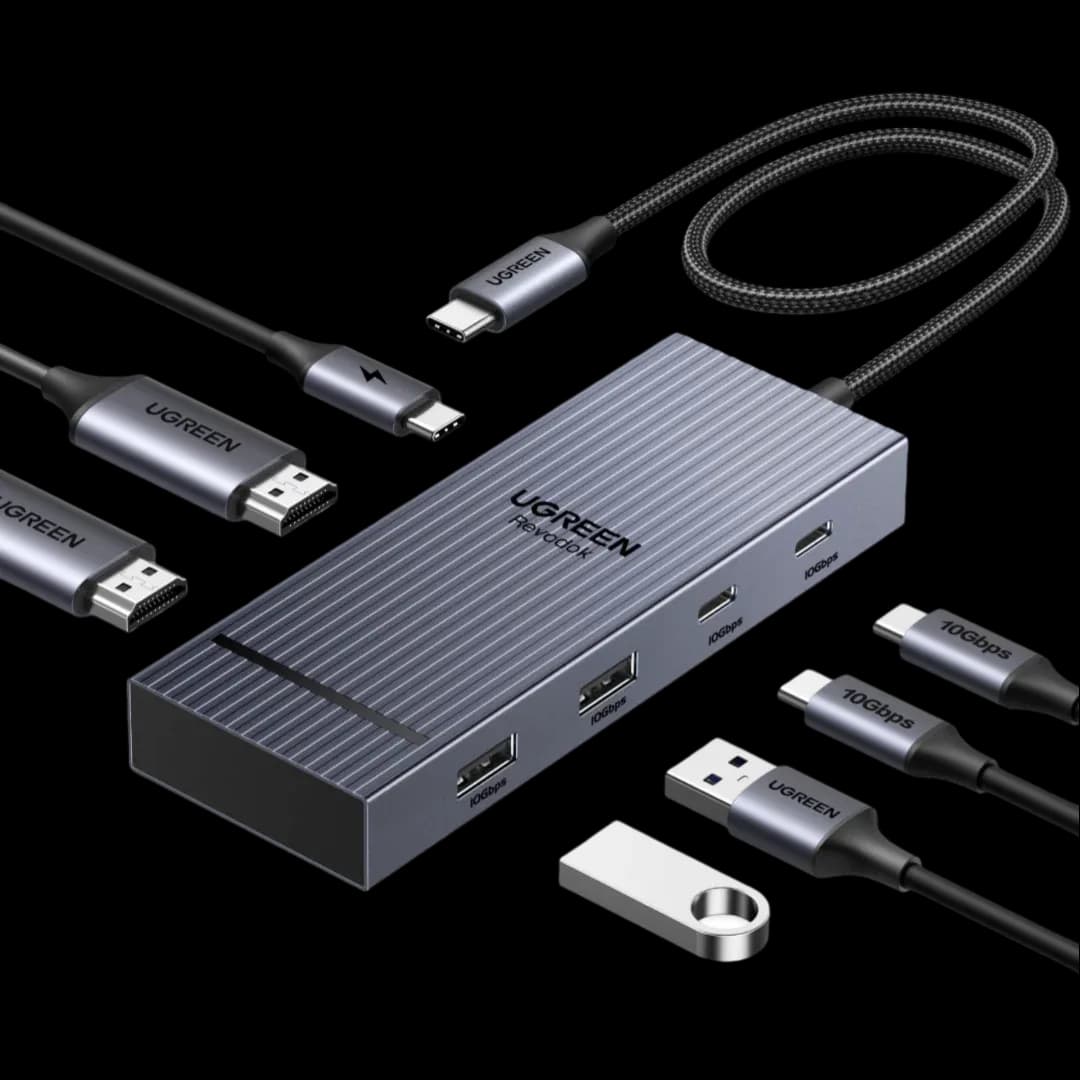
The Revodok Pro 207 is for people with a Windows or Chrome laptop who want two 4K monitors and fast USB ports from one USB-C cable. It suits a desk setup where the laptop needs up to 85W of charging through the dock.
joint 3rd of 5 docking stations we've reviewedAffiliate link. As an Amazon Associate I earn from qualifying purchases. Details
New to docking stations? What they are and what to look for
A docking station connects your laptop to your monitors, keyboard, network and charger with one cable.
Do you need a docking station? Worth it if you plug your laptop into the same desk every day and are tired of unplugging five cables.
What to look for
- Enough charging power for your laptop (check its charger's watts)
- Support for the number of screens you want on your laptop (Macs differ)
- Ethernet, and its own power supply for all-day use
Unsure about a word? Jargon explained
How the 5.6 adds up
Our docking stations rubric- Displays25% of score
- Charging and power20% of score
- Ports and bandwidth20% of score
- Compatibility and reliability20% of score
- Ethernet and value15% of score
Against the 5 docking stations we've reviewed
bar = the range of all 5 · dot = this one · better →
- Overall score 5.6/10joint 3rd of 5
Support and features
| Software updates | No end date announced; a general two-year security policy on UGREEN's UK page could not be confirmed for this model. source |
|---|
Compatibility
| Linux | Doesn't work on Linux. UGREEN's French product page says the dock is compatible with Windows and macOS and does not support Linux. source |
|---|
Pros and cons
+ pros
- Two native HDMI ports, each rated 4K at 60Hz
- Four 10Gbps data ports: two USB-A, two USB-C
- Owners say multi-screen and charging work together
− cons
- Mac displays show the same content on both screens
- Runs hot under full 100W charging
- Charger and cable are not included
Price history
Price history appears here once we have tracked this product for a few days.
The full review
Where it fits
The Revodok Pro 207 connects to a laptop over one USB-C cable. It gives you two HDMI outputs, four 10Gbps data ports and a USB-C port for charging the laptop. It uses native HDMI video, not DisplayLink. It suits a desk with two monitors and a handful of fast peripherals.
Displays7/10
Each HDMI port is rated for 4K at 60Hz, so two 4K screens at that rate is the stated target. The dock uses MST on Windows and Chrome, and SST on macOS. That split matters for Mac owners.
UGREEN's Canadian page says Mac devices are limited to mirror mode. The Australian page says extended monitors show the same content on a MacBook. The wording differs, but both point the same way: a MacBook should not be expected to drive two independent screens from this dock. Windows and Chrome laptops are the better match for the dual-screen claim.
Owners report that multi-screen and charging work together as advertised.
Charging and power6/10
The dock passes up to 85W to the laptop through a USB-C PD port rated at 100W. The dock needs its own power adapter of 100W or higher, plus a USB-C cable, and UGREEN does not include either. Budget for both. The manual separately recommends a 65W or higher charger if you add monitors or peripherals.
The 85W ceiling suits laptops that ask for 85W or less. A laptop that wants more than that falls outside the stated limit.
Owner feedback on power is mixed. Owners say the unit gets hot under full 100W charging. Reviewers describe power delivery as slightly underperforming. One forum user reports a slow-charging message with peripherals attached. If your laptop sits close to the 85W limit and you plan to fill every port, those reports are worth weighing.
Ports and bandwidth5/10
The listed ports are two HDMI, two USB-A at 10Gbps, two USB-C at 10Gbps and the 100W PD port. That gives four 10Gbps data ports, which is enough for external SSDs, a keyboard and a webcam without sharing a slow hub. There is no Ethernet, card reader or audio socket among the listed ports.
One limit stands out. The USB-A and USB-C data ports do not charge devices or carry audio. With that restriction, they work as data connections only. Charging a phone or connecting a USB audio device through them is not an intended use. Plan to charge phones and other devices from their own chargers.
Compatibility and support6/10
UGREEN describes the display behaviour for Windows, Chrome and macOS, and owner reports say the dock works as advertised. The main compatibility differences are the Mac display limits described above. The heat and slow-charging reports are the reliability points to keep in mind rather than reports of disconnects. UGREEN UK advertises a two-year product warranty.
Who it suits
This dock fits a Windows or Chrome laptop that charges at 85W or less and needs two 4K monitors plus fast USB storage. The separate power adapter, the heat reports and the Mac limits are the trade-offs. Anyone who needs a wired network port or a card reader from the dock should look at the port list before buying.
What owners report
Recurring themes from public owner feedback, summarised in our own words.
- Owners say it works as advertised, with multi-screen output and charging running together.
- The unit gets hot when charging at the full 100W.
- Reviewers describe power delivery as slightly underperforming, and one forum user saw a slow-charging message with peripherals attached.
Who should skip it
- MacBook owners who want two independent extended screens
- Buyers who need Ethernet, a card reader or audio from the dock
- Anyone with a laptop that needs more than 85W of charging
Full specifications
| Connects with | USB-C upstream connection to the laptop |
|---|---|
| External displays | Two external displays, each HDMI port rated 4K@60Hz |
| Laptop charging | Up to 85W laptop charging through a 100W USB-C PD port |
| Ports | 2× HDMI, 2× USB-A 10Gbps, 2× USB-C 10Gbps, 100W PD port |
| Display tech | Native HDMI video, not DisplayLink; MST on Windows/Chrome, SST on macOS |
| Power supply | Requires a separate 100W or higher power adapter and USB-C cable, not included |