GIGABYTE B550M AORUS ELITE
~£87typical UK price when we researched itAffiliate link. As an Amazon Associate I earn from qualifying purchases. Details
GIGABYTE B550M AORUS ELITE review
Researched, not hands-on tested.How we review ›
by SudoPicks Research · editor Paul HR · published 1 Nov 2026 · updated 1 Nov 2026
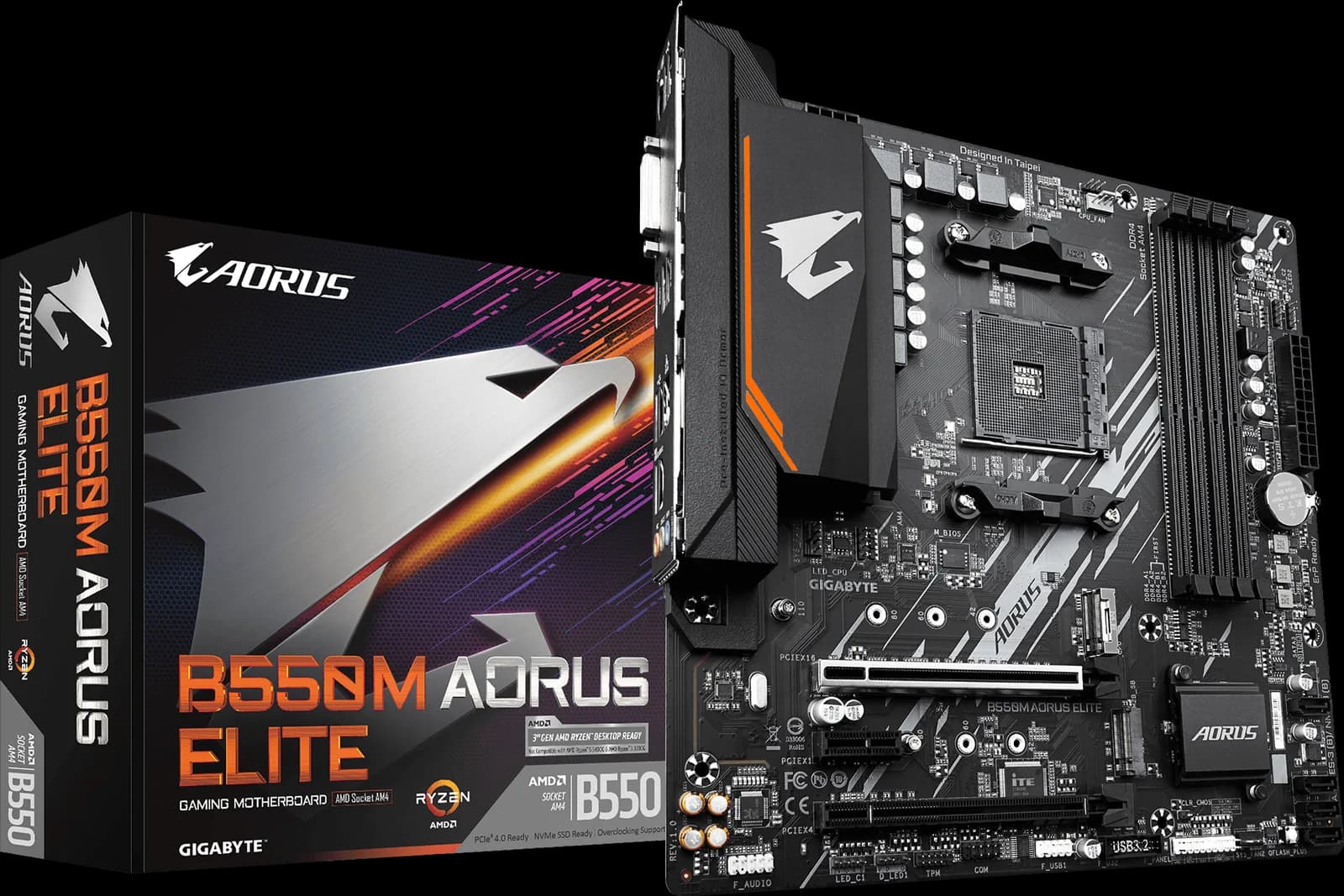
This is a micro-ATX AM4 board for compact Ryzen 5000 builds that need fast storage and simple setup. It suits buyers who want PCIe 4.0, two M.2 slots and four SATA ports without paying for extras.
18th of 18 motherboards we've reviewedAffiliate link. As an Amazon Associate I earn from qualifying purchases. Details
New to motherboards? What they are and what to look for
The motherboard is the main circuit board of a desktop PC. Every other part plugs into it: the processor, memory, graphics card, SSDs and the cables to the case.
Do you need a motherboard? Only if you're building or upgrading a desktop. Choose it after the processor, because the two must use the same socket.
What to look for
- The socket that matches your processor (AM5, AM4, LGA1851 or LGA1700)
- The size your case takes: ATX, Micro-ATX or Mini-ITX
- Enough M.2 slots, USB ports and built-in Wi-Fi or 2.5GbE if you want them
Unsure about a word? Jargon explained
How the 5.4 adds up
Our motherboards rubric- Platform and features25% of score
- Connectivity25% of score
- Power delivery20% of score
- BIOS and support15% of score
- Value15% of score
Against the 18 motherboards we've reviewed
bar = the range of all 18 · dot = this one · better →
- Overall score 5.4/1018th of 18
- Price £87cheapest
- Value for money Best value herebest of 17
Support and features
| Software updates | No end date announced; no end-of-support date was found in the notes. |
|---|
Compatibility
| Linux | Not confirmed. No maker Linux support statement was found, mainline kernel support was not confirmed, and an older owner report describes network problems on Ubuntu 20.04. source |
|---|
Pros and cons
+ pros
- PCIe 4.0 x4 M.2 slot wired to the CPU
- Q-Flash Plus updates BIOS without a CPU installed
- Owners report easy BIOS access and good memory compatibility
− cons
- Only 1GbE and no Wi-Fi on this non-AX revision
- No rear USB-C and no front USB-C header
- Owners report too few fan headers
Price history
Price history appears here once we have tracked this product for a few days.
The full review
Where it fits
The B550M AORUS ELITE is a Micro ATX board for AMD Socket AM4. It supports Ryzen 5000, 5000 G-Series, 4000 G-Series, Ryzen 3000 and 3000 G-Series chips. A Vividrepairs review describes it as a well-judged micro-ATX B550 board for compact Ryzen 5000 builds using 65W to 95W processors. That is the use the hardware points to.
Gigabyte sells several revisions under this name: Rev. 1.0/1.1/1.2, 1.3 and 1.5. The specifications here come from the Rev. 1.5 page. There is also a separate AX model with Wi-Fi 6E, so check the exact revision and variant before you buy.
Storage and expansion
The board has two M.2 slots. M2A_CPU runs at PCIe 4.0 x4 with Ryzen 5000 or 3000 chips, takes drives up to 22110 in length, and accepts SATA or NVMe. With a G-Series chip it drops to PCIe 3.0 x4. M2B_SB hangs off the chipset at PCIe 3.0 x2 and takes 2242, 2260 and 2280 drives.
Four SATA 6Gb/s ports add more room, with RAID 0, 1 and 10 from the chipset. For a small NAS-style build or a workstation with a fast boot drive and bulk SATA storage, that layout is enough.
The main PCIEX16 slot comes from the CPU and runs at PCIe 4.0 with Ryzen 5000 or 3000 chips, or 3.0 with G-Series. A second x16-length slot is wired PCIe 3.0 x4 from the chipset, and there is one PCIe 3.0 x1 slot. There is no PCIe 5.0.
Memory
Four DIMM slots support dual-channel DDR4 up to 128GB, using 32GB modules. The board lists DDR4 4733 as an overclock speed, with 3200 and below as standard. It takes ECC and non-ECC unbuffered memory, though ECC mode depends on the CPU. XMP is supported. Owners report decent memory compatibility and say the BIOS and XMP settings are easy to reach, which suits a board people will often set up once and leave.
Connectivity is the weak spot4/10
Networking is a Realtek GbE port at 1Gbps. There is no 2.5GbE, and this non-AX revision has no Wi-Fi. If you want wireless, the AX model is the one to look at.
USB is basic. The rear panel has four USB 3.2 Gen 1 ports from the CPU and four USB 2.0/1.1 ports. There is no rear USB-C and no USB4. Internally you get one USB 3.2 Gen 1 header and one USB 2.0 header, with no front USB-C header. If your case has a front USB-C port, this board has no header to connect it to.
Power delivery5/10
Gigabyte describes a 5+3 phase pure digital VRM with low RDS(on) MOSFETs and an enlarged MOSFET heatsink. The Vividrepairs review frames the board around 65W to 95W processors, so it is best matched to mid-range Ryzen 5000 parts. A 5+3 layout on a compact board suits that target. Buyers should pair it with chips in that power range.
One owner source says the board has too few fan headers. That matters in a compact build with several case fans and a CPU cooler.
BIOS and support7/10
Owner feedback is positive here. Q-Flash is praised for easy BIOS updates, and one owner still updated the BIOS almost two years after buying. Q-Flash Plus updates the BIOS without a CPU, memory or GPU installed. The one software complaint is from a single source: RGB software not working properly. It is worth knowing, but it is not a recurring theme.
Verdict
The B550M AORUS ELITE suits a compact Ryzen 5000 build where storage, memory and BIOS handling matter more than networking and USB extras. Its PCIe 4.0 CPU-linked M.2 slot, second M.2 slot and four SATA ports cover most storage plans. The 1GbE port, lack of any USB-C and missing wireless on this revision are the trade-offs. Check the revision and whether you need the AX model before you order.
What owners report
Recurring themes from public owner feedback, summarised in our own words.
- Owners find BIOS updates easy, with Q-Flash praised and updates still possible long after purchase.
- Owners say the BIOS and XMP settings are easy to reach and memory compatibility is decent.
Who should skip it
- Buyers who want 2.5GbE or Wi-Fi without adding a card or choosing the AX model
- Builders who need a front USB-C header or rear USB-C for their case and peripherals
- Anyone planning a high-wattage Ryzen build beyond the 65W to 95W range the Vividrepairs review describes
Full specifications
| Socket | AMD Socket AM4; supports Ryzen 5000, 5000 G-Series, 4000 G-Series, Ryzen 3000 and 3000 G-Series |
|---|---|
| Chipset | AMD B550 |
| Form factor | Micro ATX (24.4 × 24.4 cm) |
| Memory | DDR4 only; 4 DIMM slots, dual channel, up to 128 GB (32 GB per DIMM); DDR4 4733 overclock, 3200 and below standard; ECC and non-ECC unbuffered; XMP; ECC mode depends on CPU |
| M.2 slots | Two M.2 slots: M2A_CPU (PCIe 4.0 x4 with Ryzen 5000/3000, PCIe 3.0 x4 with G-Series; 2242/2260/2280/22110; SATA or NVMe) and M2B_SB (chipset, PCIe 3.0 x2; 2242/2260/2280) |
| PCIe slots | One PCIEX16 slot from CPU (PCIe 4.0 x16 with Ryzen 5000/3000, 3.0 with G-Series); one x16-length slot wired PCIe 3.0 x4 from chipset; one PCIe 3.0 x1 slot; no PCIe 5.0 |
| Networking | Realtek GbE LAN, 1 Gbps; no 2.5GbE; no Wi-Fi on this non-AX revision |
| Rear USB | Rear: 4 × USB 3.2 Gen 1 from CPU, 4 × USB 2.0/1.1; no rear USB-C, no USB4. Internal: 1 × USB 3.2 Gen 1 header, 1 × USB 2.0 header; no front USB-C header |
Sources
Alternatives
Compare head to head
- GIGABYTE B550M AORUS ELITE vs MSI PRO B650M-A WIFI ›
- GIGABYTE B550M AORUS ELITE vs MSI PRO B760M-A WIFI DDR4 ›
- GIGABYTE B550M AORUS ELITE vs ASRock B650M Pro RS WiFi ›
- GIGABYTE B550M AORUS ELITE vs MSI MAG B550 TOMAHAWK ›
- GIGABYTE B550M AORUS ELITE vs ASRock B850I Lightning WiFi ›
- GIGABYTE B550M AORUS ELITE vs GIGABYTE B760M DS3H AX DDR4 ›