Skip to content
sudopicks
esc

Keychron Q1 Max QMK/VIA Wireless Mechanical Keyboard vs YUNZII B75 PRO

Researched, not hands-on tested.How we review ›

all judged against mechanical keyboards at a similar price

The Keychron Q1 Max QMK/VIA Wireless Mechanical Keyboard scores 7.7/10 overall, ahead of the YUNZII B75 PRO at 6.7/10.

The Keychron Q1 Max QMK/VIA Wireless Mechanical Keyboard leads on build quality, customisation and battery and software.

The YUNZII B75 PRO leads on typing feel.

They score the same on connectivity and layout and ergonomics.

The biggest difference is customisation, where the Keychron Q1 Max QMK/VIA Wireless Mechanical Keyboard scores 9/10 to the YUNZII B75 PRO's 5/10.

Keychron Q1 Max QMK/VIA Wireless Mechanical Keyboard

Keychron Q1 Max QMK/VIA Wireless Mechanical Keyboard

7.7/10verdict: buy

The Keychron Q1 Max is for typists who want a premium 75% wireless board with a metal case and full control over the keymap. It suits people who work across macOS, Windows and Linux and want to swap switches without soldering. It is less suited to anyone who wants a light, low-profile board or relies mainly on Bluetooth.

Typically about £219.99 in the UK when we researched itCheck price at Amazon UK (opens in a new tab, affiliate link)

Affiliate link. As an Amazon Associate I earn from qualifying purchases. Details
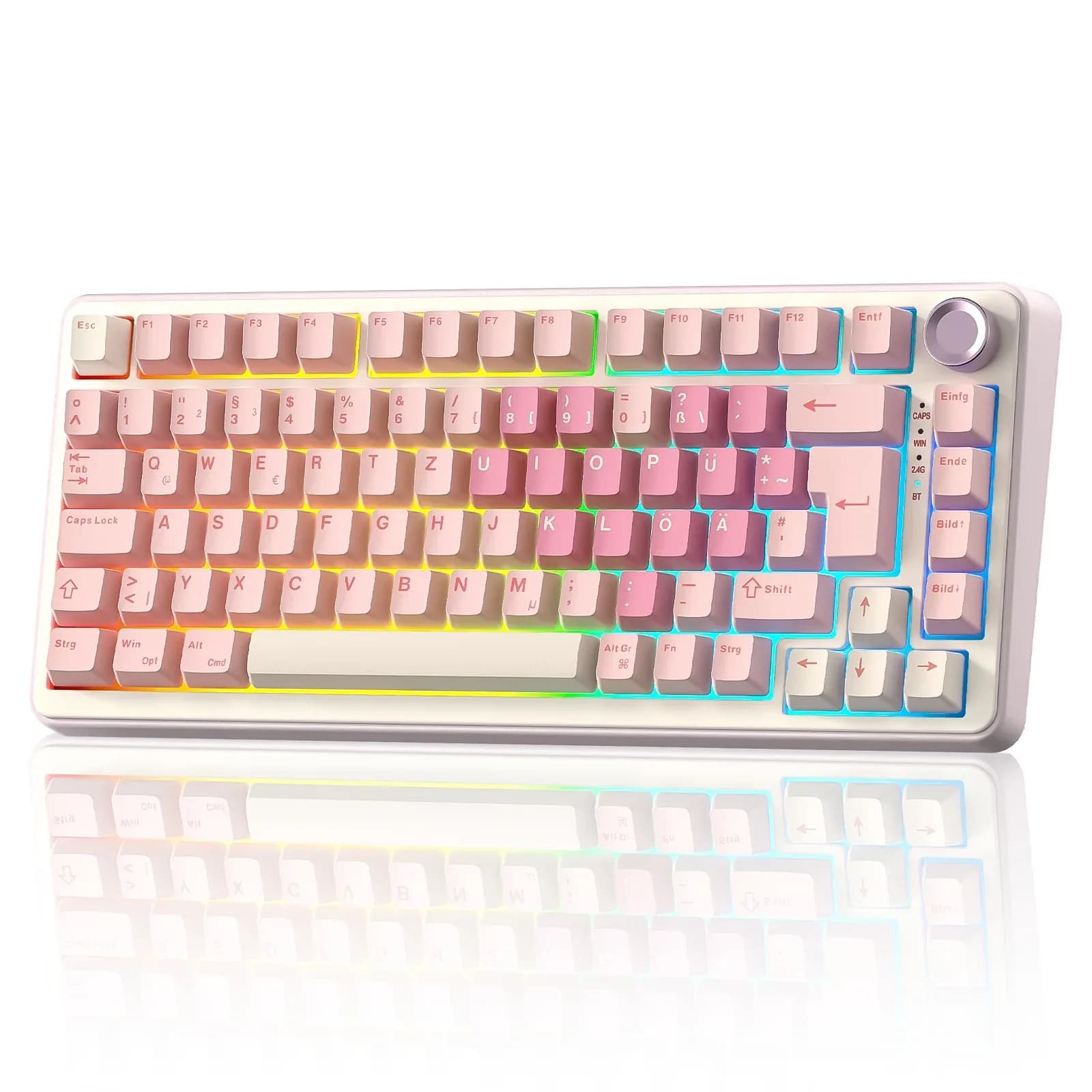
YUNZII B75 PRO

YUNZII B75 PRO

6.7/10verdict: buy

The YUNZII B75 PRO is for UK typists who want a compact, wireless 75% keyboard with an ISO layout and a knob. It suits people who care about typing sound and feel and who like the option of swapping switches later. It's less suited to anyone who wants open firmware such as QMK or VIA.

Typically about £66.29 in the UK when we researched itCheck price at Amazon UK (opens in a new tab, affiliate link)

Affiliate link. As an Amazon Associate I earn from qualifying purchases. Details

Scores, criterion by criterion

CriterionWeightKeychron Q1 Max QMK/VIA Wireless Mechanical KeyboardYUNZII B75 PRO
Typing feel25%7/108/10
Build quality20%9/107/10
Customisation20%9/105/10
Connectivity15%7/107/10
Layout and ergonomics10%6/106/10
Battery and software10%7/106/10
Overall7.7/106.7/10

Specifications

SpecKeychron Q1 Max QMK/VIA Wireless Mechanical KeyboardYUNZII B75 PRO
Layout75%, ANSI, with knob75% with knob, 83-key ISO (ANSI variant 82-key)
SwitchesGateron Jupiter Red, Brown or Banana; hot-swappableVaries by variant: YUNZII Milk Linear, Cocoa Cream V2 Linear, or Blue Grey Tactile; pre-lubed
Hot-swappableYes; sockets accept 3-pin and 5-pin MX switchesFull-key hot-swappable, supports 3-pin or 5-pin switches
Connectivity2.4 GHz, Bluetooth (up to 3 devices), wired; 1000 Hz polling on 2.4 GHz and wired, 90 Hz on BluetoothBluetooth, 2.4GHz wireless, and wired Type-C
Firmware (QMK / VIA)QMK with VIA support; Keychron Launcher web app for remapping and macros; macOS, Windows and LinuxYUNZII software for key remapping, macros and RGB; Windows and macOS per manufacturer, Windows-only per Vivid Repairs review. No QMK/VIA support found
KeycapsKSA double-shot PBT, not shine-through (ANSI/UK)Double-shot PBT Cherry profile
Battery4000 mAh; rated up to 180 hours with backlight off4000mAh

Strengths and weaknesses

Keychron Q1 Max QMK/VIA Wireless Mechanical Keyboard

  • + Full aluminium CNC case with gasket mount
  • + QMK/VIA firmware and hot-swap sockets for 3-pin and 5-pin switches
  • + UK-ISO layout available, with 2.4GHz, Bluetooth and wired modes
  • − Heavy at about 1.72 kg, and thick
  • − Stabiliser rattle reported on some units
  • − Bluetooth polls at only 90Hz and can stutter

Skip it if:

  • Buyers who want a light keyboard to carry between desks
  • People who rely mainly on Bluetooth and need a high polling rate
  • Anyone who wants a full-size or tenkeyless layout
Read the full Keychron Q1 Max QMK/VIA Wireless Mechanical Keyboard review ›

YUNZII B75 PRO

  • + Gasket mount with pre-lubed switches and tuned stabilisers
  • + Owners praise the typing sound and battery life
  • + ISO layout with Bluetooth, 2.4GHz and wired modes
  • − No QMK or VIA support; remapping uses YUNZII software
  • − One review reports the software is Windows-only
  • − Switch type depends on which variant you buy

Skip it if:

  • Buyers who want QMK or VIA open firmware for remapping
  • Buyers who depend on the remapping software working on their operating system
  • Anyone who wants a tactile switch without checking the variant first
Read the full YUNZII B75 PRO review ›

More comparisons

Compare all mechanical keyboards · Best mechanical keyboards