GravaStar Mercury K1
~£129typical UK price when we researched itAffiliate link. As an Amazon Associate I earn from qualifying purchases. Details
GravaStar Mercury K1 review
Researched, not hands-on tested.How we review ›
by SudoPicks Research · editor Paul HR · published 29 Oct 2026 · updated 29 Oct 2026
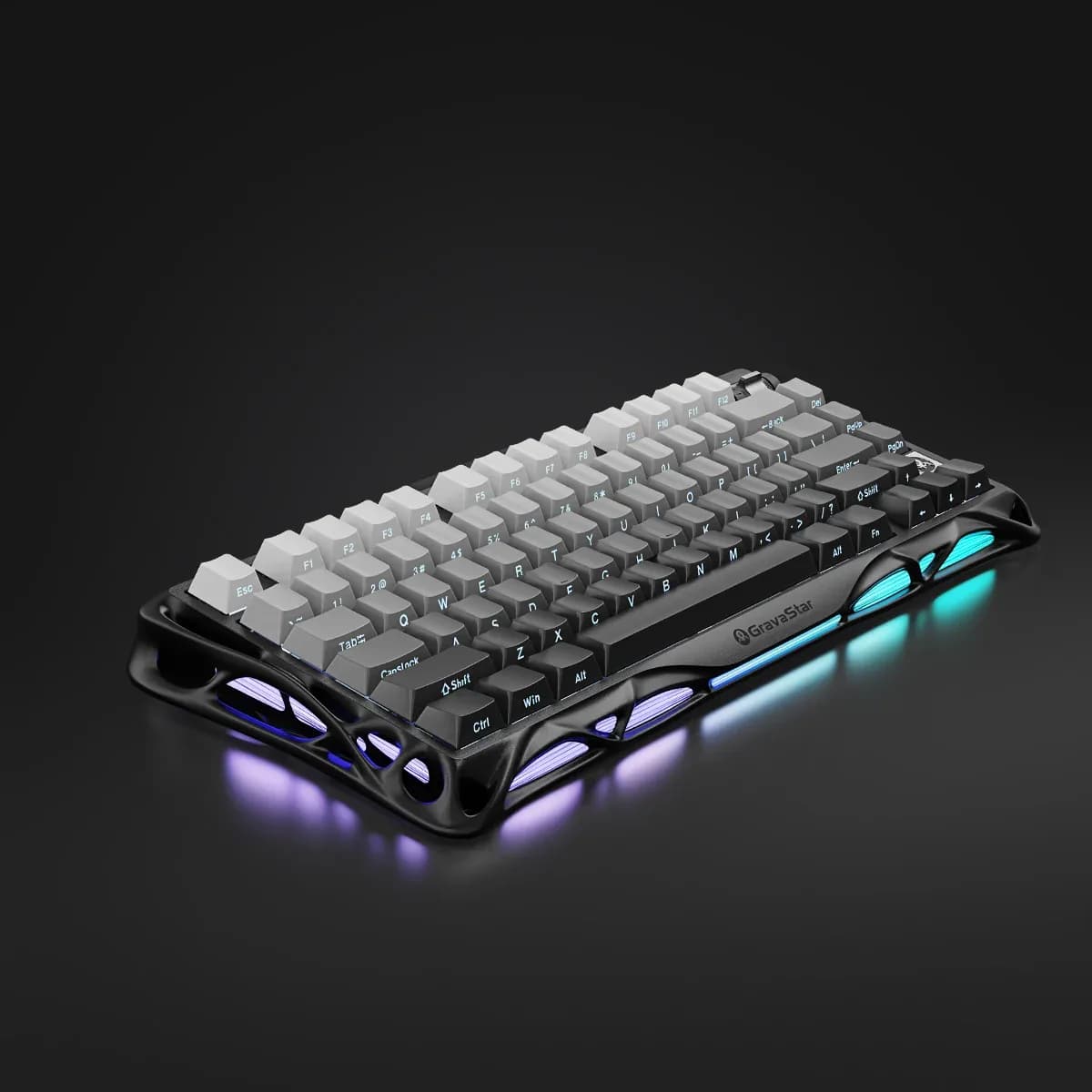
The GravaStar Mercury K1 is for people who want a compact 75% wireless keyboard with an aluminium frame. It suits buyers who value a muted, cushioned sound and want to swap switches later.
4th of 16 mechanical keyboards we've reviewedAffiliate link. As an Amazon Associate I earn from qualifying purchases. Details
New to mechanical keyboards? What they are and what to look for
A keyboard with a separate switch under every key. They feel more precise, last longer and can be customised.
Do you need a mechanical keyboard? A nice upgrade if you type a lot. It's a matter of taste rather than necessity.
What to look for
- Layout: UK or US, and full-size or compact
- Switch type: linear (smooth), tactile (bump) or clicky (loud)
- Wired, Bluetooth or both
Unsure about a word? Jargon explained
How the 6.5 adds up
Our mechanical keyboards rubric- Typing feel25% of score
- Build quality20% of score
- Customisation20% of score
- Connectivity15% of score
- Layout and ergonomics10% of score
- Battery and software10% of score
Against the 16 mechanical keyboards we've reviewed
bar = the range of all 16 · dot = this one · better →
- Overall score 6.5/104th of 16
- Price £12911th cheapest
- Value for money Poorer value than most12th best of 15
Support and features
| Software updates | No end-of-support or end-of-life date announced; the maker's firmware page lists a K1 update with no end date. source |
|---|
- Hot-swap
- Wireless
Featured in: Best mechanical keyboards with hot-swap switches
Compatibility
| Linux | Not confirmed. No Linux drivers, kernel support, or Linux software was found for the K1; the only Linux mention concerns the K1 Lite, and the maker's software is Windows-only. source |
|---|
Pros and cons
+ pros
- Aluminium alloy frame praised as solid and heavy
- Gasket mount with foam gives muted, cushioned typing
- Hot-swap sockets take 3-pin and 5-pin switches
− cons
- Volume roller is plastic styled to look like metal
- Front logo placement does not blend in
- Backplate is plastic beneath the aluminium frame
Price history
Price history appears here once we have tracked this product for a few days.
The full review
Where it fits
The Mercury K1 is a 75% keyboard with 79 keys and a rotary knob. It connects three ways: Bluetooth 5.0, 2.4GHz wireless and USB-C wired. That mix suits a desk board you might also carry between machines or plug in when you prefer a cable.
The pitch is a compact layout in a heavy aluminium case with a soft, muted sound. The specifications and owner reports line up with that pitch, with a few small finish complaints.
Typing feel7/10
The switches are GravaStar Custom Linear. They have a 40gf actuation force, 1.5mm pre-travel and 3.5mm total travel. Those figures describe the stock switch. Because the sockets are hot-swap, it is not the only option.
The case uses a gasket mount with 5-layer foam dampening. Owners praise the sound and the muted, cushioned feel when typing. With the foam layers listed in the construction, that praise follows directly from the design. Anyone who wants a sharper, louder sound may find the K1 tuned in the opposite direction.
The positive comments centre on sound and cushioning.
Build quality8/10
The K1 has an aluminium alloy exoskeleton frame with a plastic backplate. Owners call the frame solid and heavy. The keycaps are PBT and PC, and the mounting is gasket style.
Two complaints appear. The volume roller is plastic styled to look like metal, so it does not match the aluminium around it. The logo on the front also does not blend in for some owners. Both complaints are about finish, not about how the board performs, but they matter if appearance is part of why you are buying.
The plastic backplate sits under the aluminium frame. That is a point to know about if you were expecting metal throughout.
Hot-swap and customisation5/10
The hot-swap sockets accept both 3-pin and 5-pin switches. Owners report that swapping switches takes about ten seconds. With a quick swap and two pin types supported, you can change the linear switches later without soldering.
The rotary knob adds a physical control to a 79-key layout. Separately, owners complain that the volume roller is plastic styled to look like metal.
Connectivity and batteryConnectivity 7/10Battery and software 6/10
The K1 offers three connection modes: Bluetooth 5.0, 2.4GHz wireless and USB-C wired. Bluetooth 5.0 is the version listed. 2.4GHz wireless is the other wireless mode. USB-C wired is available when you would rather plug in.
The battery is rated at 8000mAh. That is the capacity to weigh against how often you plan to use the K1 wirelessly.
Layout5/10
A 75% layout with 79 keys keeps the board compact. The layout is listed as 79 keys plus a rotary knob. The rotary knob takes a spot in the layout as a dedicated control. If your work depends on a full numpad, this layout leaves it out.
Who it suits
The Mercury K1 suits people who care about case weight, a muted sound and the option to change switches later. Its main strengths are the aluminium frame, the foam-dampened gasket construction and the hot-swap sockets. Its drawbacks are mostly cosmetic: the plastic roller made to look like metal and the front logo placement.
What owners report
Recurring themes from public owner feedback, summarised in our own words.
- Owners praise the solid, heavy aluminium frame.
- Owners like the muted, cushioned typing sound.
- Some owners dislike that the volume roller is plastic styled to look like metal.
- Some owners say the front logo placement does not blend in.
Who should skip it
- Buyers who need a full numpad
- Anyone who wants a loud, sharp typing sound
- Buyers who want metal controls throughout
Full specifications
| Layout | 75%, 79 keys plus rotary knob |
|---|---|
| Switches | GravaStar Custom Linear, 40gf actuation, 1.5mm pre-travel, 3.5mm total travel |
| Hot-swappable | Yes, 3-pin and 5-pin compatible |
| Connectivity | Tri-mode: Bluetooth 5.0, 2.4GHz wireless and USB-C wired |
| Keycaps | PBT and PC |
| Battery | 8000mAh |
Sources
- GravaStar Mercury K1 Gradient Black
- GravaStar Mercury K1 Pink
- GravaStar FAQs
- Vivid Repairs GravaStar Mercury K1 review
- Vivid Repairs GravaStar Mercury K1 75% wireless review
- Sypnotix GravaStar Mercury K1 review
- NotEnoughTech GravaStar Mercury K1 review
- Tom's Guide GravaStar Mercury K1 review
- KeenGamer GravaStar Mercury K1 review
- Frontum GravaStar Mercury K1
- PriceSpy GravaStar Mercury K1