TP-Link Deco BE9300 (3-pack)
~£439typical UK price when we researched itAffiliate link. As an Amazon Associate I earn from qualifying purchases. Details
TP-Link Deco BE9300 (3-pack) review
Researched, not hands-on tested.How we review ›
by SudoPicks Research · editor Paul HR · published 29 Oct 2026 · updated 29 Oct 2026
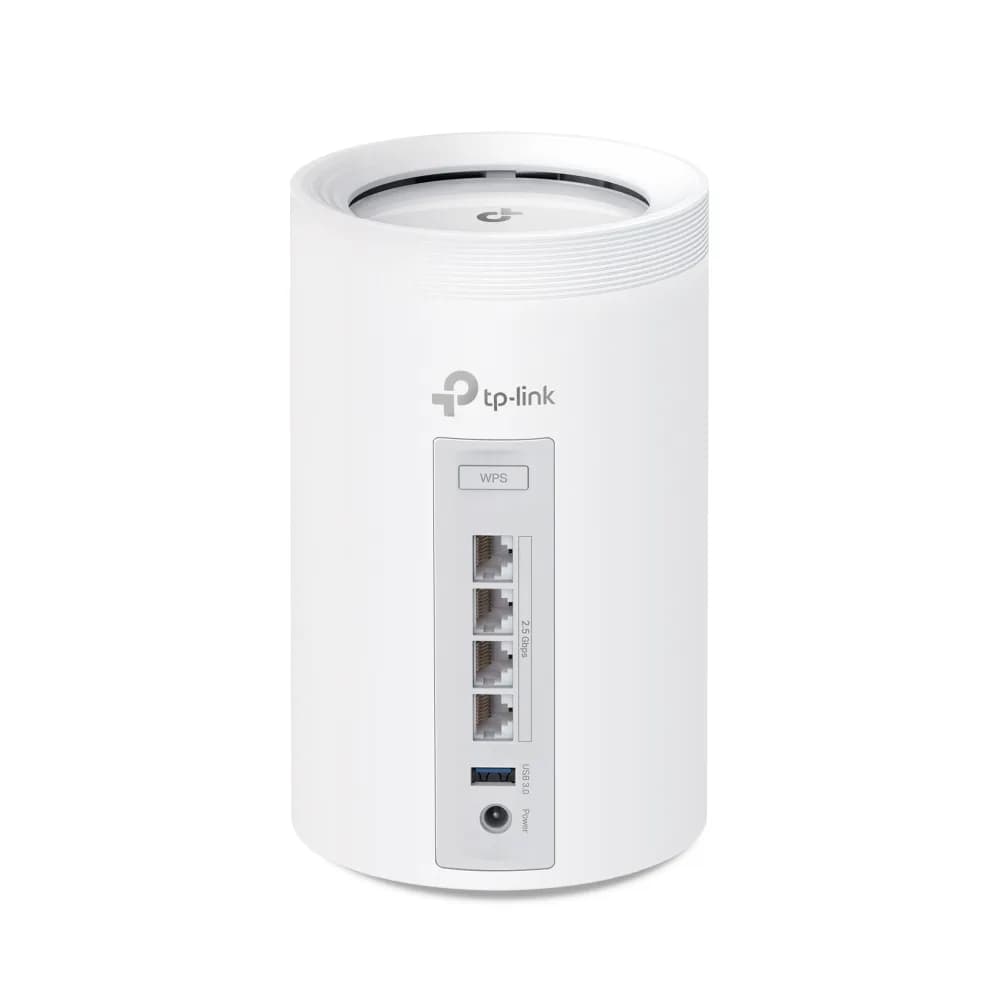
The Deco BE9300 three-pack is for households that want a Wi-Fi 7 mesh with plenty of fast wired ports on every unit. It suits people who will run Ethernet to desktops, consoles or storage in several rooms.
3rd of 14 Wi-Fi routers and mesh systems we've reviewedAffiliate link. As an Amazon Associate I earn from qualifying purchases. Details
New to Wi-Fi routers and mesh systems? What they are and what to look for
A router connects your home to the internet and creates your Wi-Fi network. Mesh systems use several units around the house for stronger signal everywhere.
Do you need a Wi-Fi router? Your broadband provider gives you one, but a better router can fix weak Wi-Fi, slow speeds in far rooms and frequent drop-outs.
What to look for
- Wi-Fi 6 or newer
- Mesh if your home is large or has thick walls
- Regular security updates from the maker
Unsure about a word? Jargon explained
How the 6.6 adds up
Our Wi-Fi routers and mesh systems rubric- Wi-Fi standard and bands25% of score
- Wired ports20% of score
- Coverage15% of score
- Software and security25% of score
- Value15% of score
Against the 14 Wi-Fi routers and mesh systems we've reviewed
bar = the range of all 14 · dot = this one · better →
- Overall score 6.6/103rd of 14
- Price £43914th cheapest
- Value for money Poorer value than most14th best of 14
Support and features
| Power draw | 27.5W under load (manufacturer's figure, source) |
|---|---|
| Software updates | No end date announced; firmware updates delivered via Online Upgrade. source |
- Wi-Fi 7
- Multi-gig WAN
- Mesh
Featured in: Best Wi-Fi routers and mesh systems with Wi-Fi 7 · Best Wi-Fi routers and mesh systems with mesh
Measured by owners
No owner readings yet. If you own one and have a smart plug or power meter, a reading takes a minute and helps everyone else.
Security and compatibility
| Latest firmware or software | No release date found |
|---|---|
| Known security issues | None found in public advisories. That's a good sign, not a guarantee. |
| Update record | No advisory naming the Deco BE9300 was found; the only firmware date (2026-08-13) is on an Archer BE9300 page and conflicts with its build date of 20260623, so it is unconfirmed for this product. |
Pros and cons
+ pros
- Wi-Fi 7 tri-band with a 6 GHz band
- Four 2.5 Gbps ports on every unit
- Wired backhaul between units is supported
− cons
- Full parental controls and IoT security need a paid plan
- No locally hosted web interface
- Limited QoS and traffic features
Price history
Price history appears here once we have tracked this product for a few days.
The full review
Where it fits
The Deco BE9300 three-pack is a Wi-Fi 7 mesh system made up of three identical units. It is aimed at a home that wants one wireless network across several rooms, with the option of linking the units by cable. The box contains the three units, one RJ45 Ethernet cable, three power adapters and a quick installation guide.
The two things that stand out are the wired ports and the Wi-Fi 7 radio set. The main drawback is how much of the software sits behind a subscription.
Wi-Fi 7 on three bands8/10
The system uses Wi-Fi 7 (IEEE 802.11be) and is tri-band, covering 2.4, 5 and 6 GHz. TP-Link lists signal rates of 688 Mbps on 2.4 GHz, 2882 Mbps on 5 GHz and 5765 Mbps on 6 GHz. Those are the manufacturer's signal rates for each band.
The feature list also includes an MLO network, so multi-link operation is part of the setup. Guest networks are offered separately on the 2.4, 5 and 6 GHz bands. With a dedicated 6 GHz band alongside the other two, the hardware gives you room to keep newer devices apart from older ones if you choose to.
Ports on every unit9/10
Each unit has four 2.5 Gbps auto-sensing WAN/LAN ports. One port can act as the WAN at a time, and the other ports work as LAN. One of the LAN ports can also serve as wired backhaul between units.
Owners single this out for praise. They say the 2.5 Gbps ports are useful for wiring several devices per node, and for running a solid 2 Gbps when hard-wired. With four 2.5 Gbps ports on every unit rather than just the main one, the system suits homes where wired devices are spread across different rooms. Each satellite can serve as a local wired hub for whatever sits near it.
Coverage and layout6/10
You get three units in the pack. Because wired backhaul is supported, you can connect units to each other by Ethernet where cabling already runs through the house. That gives you a choice in how to lay the system out.
Software and security4/10
Encryption covers WPA, WPA2 and WPA3. The feature list also names a firewall, a device blocklist, an IoT network, Parental Controls, QoS, Network Protection and remote management. Firmware updates come through Online Upgrade.
HomeShield includes a Free Basic Plan, and fees apply for the Pro Plan. Owners report that full parental controls and IoT security need a paid HomeShield plan. If you plan to rely on those features, the ongoing cost is part of the decision.
Owners also complain about limited advanced configuration. They say there is no locally hosted web interface, and that traffic and QoS features are limited. That sits poorly with anyone who likes to adjust every setting. TP-Link's datasheet does not list a VPN server.
Who it suits
The hardware is the stronger half of this product. Wi-Fi 7 across three bands and four 2.5 Gbps ports per unit make it a good match for a household with many wired and wireless devices. The software is the weaker half. Reports of paid plans for the fuller security and parental features, together with the lack of a local web interface, count against it for anyone who wants control without a subscription.
If you want a mesh you can wire up room by room and can live without a local web interface, it fits. If you want detailed traffic shaping, local administration or security tools included in the purchase, owner reports point to limits.
What owners report
Recurring themes from public owner feedback, summarised in our own words.
- Owners praise the 2.5 Gbps ports for wiring several devices per node or holding a solid 2 Gbps when hard-wired.
- Owners complain that full parental controls and IoT security need a paid HomeShield plan.
- Owners find advanced configuration limited, with no locally hosted web interface and restricted traffic and QoS features.
Who should skip it
- Buyers who want full parental controls and IoT security without a subscription
- Anyone who wants a local web interface and detailed QoS or traffic control
- Buyers who need a built-in VPN server
Full specifications
| Wi-Fi standard | Wi-Fi 7 (IEEE 802.11be) |
|---|---|
| Bands and speed class | Tri-band 2.4 / 5 / 6 GHz; signal rates 688 Mbps (2.4 GHz), 2882 Mbps (5 GHz), 5765 Mbps (6 GHz) |
| WAN port | 4 x 2.5 Gbps auto-sensing WAN/LAN ports per unit; one port can be WAN at a time |
| LAN ports | The same 4 x 2.5 Gbps ports per unit can be used as LAN; one can serve as wired backhaul between units |
| Mesh nodes in the box | 3 |
| Security and VPN features | WPA/WPA2/WPA3 encryption, firewall, device blocklist, separate 2.4/5/6 GHz guest networks, IoT network, MLO network, Parental Controls, QoS, Network Protection, remote management, Online Upgrade firmware updates |
Alternatives
Compare head to head
- TP-Link Deco BE9300 (3-pack) vs TP-Link Archer BE3600 ›
- TP-Link Deco BE9300 (3-pack) vs GL.iNet Flint 2 GL-MT6000 ›
- TP-Link Deco BE9300 (3-pack) vs MERCUSYS MR80X AX3000 Wi-Fi 6 Router ›
- TP-Link Deco BE9300 (3-pack) vs TP-Link Archer C6 AC1200 Router ›
- TP-Link Deco BE9300 (3-pack) vs TP-Link Deco X50 (3-pack) ›
- TP-Link Deco BE9300 (3-pack) vs TP-Link Archer AX53 ›