NiPoGi AK1PLUS Celeron N5095 Mini PC
No live price yetAffiliate link. As an Amazon Associate I earn from qualifying purchases. Details
NiPoGi AK1PLUS Celeron N5095 Mini PC review
Researched, not hands-on tested.How we review ›
by SudoPicks Research · editor Paul HR · published 29 Oct 2026 · updated 29 Oct 2026
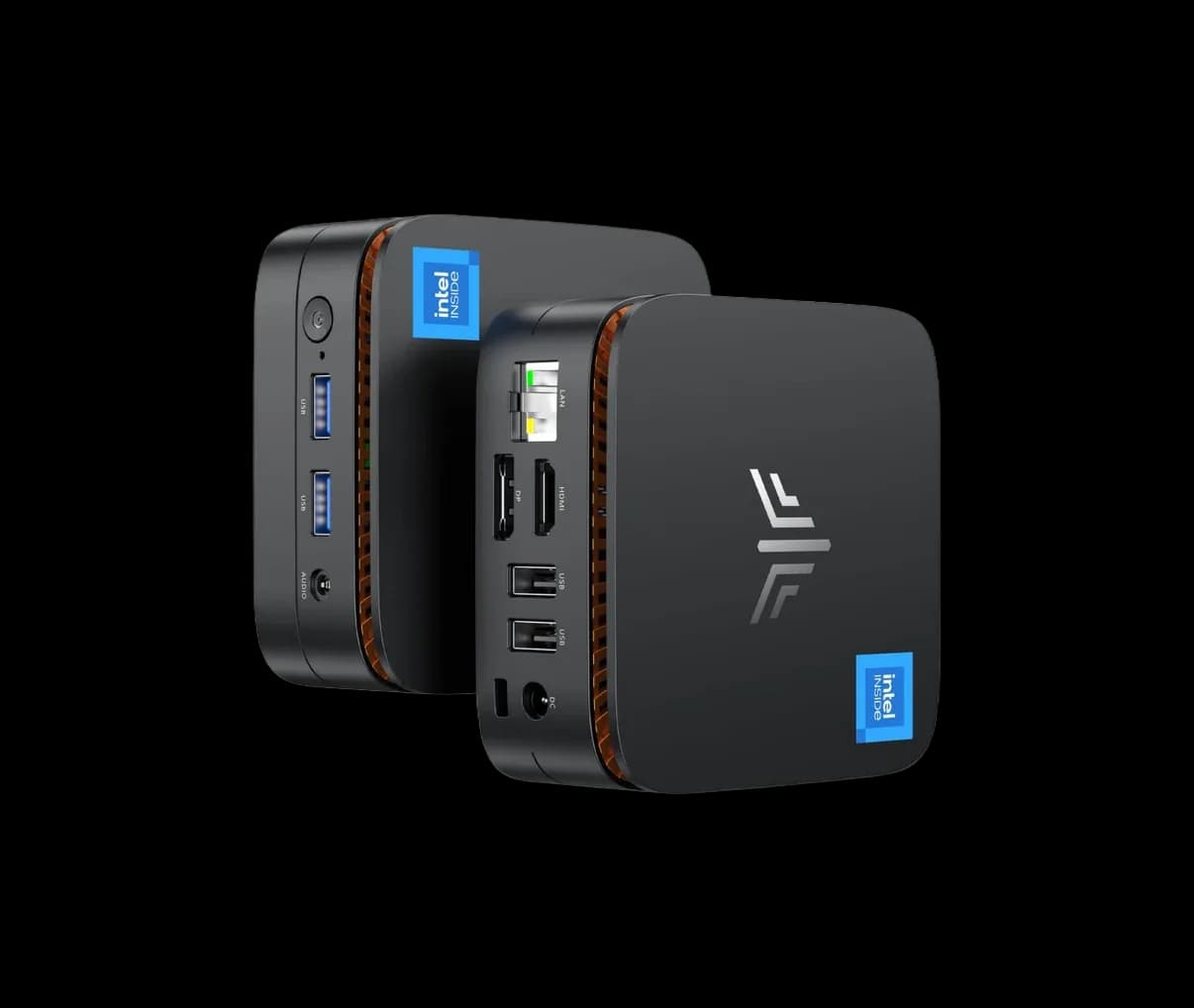
The NiPoGi AK1PLUS is a 2021-era entry-level mini PC built around a four-core Intel Celeron N5095. It suits buyers who want a small, inexpensive machine for light desktop work with two monitors.
14th of 14 mini PCs we've reviewedAffiliate link. As an Amazon Associate I earn from qualifying purchases. Details
New to mini PCs? What they are and what to look for
A mini PC is a full desktop computer about the size of a sandwich. It plugs into any monitor and uses far less electricity than a tower PC.
Do you need a mini PC? A good fit for everyday office work, a second computer, a living-room media PC, or a quiet home server. It isn't the right choice for serious gaming.
What to look for
- 16GB of memory and a 500GB or larger SSD
- Enough USB and display ports for your setup
- Quiet cooling, and whether you can upgrade memory and storage later
Unsure about a word? Jargon explained
How the 4.3 adds up
Our mini PCs rubric- CPU performance25% of score
- Upgradeability20% of score
- Networking20% of score
- Efficiency and noise15% of score
- Ports and expansion10% of score
- Build and support10% of score
Against the 14 mini PCs we've reviewed
bar = the range of all 14 · dot = this one · better →
- Overall score 4.3/1014th of 14
Support and features
| Software updates | No end date announced; a listing for an N95 variant claims lifetime technical support, which is a marketing claim rather than a stated end date. source |
|---|
- Quick Sync
Measured by owners
No owner readings yet. If you own one and have a smart plug or power meter, a reading takes a minute and helps everyone else.
Security and compatibility
| Latest firmware or software | No release date found |
|---|---|
| Known security issues | None found in public advisories. That's a good sign, not a guarantee. |
| Update record | No NiPoGi firmware release notes or security advisories were found for this model, and the notes do not confirm whether any were fixed. |
| Linux | Not confirmed. Reports cover N95 and N100 variants rather than the N5095; one N95 test found most hardware working on Ubuntu 23.04, while another unit needed kernel 6.5.6 for graphics and an N100 unit crashed on Ubuntu 24.04. source |
Pros and cons
+ pros
- Two HDMI 2.0 outputs for dual-display setups
- M.2 slot plus a 2.5 inch SATA bay
- Owners call it good value at entry level
− cons
- Four-core Celeron with limited processor headroom
- Gigabit Ethernet only, with no faster option
- No USB4, Thunderbolt or OCuLink
Price history
Price history appears here once we have tracked this product for a few days.
The full review
Where it fits
The AK1PLUS is an entry-level mini PC. It pairs an Intel Celeron N5095 with 16GB of memory and a 256GB M.2 SSD. Owners describe it as a great entry-level machine for the money, and the hardware list backs that up as a basic desktop box rather than a performance machine.
Processor
The Celeron N5095 is a four-core, four-thread Jasper Lake part. One review places it in Intel's 11th generation. It boosts to 2.9GHz, has 4MB of L3 cache and uses Intel UHD Graphics with 16 execution units.
Owner feedback on performance is mixed. Reviewers point to limited processor headroom. With four threads and no stated higher-tier graphics, this is a chip for light tasks such as browsing, documents and video playback. It is a weaker choice for running several virtual machines or heavy builds, where thread count and headroom matter.
Memory and storage
The machine ships with 16GB of memory and a 256GB M.2 SSD. For storage, there is one M.2 slot that accepts SATA and NVMe PCIe drives, plus a 2.5 inch SATA3.0 bay. That gives you two places for drives, so you can add capacity without replacing the SSD. There is only the one M.2 slot, though, so a second NVMe drive is not an option.
The specifications give no maximum RAM figure and no statement on whether the memory can be swapped. If you plan to expand memory later, check that with the seller before you buy.
Connectivity and ports4/10
Networking is a single RJ45 Gigabit Ethernet port and Wi-Fi 5, with Bluetooth for wireless peripherals. The machine is not a base for anything that needs more than gigabit speeds, as there is only the one wired port.
Ports are a strength owners single out. There are two HDMI 2.0 outputs, so a dual-monitor desk works without extra adapters. USB comes as two USB 3.2 Gen1 Type-A ports and two USB 2.0 Type-A ports. A 3.5mm-style audio jack and a DC input complete the set. Only two of the four USB ports are the faster Gen1 type, which matters if you connect external drives and other peripherals together. There is no USB4, Thunderbolt or OCuLink, so there is no route to fast external storage or an external GPU through those standards.
Power
The listed power figure is 15W. That is a listing number and not a measured one, and no idle draw or cooling details are given. A low rated figure points to a modest power draw, but you should not treat it as a guaranteed running cost.
Build and support5/10
NiPoGi is a sister brand of Kamrui, which operates in the United States. The AK1PLUS dates from 2021. No BIOS update policy or warranty terms are given for this variant, so check the seller's terms before buying.
Verdict
The AK1PLUS makes sense as a low-cost second machine for light work. Owners rate the value and the dual HDMI outputs. The four-core Celeron, the single gigabit port and the lack of fast expansion ports limit it. Choose it for simple, undemanding jobs where a small footprint and two displays matter more than speed.
What owners report
Recurring themes from public owner feedback, summarised in our own words.
- Reviewers call it a great entry-level machine for the price.
- Processor performance gets mixed results, with little headroom.
- Dual HDMI outputs and plentiful USB ports earn praise.
Who should skip it
- Buyers who want to run several virtual machines or heavy workloads
- Homelabbers who need faster-than-gigabit or multiple network ports
- Anyone who needs USB4, Thunderbolt or OCuLink for fast external devices
Full specifications
| CPU | Intel Celeron N5095, 4 cores/4 threads, up to 2.9 GHz burst, 4 MB L3 cache, Intel UHD Graphics 16 EU |
|---|---|
| Memory | 16GB (type conflicting: LPDDR4 or DDR4) |
| Storage | 256GB M.2 SSD |
| Networking | 1 x RJ45 Gigabit Ethernet, Wi-Fi 5, Bluetooth (4.2, 5.0 or 5.2 conflicting) |
| Storage slots | 1 x M.2 slot (SATA and NVMe PCIe), 1 x 2.5 inch SATA3.0 SSD bay |
| Ports | 2 x USB 3.2 Gen1 Type-A, 2 x USB 2.0 Type-A, 1 x DC input, 2 x HDMI 2.0, 1 x 1/8 inch audio jack |
| Power draw | 15 W (listing figure, not measured) |
Sources
- NiPoGi Essenx Series AK1 PLUS (manufacturer page, N95 variants only)
- NiPoGi collections page
- Amazon UK listing (search snippet only)
- Amazon Spain listing
- Amazon Germany listing
- Amazon France listing
- Raspberry.tips NiPoGi AK1 Plus review
- Camerajabber NiPoGi AK-1 Plus review
- Bamiela NiPoGi AK1PLUS review
- Mightygadget NiPoGi E1 N150 review
- Minipc-review KAMRUI AK1 Plus review
- Notebookcheck NiPoGi AK1 Plus N97 news
- Notebookcheck KAMRUI AK1 Plus news
- IgorsLab AK1 Plus N97 test
Alternatives
Compare head to head
- NiPoGi AK1PLUS Celeron N5095 Mini PC vs DreamQuest Mini Plus ›
- NiPoGi AK1PLUS Celeron N5095 Mini PC vs BOSGAME E2Air Mini PC Ryzen 5 3501U ›
- NiPoGi AK1PLUS Celeron N5095 Mini PC vs ACEMAGIC K1 AMD Ryzen Embedded R2544 Mini PC ›
- NiPoGi AK1PLUS Celeron N5095 Mini PC vs Bosgame E4 Mini PC - AMD Ryzen 5 3550H ›
- NiPoGi AK1PLUS Celeron N5095 Mini PC vs BOSGAME E5 Mini PC ›
- NiPoGi AK1PLUS Celeron N5095 Mini PC vs Apple Mac mini (2024), Apple M4, 16GB, 256GB ›