Apple Mac mini (2024), Apple M4, 16GB, 256GB
~£799typical UK price when we researched itAffiliate link. As an Amazon Associate I earn from qualifying purchases. Details
Apple Mac mini (2024), Apple M4, 16GB, 256GB review
Researched, not hands-on tested.How we review ›
by SudoPicks Research · editor Paul HR · published 29 Oct 2026 · updated 29 Oct 2026
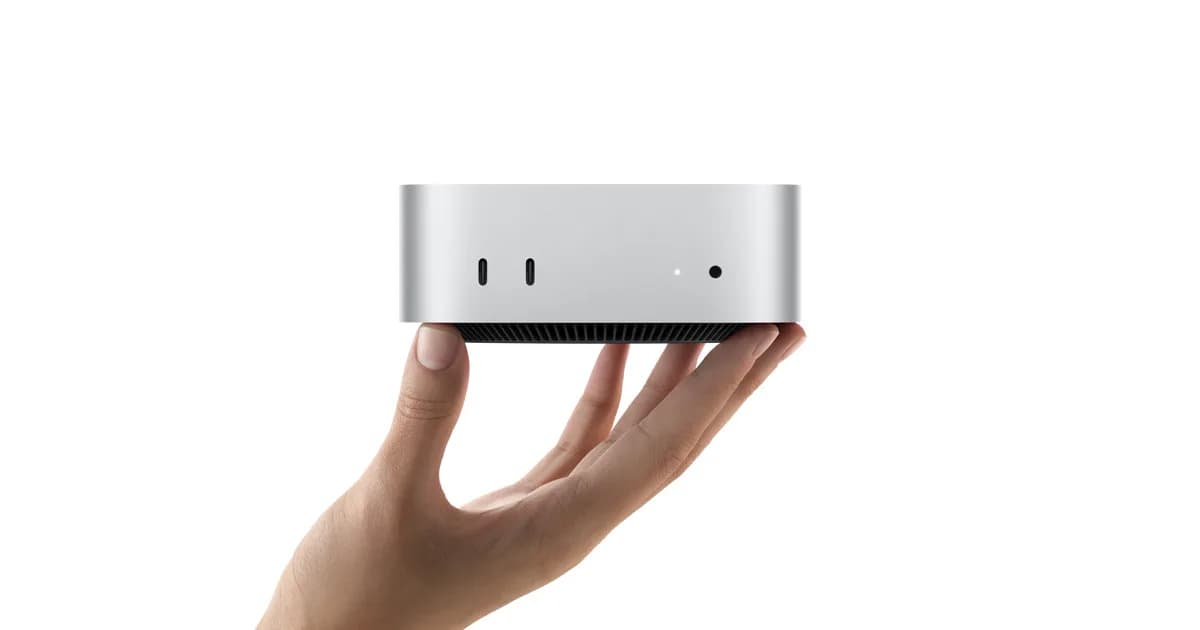
The Mac mini M4 suits anyone who wants a small, always-on machine with very low idle power draw. It fits users who are happy with 16GB of memory and a modest internal drive, or who will pay for a larger configuration up front.
joint 6th of 9 mini PCs we've reviewedAffiliate link. As an Amazon Associate I earn from qualifying purchases. Details
New to mini PCs? What they are and what to look for
A mini PC is a full desktop computer about the size of a sandwich. It plugs into any monitor and uses far less electricity than a tower PC.
Do you need a mini PC? A good fit for everyday office work, a second computer, a living-room media PC, or a quiet home server. It isn't the right choice for serious gaming.
What to look for
- 16GB of memory and a 500GB or larger SSD
- Enough USB and display ports for your setup
- Quiet cooling, and whether you can upgrade memory and storage later
Unsure about a word? Jargon explained
How the 5.8 adds up
Our mini PCs rubric- CPU performance25% of score
- Upgradeability20% of score
- Networking20% of score
- Efficiency and noise15% of score
- Ports and expansion10% of score
- Build and support10% of score
Against the 9 mini PCs we've reviewed
bar = the range of all 9 · dot = this one · better →
- Overall score 5.8/10joint 6th of 9
- Price £7998th cheapest
- Value for money Poorer value than most9th best of 9
Power use and running costs
Running 24/7 at idle, at 26.32p per kWh (the Ofgem price cap).
- Electricity per year
- £9.22
- 35 kWh
- 3 years, all in
- £826.67
- £799.00 to buy + £27.67 to run
- Against the others
- 2nd of 5
- 1st = lowest idle power
- Apple Mac mini2.7 W£6.23
- Apple Mac mini (this)4 W£9.22
- GEEKOM A6 Mini PC Ryzen 7 6800H4.2 W£9.68
- GEEKOM A5 2027 Edition6 W£13.83
- GMKtec NucBox M6 Ultra Mini PC AMD Ryzen 5 7640HS10 W£23.06
- GEEKOM A5 2027 Edition£510.50
- GEEKOM A6 Mini PC Ryzen 7 6800H£578.05
- GMKtec NucBox M6 Ultra Mini PC AMD Ryzen 5 7640HS£619.13
- Apple Mac mini (this)£826.67
- Apple Mac mini£842.68
Today's best price, or the typical price when researched. Drives and accessories not included.
Not shown, as no idle figure is published: GMKtec NucBox M5 Ultra AMD Ryzen™ 7 7730U Mini PC, BOSGAME E5 Mini PC, ACEMAGIC K1 AMD Ryzen Embedded R2544 Mini PC, BOSGAME E2Air Mini PC Ryzen 5 3501U.
Support and features
| Software updates | No end date announced; Apple classifies products as obsolete when sales stopped more than 7 years ago, and the notes did not confirm this model's status. source |
|---|
Featured in: Best mini PCs with the lowest running costs
Measured by owners
No owner readings yet. If you own one and have a smart plug or power meter, a reading takes a minute and helps everyone else.
Security and compatibility
| Latest firmware or software | October 2026updated in the last year source |
|---|---|
| Known security issues | None found in public advisories. That's a good sign, not a guarantee. |
| Linux | Partly works on Linux. Gravity Linux has an early developer alpha for the M4 Mac mini with gaps in suspend, USB-C display output, and Thunderbolt/USB4, while Asahi Linux is not ready for this machine. source |
Pros and cons
+ pros
- Idle draw of just 4W at the wall
- 10-core M4 with 10-core GPU
- Three Thunderbolt 4 ports plus HDMI
− cons
- RAM is soldered with no upgrade slot
- Internal SSD is not user-upgradable
- Base model has only Gigabit Ethernet
Price history
Price history appears here once we have tracked this product for a few days.
The full review
Where it fits
This is the base Mac mini with the Apple M4, 16GB of unified memory and a 256GB SSD. It targets people who want a compact desktop that sips power. The headline figure is an idle draw of 4W, measured at the wall for this configuration. Maximum draw is 65W. Apple also states the unit is ENERGY STAR certified.
The trade-off is flexibility. Memory and storage are fixed at purchase, and the network connection on the base model is Gigabit. Those points shape who should buy it.
CPU and memory
The M4 has a 10-core CPU, split into four performance cores and six efficiency cores. It also has a 10-core GPU and a 16-core Neural Engine. Owners repeatedly point to performance for the money as a strength.
Memory is 16GB of unified memory. It is soldered, and there is no DIMM or SO-DIMM slot. The maximum is 32GB, and Apple lists that as a choice you make when you configure the machine at purchase. With a 16GB base and a 32GB ceiling, anyone planning heavier multitasking or several concurrent workloads should decide on memory before ordering, because it cannot be changed later.
Power draw
The 4W idle figure is the strongest part of this machine's case for a homelab or an always-on desk box. At that level, leaving it running around the clock costs little in electricity. Owners name low idle power as a recurring positive.
The 65W maximum gives a ceiling for planning, for example when sizing a power strip or a UPS. Apple's ENERGY STAR certification backs up the efficiency story.
Storage and upgrades
The base model has a 256GB SSD. Owners say that fills quickly, and they also flag that the storage cannot be upgraded. ServeTheHome describes the SSD as not user-upgradable. Together with soldered memory, that means the internal specification you buy is the one you keep.
The small base drive is the obvious limit here. If you expect to hold large datasets, VM images or media locally, the 256GB capacity is likely to feel tight. Because the SSD is not user-upgradable, that capacity is what the machine has for its whole life.
Networking4/10
The base model has Gigabit Ethernet (10/100/1000BASE-T, RJ-45). Wi-Fi 6E (802.11ax) and Bluetooth 5.3 are built in. Apple offers 10Gb Ethernet as a configure-to-order option, but it is not part of the base configuration.
For a homelab, Gigabit is the main networking limit. It is fine for light services and general use. Anyone moving large files across the network, or building around faster links, should look at the 10Gb option at the time of purchase rather than the base unit.
Ports8/10
The back has three Thunderbolt 4 (USB-C) ports supporting USB 4 at up to 40Gb/s and DisplayPort, plus an HDMI port and the Ethernet jack. The front has two USB-C ports (USB 3, up to 10Gb/s) and a 3.5mm headphone jack.
That is a good spread of high-speed ports and display outputs. The catch is that the Mac mini has no USB-A ports. Owners call this out as a recurring annoyance. If you have older USB-A peripherals, keys or adapters, budget for a hub or adapters.
What owners say
Feedback is consistent. People like the low idle power and the performance for the money. They dislike the small base storage, the fixed internal storage and the lack of USB-A. None of these are surprises given the specification, and all of them come down to deciding on configuration before you buy.
Bottom line
The M4 Mac mini makes sense if its fixed hardware matches your needs from day one. A 4W idle draw, a 10-core chip and three Thunderbolt 4 ports are strong points. Soldered memory, non-upgradable storage and Gigabit-only Ethernet on the base model are the constraints to weigh.
What owners report
Recurring themes from public owner feedback, summarised in our own words.
- Owners praise the very low idle power draw.
- Many say the performance is good for the money.
- The 256GB base storage is reported to fill up quickly.
- Owners dislike that storage cannot be upgraded and that there are no USB-A ports.
Who should skip it
- Buyers who want to upgrade RAM or storage later
- Anyone needing faster than Gigabit Ethernet from the base unit
- Users with many USB-A devices who don't want adapters
Full specifications
| CPU | Apple M4: 10-core CPU (4 performance + 6 efficiency cores), 10-core GPU, 16-core Neural Engine |
|---|---|
| Memory | 16GB unified memory |
| Storage | 256GB SSD |
| Networking | Wi-Fi 6E (802.11ax), Bluetooth 5.3, Gigabit Ethernet (10/100/1000BASE-T, RJ-45) |
| Maximum memory | 32GB (configurable at purchase on the M4 chip) |
| Ports | Front: two USB-C ports (USB 3, up to 10Gb/s) and a 3.5mm headphone jack. Back: Gigabit Ethernet, HDMI, and three Thunderbolt 4 (USB-C) ports supporting USB 4 (up to 40Gb/s) and DisplayPort |
| Power draw | Idle 4W, maximum 65W, measured at the wall for this configuration |
Sources
Alternatives
Compare head to head
- Apple Mac mini (2024), Apple M4, 16GB, 256GB vs BOSGAME E5 Mini PC ›
- Apple Mac mini (2024), Apple M4, 16GB, 256GB vs ACEMAGIC K1 AMD Ryzen Embedded R2544 Mini PC ›
- Apple Mac mini (2024), Apple M4, 16GB, 256GB vs Apple Mac mini (M6) ›
- Apple Mac mini (2024), Apple M4, 16GB, 256GB vs BOSGAME E2Air Mini PC Ryzen 5 3501U ›
- Apple Mac mini (2024), Apple M4, 16GB, 256GB vs GMKtec NucBox M6 Ultra Mini PC AMD Ryzen 5 7640HS ›
- Apple Mac mini (2024), Apple M4, 16GB, 256GB vs GEEKOM A6 Mini PC Ryzen 7 6800H ›