CORSAIR XENEON EDGE 14.5" LCD Touchscreen
~£219.95typical UK price when we researched itAffiliate link. As an Amazon Associate I earn from qualifying purchases. Details
CORSAIR XENEON EDGE 14.5" LCD Touchscreen review
Researched, not hands-on tested.How we review ›
by SudoPicks Research · editor Paul HR · published 26 Oct 2026 · updated 26 Oct 2026
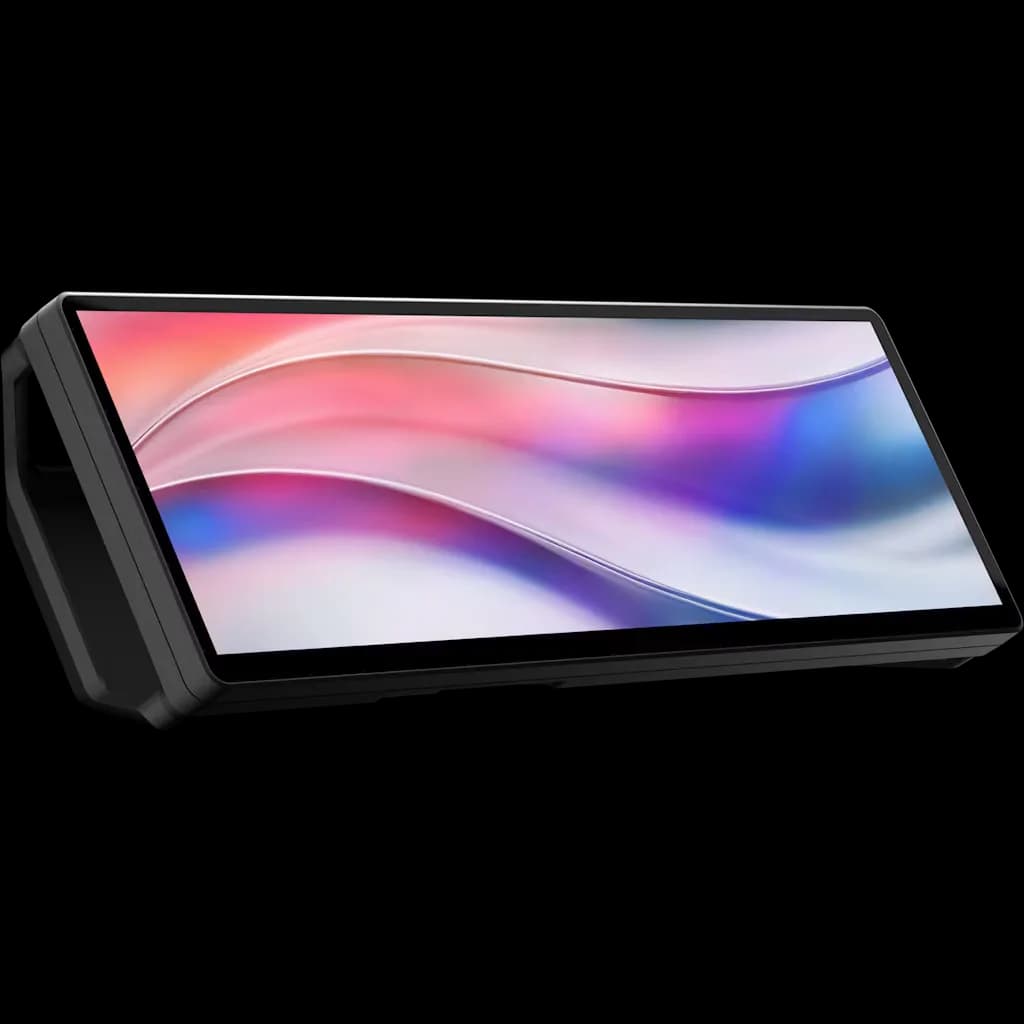
The Corsair Xenon Edge 14.5" is a 32:9 touchscreen for buyers who already know where it will sit, such as a desk, a PC case or a fan mount. It suits people who want a small status or control panel driven from Windows 11 through iCUE.
6th of 10 monitors we've reviewedAffiliate link. As an Amazon Associate I earn from qualifying purchases. Details
New to monitors? What they are and what to look for
A screen for a desktop computer, or a second screen for a laptop.
Do you need a monitor? A bigger second screen makes laptop work much more comfortable.
What to look for
- 27 inches at 1440p is a sweet spot for desks
- USB-C with power delivery can charge a laptop with one cable
- A height-adjustable stand for comfort
Unsure about a word? Jargon explained
How the 6.1 adds up
Our monitors rubric- Sharpness for text20% of score
- Panel quality25% of score
- Connectivity and docking20% of score
- Ergonomics15% of score
- Refresh rate and motion10% of score
- Build and warranty10% of score
Against the 10 monitors we've reviewed
bar = the range of all 10 · dot = this one · better →
- Overall score 6.1/106th of 10
- Price £219.956th cheapest
- Value for money Poorer value than most7th best of 10
Support and features
| Power draw | 10.5W under load (measured by owners or reviewers, source) |
|---|---|
| Software updates | No end date announced; sources give a three-year warranty but no software-support end date |
Pros and cons
+ pros
- Many mounting options: 14 magnets, two ¼-20" threads, fan-mount fit
- Three-year warranty with a zero dead pixel guarantee
- 2560 x 720 resolution on a 14.5 inch panel
− cons
- No power LED and no input buttons
- 60Hz only, with no Adaptive Sync
- iCUE supports Windows 11 only; Mac version doesn't support it
Price history
Price history appears here once we have tracked this product for a few days.
The full review
Where it fits
This is a 14.5 inch panel with a 32:9 aspect ratio and a resolution of 2560 x 720. It is a narrow strip, not a general-purpose monitor. Owners praise it for working on a desk or inside a desktop PC, and the best fit is a use you have already planned: system stats, a control surface, or a secondary display beside a main screen.
Owners also say the price is high for the use case. That points the same way. If you cannot name what the strip will show, it is hard to justify.
Sharpness and panelSharpness for text 8/10Panel quality 6/10
The panel is AHVA with 350 cd/m² brightness and 16.7M colours at 8-bit. It is SDR only and has no HDR. Corsair lists no contrast or colour coverage figures in the specifications. The 720-pixel height limits how much fits on screen vertically, so it suits compact readouts more than long documents.
It runs at 60Hz and has no Adaptive Sync. For dashboards, monitoring and controls, that matches the job. For fast-moving content, it gives you nothing extra.
Connections
There are two inputs: one HDMI 2.0 and one USB Type-C with DP Alt Mode. Power input is 5 V at 2 A through USB-C. Corsair doesn't publish whether USB-C power delivery of 65W or more is supported. No KVM switch, USB hub, Ethernet or daisy-chaining is listed. This is a simple display with two ways in. It does not work as a dock.
Owners raise one practical annoyance. There is no power LED and there are no input buttons. That makes it hard to tell whether the screen is on or which input is active. If you plan to hide it inside a case, that matters, because you will have little visual feedback when something goes wrong.
Mounting and build7/10
Mounting is the strongest part of the design. The detachable magnetic desktop stand supports both vertical and horizontal orientation. The screen has 14 built-in magnets and two ¼-20" threaded mounts, and it is compatible with 360 mm fan mounts. Owners also praise the solid build quality and the number of mounting options. There's no height adjustment, so placement depends on the stand, magnets or threads rather than on fine positioning listed.
Corsair gives a three-year warranty and a zero dead pixel guarantee. For a display that may sit inside a PC, that is a useful level of cover.
Software
iCUE is the control software, and Windows 11 is the listed supported OS. Corsair says the Mac version of iCUE does not support the display. Linux is not listed. A homelabber or developer on macOS or Linux should check how they would drive and configure it before buying. With Windows 11 and iCUE, the setup follows the supported path.
Verdict
The Edge suits a buyer with a specific mounting plan and a Windows 11 machine. Its flexible mounting, three-year warranty and zero dead pixel guarantee support that use. Its limits are the 60Hz refresh rate, the two-input connectivity and the lack of any power or input indicator. It is a niche display, and it works best when you buy it for that niche.
What owners report
Recurring themes from public owner feedback, summarised in our own words.
- Owners praise the solid build quality and the many mounting options, on a desk or inside a PC.
- Owners complain there is no power LED and no input buttons, so status and active input are hard to judge.
- Owners say the price is high for the use case, so you need a specific purpose in mind.
Who should skip it
- Mac or Linux users who need official software support
- Buyers who want a general-purpose monitor or a USB-C dock
- Anyone who wants high refresh rates or Adaptive Sync
Full specifications
| Screen size | 14.5 inch diagonal, 32:9 aspect ratio |
|---|---|
| Resolution | 2560 x 720 |
| Panel type | AHVA |
| Refresh rate | 60 Hz |
| Inputs and USB-C | 1x HDMI 2.0, 1x USB Type-C with DP Alt Mode |
| Stand adjustment | Detachable magnetic desktop stand |
| HDR | None |
Alternatives
Compare head to head
- CORSAIR XENEON EDGE 14.5" LCD Touchscreen vs Dell Pro 27 Plus FHD USB-C Monitor - P2725HE ›
- CORSAIR XENEON EDGE 14.5" LCD Touchscreen vs AOC 24B3HA2 ›
- CORSAIR XENEON EDGE 14.5" LCD Touchscreen vs ARZOPA Z1FC 16.1 inch Portable Monitor ›
- CORSAIR XENEON EDGE 14.5" LCD Touchscreen vs BenQ GW2790QT ›
- CORSAIR XENEON EDGE 14.5" LCD Touchscreen vs Yodoit PTM15 ›
- CORSAIR XENEON EDGE 14.5" LCD Touchscreen vs ASUS ProArt Display PA278CV ›