ASUS Zenbook A14 (UX3407)
~£649.99typical UK price when we researched itAffiliate link. As an Amazon Associate I earn from qualifying purchases. Details
ASUS Zenbook A14 (UX3407) review
Researched, not hands-on tested.How we review ›
by SudoPicks Research · editor Paul HR · published 28 Oct 2026 · updated 28 Oct 2026
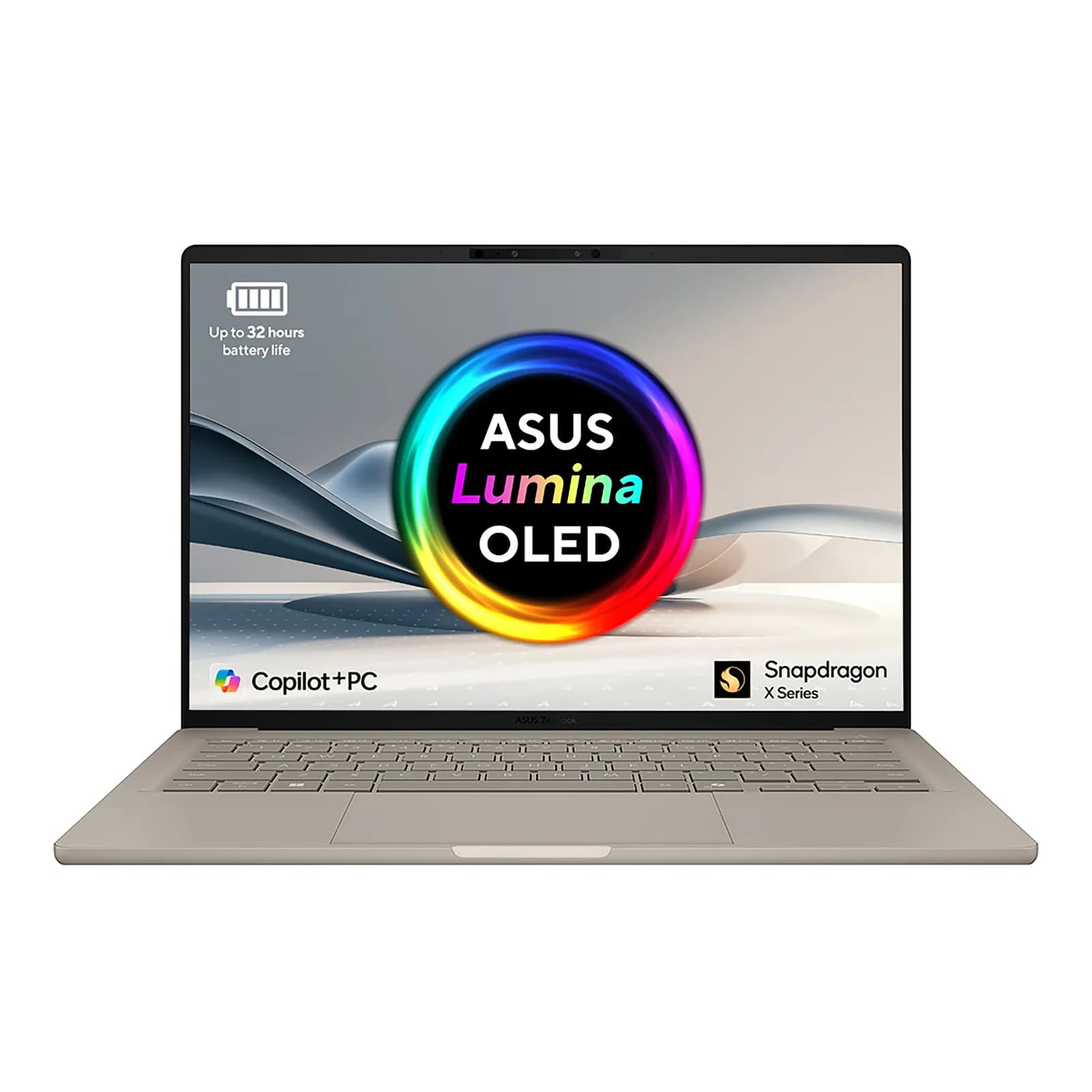
The ASUS Zenbook A14 UX3407 is for people who want a light 14-inch Windows laptop with very long battery life and an OLED screen. It suits everyday office, web and admin work where the software runs on Windows on Arm.
6th of 7 laptops we've reviewedAffiliate link. As an Amazon Associate I earn from qualifying purchases. Details
New to laptops? What they are and what to look for
A portable computer with a built-in screen, keyboard and battery.
Do you need a laptop? Almost everyone needs one computer; a laptop suits you if you work in different places.
What to look for
- 16GB of memory for comfortable everyday use
- A real-world battery life of 8 hours or more
- Enough ports, or budget for a USB-C hub
Unsure about a word? Jargon explained
How the 6.1 adds up
Our laptops rubric- Performance25% of score
- Memory and storage20% of score
- Display15% of score
- Battery life15% of score
- Keyboard and build10% of score
- Ports10% of score
- Linux support5% of score
Against the 7 laptops we've reviewed
bar = the range of all 7 · dot = this one · better →
- Overall score 6.1/106th of 7
- Price £649.992nd cheapest
- Value for money Better value than most3rd best of 7
Support and features
| Power draw | 7.1W idle, 39.6W under load (measured by owners or reviewers, source) |
|---|---|
| Software updates | No end date announced in sources read |
- USB4 / Thunderbolt
Compatibility
| Linux | Partly works on Linux. ASUS doesn't offer Linux for this model; community patches make the display and speakers work on some variants, while video decoding is unfinished and the camera isn't fully working. source |
|---|
Pros and cons
+ pros
- Long rated battery life, praised by several reviewers
- Light, sturdy build at a claimed 0.99kg
- Two 40Gbps USB4 ports plus HDMI and USB-A
− cons
- Low-end Snapdragon X chip called slow by reviewers
- Windows on Arm limits app compatibility
- Memory soldered on board; base OLED panel only 60Hz
Price history
Price history appears here once we have tracked this product for a few days.
The full review
Where it fits
The Zenbook A14 UX3407 is a 14-inch Windows laptop built around Qualcomm Snapdragon X chips. ASUS sells it in several variants. The range runs from the 8-core Snapdragon X1-26-100 up to the 18-core Snapdragon X2 Elite X2E88100. This review leans on the UX3407QA with the X1-26-100, 16GB of memory and a 1TB SSD, because that is the version in the retail listings.
Performance and software4/10
The X1-26-100 has 8 cores and 8 threads, a 2.97GHz boost clock and 30MB of cache. Its Qualcomm Hexagon NPU is rated at up to 45 TOPS, and the laptop is marketed as a Copilot+ PC. Reviewers are less kind about the chip itself. They describe this low-end Snapdragon X part as slow for the price. Higher variants use the 12-core X1E 78 100 or the 18-core X2 Elite, so more CPU is available if you look beyond the base model.
Software is the bigger question. Reviewers say Windows on Arm limits app compatibility. If your work depends on x86-only tools, VM images or niche drivers, check each one before you buy. If your day is mostly a browser, an editor and office apps, the limit matters less.
Memory and storage6/10
Memory is 16GB or 32GB of LPDDR5X, soldered to the board and not user-upgradeable. The 16GB version is therefore fixed for the life of the machine. With 16GB soldered and no way to add more, it suits a handful of containers or a light dev environment more than several VMs at once.
Storage is a 512GB or 1TB PCIe 4.0 SSD. ASUS lists one M.2 2280 PCIe 4.0x4 slot on some variants, so check the exact model if you want room to grow.
Display7/10
The screen varies by variant. Options include a 14-inch 3K (2880 x 1800) OLED at 120Hz, a 14-inch WUXGA (1920 x 1200) OLED at 60Hz, and a WUXGA IPS-level non-touch panel at 60Hz. The X1-26-100 listing shows the WUXGA OLED. It is 16:10 with a glossy surface, 400 nits typical brightness and 600 nits peak in HDR. It covers 100% of DCI-P3, and the contrast ratio is listed as 1,000,000:1. It is not a touchscreen.
Reviewers complain that the base OLED panel is limited to 60Hz. If smoother motion matters to you, the 3K 120Hz variant is the one to look for. The gloss finish may matter if you work near windows.
Battery life9/10
This is the strongest part of the case. The battery is 70Wh, with a smaller 48Wh in some lower-tier variants. ASUS rates it at up to 32 hours of sustained use in its 1080p video playback test. Reviewers at PCWorld, TweakTown, TechRadar and Digital Trends all report long runtimes. ASUS's number comes from video playback, so treat it as a ceiling rather than a promise for everyday work.
Build, keyboard and portsKeyboard and build 7/10Ports 7/10
The chassis is ASUS's Ceraluminum, and the housing is listed as aluminium and magnesium. ASUS claims 0.99kg, and PCWorld's figure is 2.16lb. The 48Wh variants come in under 0.9kg. Reviewers describe the build as light and sturdy.
The keyboard is a backlit chiclet design with 1.3mm of key travel and a precision touchpad. An FHD camera with an IR sensor supports Windows Hello.
Ports are two USB4 Type-C ports at up to 40Gbps with display and power delivery, one USB 3.2 Gen 2 Type-A port, an HDMI 2.1 TMDS port and a 3.5mm combo audio jack. Reviewers call the selection good for its class. Two USB4 ports and an HDMI port cover an external monitor plus charging without a dongle. An SD slot and Ethernet are not listed. Wi-Fi 7 and Bluetooth 6.0 appear in ASUS's specification, although one retail data sheet for the X1-26-100 model lists Wi-Fi 6E, so confirm the exact model.
Linux and operating system2/10
The laptop ships with Windows 11 Home, and ASUS recommends Windows 11 Pro for business use. ASUS doesn't list Linux support for it, and this is an Arm machine, so it is a Windows laptop first.
Verdict
The Zenbook A14 makes sense as a light, long-lasting laptop for people whose apps run on Windows on Arm. The OLED screen, the USB4 and HDMI ports and the battery all support that case. The low-end chip, the soldered memory and the 60Hz base panel count against it. Choose a higher variant if you want more performance or a faster display. Look elsewhere if you need x86 software or Linux.
What owners report
Recurring themes from public owner feedback, summarised in our own words.
- Several reviewers praise the long battery runtimes.
- Reviewers describe the laptop as light and sturdy.
- Reviewers find the port selection good for this class of laptop.
- The low-end Snapdragon X chip is called slow for the price, and Windows on Arm limits app compatibility.
Who should skip it
- Developers and admins who rely on x86-only software or VM images
- Anyone who wants to run Linux as their main operating system
- Buyers who need upgradeable memory
Full specifications
| CPU | Varies by variant: Snapdragon X1-26-100 (8 cores), Snapdragon X Plus X1P 42 100 (8 cores), Snapdragon X Elite X1E 78 100 (12 cores), Snapdragon X2 Elite X2E88100 (18 cores) |
|---|---|
| Memory | 16GB or 32GB LPDDR5X, soldered on board (not user-upgradeable) |
| Storage | 512GB or 1TB PCIe 4.0 SSD; one M.2 2280 PCIe 4.0x4 slot listed on some variants |
| Display | Varies by variant: 14.0-inch 3K (2880 x 1800) OLED 120Hz; 14.0-inch WUXGA (1920 x 1200) OLED 60Hz; 14.0-inch WUXGA IPS-level non-touch 60Hz; 400 nits typical |
| Battery | 70 Wh (some lower-tier variants 48 Wh); rated up to 32 hours of sustained battery in ASUS 1080p video playback test |
| Ports | 2x USB 4.0 Gen 3 Type-C with display/power delivery (up to 40Gbps), 1x USB 3.2 Gen 2 Type-A, 1x 3.5mm combo audio jack, 1x HDMI 2.1 TMDS |
| Weight | 2.18 lb (0.99 kg) claimed; PCWorld measured 2.16 lb; sub 2 lb (0.9 kg) on 48Wh battery variants |
| Operating system | Windows 11 Home (ASUS recommends Windows 11 Pro for business) |
✓ Specs checked against the maker's data sheet.
Sources
- ASUS Zenbook A14 UX3407 where to buy (ASUS US)
- ASUS Zenbook A14 UX3407 tech specs (ASUS US)
- ASUS Zenbook A14 UX3407 tech specs (ASUS HK)
- ASUS Zenbook A14 UX3407 tech specs (ASUS GR)
- ASUS Zenbook A14 UX3407 tech specs (ASUS PH)
- ASUS Zenbook A14 UX3407 tech specs (ASUS MY)
- ASUS UK store 90NB1501-M00AX0
- ASUS UK store UX3407QA listing
- Notebookcheck Zenbook A14 X2 Elite review
- Notebookcheck Zenbook A14 UX3407QA review
- Ultrabookreview Zenbook A14 review
- PCWorld Zenbook A14 review
- SlashGear Zenbook A14 review
- TweakTown Zenbook A14 review
- TechRadar Zenbook A14 review
- Digital Trends Zenbook A14 review
- Amazon UK UX3407QA 16GB/1TB listing
- Amazon UK UX3407QA X1-26-100 listing
- Amazon UK UX3407QA listing B0DM6KXTRS
- Amazon UK Zenbook OLED UX3407QA listing
- CamelCamelCamel price tracker B0DM6KXTRS
- Icecat data sheet: ASUS Zenbook A14 UX3407QA-QD244W Copilot+ PC Snapdragon X1-26-100 Laptop 35.6 cm (14") WUXGA 16 GB LPDDR5x-SDRAM 1 TB SSD Wi-Fi 6E (802.11ax) Windows 11 Home Beige
Alternatives
Compare head to head
- ASUS Zenbook A14 (UX3407) vs ASUS Vivobook S 14 OLED S5406SAL ›
- ASUS Zenbook A14 (UX3407) vs Apple MacBook Air 13-inch M5 ›
- ASUS Zenbook A14 (UX3407) vs Samsung Galaxy Book4 Pro 360 (16-inch) ›
- ASUS Zenbook A14 (UX3407) vs Apple MacBook Pro (14-inch, M5) ›
- ASUS Zenbook A14 (UX3407) vs Apple MacBook Neo 13-inch A18 Pro ›
- ASUS Zenbook A14 (UX3407) vs HONOR MagicBook Pro 14 2025 ›