Skip to content
sudopicks
esc

ASUS TUF GAMING B850-PLUS WIFI vs MSI MAG X870 TOMAHAWK WIFI

Researched, not hands-on tested.How we review ›

all judged against motherboards at a similar price

The ASUS TUF GAMING B850-PLUS WIFI scores 7.3/10 overall, ahead of the MSI MAG X870 TOMAHAWK WIFI at 7.2/10.

The ASUS TUF GAMING B850-PLUS WIFI leads on BIOS and support.

The MSI MAG X870 TOMAHAWK WIFI leads on connectivity.

They score the same on platform and features, power delivery and value.

ASUS TUF GAMING B850-PLUS WIFI

ASUS TUF GAMING B850-PLUS WIFI

7.3/10verdict: good, not the best

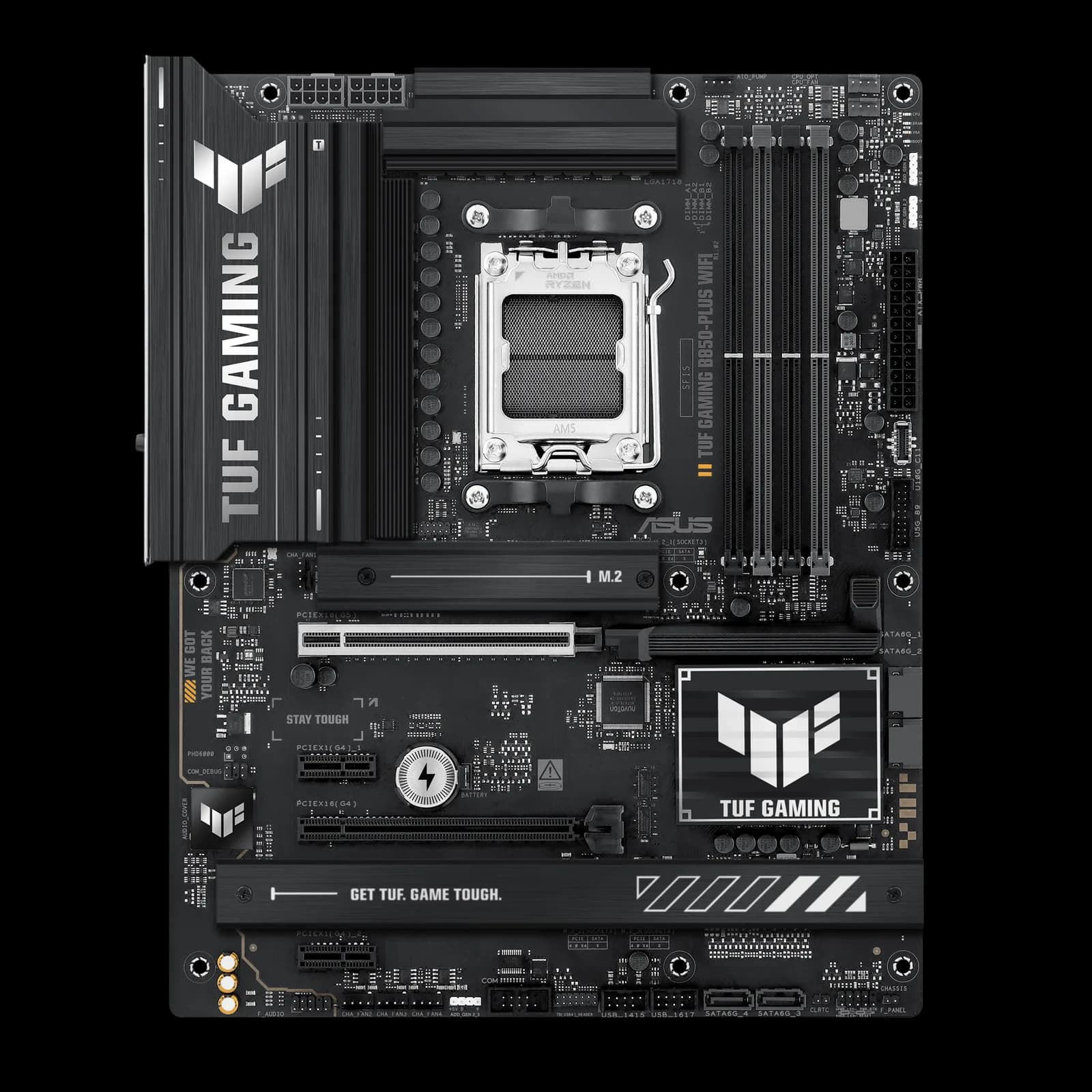
The ASUS TUF GAMING B850-PLUS WIFI is an ATX AM5 board for building a mainstream Ryzen 9000, 8000 or 7000 desktop. It suits buyers who want PCIe 5.0 graphics, Wi-Fi 7, 2.5GbE and a 20Gbps USB-C port on one board. It is less suited to extreme overclockers or anyone who needs several PCIe 5.0 drives.

Typically about £184.90 in the UK when we researched itSearch Amazon UK (opens in a new tab, affiliate link)

Affiliate link. As an Amazon Associate I earn from qualifying purchases. Details

MSI MAG X870 TOMAHAWK WIFI

MSI MAG X870 TOMAHAWK WIFI

7.2/10verdict: good, not the best

The MSI MAG X870 TOMAHAWK WIFI is for people building a high-end AM5 system around a Ryzen 9000 chip. It suits buyers who want USB4, Wi-Fi 7, 5G LAN and fast NVMe storage on one ATX board. It is a better fit for a single graphics card plus drives than for a build full of expansion cards.

Typically about £255 in the UK when we researched itSearch Amazon UK (opens in a new tab, affiliate link)

Affiliate link. As an Amazon Associate I earn from qualifying purchases. Details

Scores, criterion by criterion

CriterionWeightASUS TUF GAMING B850-PLUS WIFIMSI MAG X870 TOMAHAWK WIFI
Platform and features25%7/107/10
Connectivity25%8/109/10
Power delivery20%8/108/10
BIOS and support15%6/104/10
Value15%7/107/10
Overall7.3/107.2/10

Specifications

SpecASUS TUF GAMING B850-PLUS WIFIMSI MAG X870 TOMAHAWK WIFI
CPU socket (e.g. AM5, AM4, LGA1851, LGA1700)AM5; supports AMD Ryzen 9000, 8000 and 7000 seriesAM5, supports Ryzen 9000, 8000 and 7000 series desktop CPUs
ChipsetAMD B850AMD X870
Form factor (ATX, Micro-ATX, Mini-ITX, E-ATX)ATX, 30.5 x 24.4 cmATX, 304.8 × 243.84 mm
Memory: type (DDR4 or DDR5), number of slots, maximum capacity and speedDDR5, 4 DIMM slots, maximum 256GB, up to 8000+ MT/s overclocked, ECC and non-ECC unbuffered supportDDR5, 4 × UDIMM slots, maximum 256GB, non-ECC unbuffered only; overclocked 8400–5600 MT/s, JEDEC 5600–4800 MT/s
M.2 NVMe slots and their PCIe generationThree Key M slots: M.2_1 is 2280 PCIe 5.0 x4 with Ryzen 9000 and 7000 CPUs; M.2_2 is PCIe 4.0 x4; M.2_3 is 2280 PCIe 4.0 x4 sharing bandwidth with the second x16 slot4 slots: M.2_1 and M.2_2 from CPU at PCIe 5.0 x4 (M.2_2 shares bandwidth with rear USB4 ports); M.2_3 PCIe 4.0 x2 and M.2_4 PCIe 4.0 x4 from chipset
PCIe slotsOne PCIe 5.0 x16; one PCIe 4.0 x16 (x8/x4 on 8000 series CPUs, x4 on chipset); two PCIe 4.0 x13 × x16 physical slots: PCI_E1 PCIe 5.0 x16 from CPU; PCI_E2 PCIe 3.0 x1 from chipset; PCI_E3 PCIe 4.0 x4 from chipset, drops to x2 when M2_3 is populated
Wired and wireless networking (e.g. 2.5GbE, Wi-Fi 7)Realtek 2.5Gb Ethernet; Wi-Fi 7 (802.11be, 2x2) with Bluetooth 5.4Realtek 8126-CG 5G LAN; Wi-Fi 7 with Bluetooth 5.4 pre-installed in M.2 Key-E slot
Rear USB ports, including USB-C and USB4Rear (10 ports): one USB 20Gbps Type-C, three USB 10Gbps Type-A, four USB 5Gbps Type-A, two USB 2.0. Front: one USB 10Gbps Type-C, one USB 5Gbps header, two USB 2.0 headers. USB4 only via internal Thunderbolt header12 rear ports: 4 × USB 2.0, 3 × USB 5Gbps Type-A, 2 × USB 10Gbps Type-A, 1 × USB 10Gbps Type-C, 2 × USB 40Gbps Type-C (USB4); front: 1 × USB 20Gbps Type-C header, 4 × USB 5Gbps Type-A

Strengths and weaknesses

ASUS TUF GAMING B850-PLUS WIFI

  • + Wi-Fi 7, 2.5GbE and a rear 20Gbps USB-C port
  • + 14+2+1 80A DrMOS power stages with 8+8 pin power
  • + BIOS FlashBack button plus EZ Flash 3 and CrashFree BIOS 3
  • − Only one M.2 slot runs at PCIe 5.0
  • − USB4 only through an internal Thunderbolt header
  • − Some owners report memory and boot problems

Skip it if:

  • Buyers who want more than one PCIe 5.0 M.2 drive
  • Buyers who need USB4 ports on the rear panel
  • Extreme overclockers pushing heavy voltage and power limits
Read the full ASUS TUF GAMING B850-PLUS WIFI review ›

MSI MAG X870 TOMAHAWK WIFI

  • + Two USB4 ports and a 20Gbps front Type-C header
  • + 14+2+1 phase VRM with 80A power stages
  • + Wi-Fi 7 and 5G LAN, with four M.2 slots
  • − Owners report boot loops after BIOS updates
  • − M.2_2 shares bandwidth with the rear USB4 ports
  • − X870 chipset, not X870E

Skip it if:

  • Buyers who want X870E rather than X870
  • Builders who need several fast expansion slots alongside multiple NVMe drives
  • Anyone who wants to avoid any risk of BIOS update trouble or CUDIMM boot problems
Read the full MSI MAG X870 TOMAHAWK WIFI review ›

More comparisons

Compare all motherboards · Best motherboards