Logitech Lift Vertical Ergonomic Mouse
~£32.99typical UK price when we researched itAffiliate link. As an Amazon Associate I earn from qualifying purchases. Details
Logitech Lift Vertical Ergonomic Mouse review
Researched, not hands-on tested.How we review ›
by SudoPicks Research · editor Paul HR · published 24 Oct 2026 · updated 24 Oct 2026
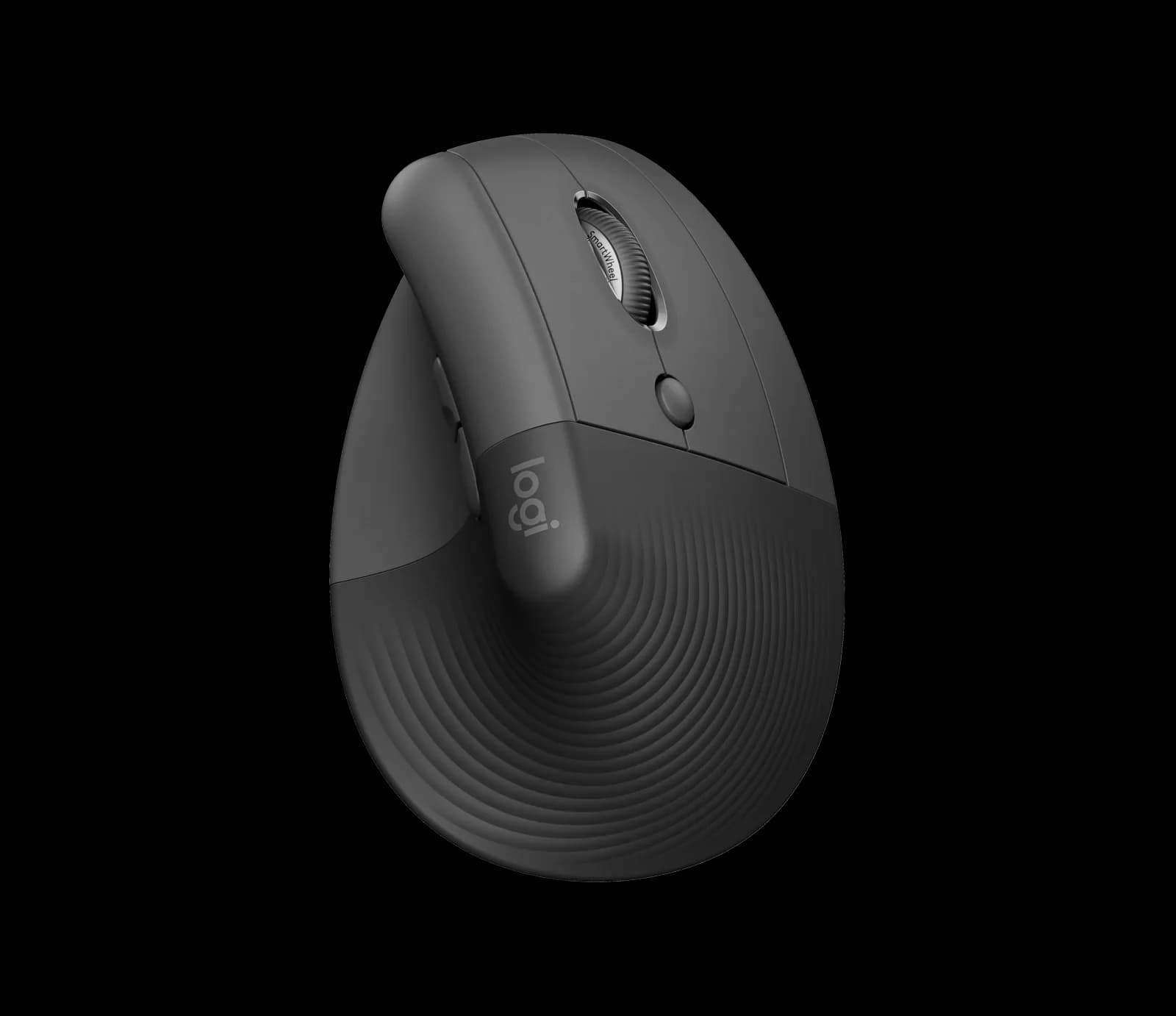
The Logitech Lift is a vertical mouse for people with small to medium-sized hands who want wrist relief over long working sessions. It suits those who switch between up to three devices and like a battery that lasts months.
2nd of 9 mice we've reviewedAffiliate link. As an Amazon Associate I earn from qualifying purchases. Details
New to mice? What they are and what to look for
A mouse is the pointer you move around your screen. A better one is more comfortable, more precise and can work with several computers.
Do you need a new mouse? Worth upgrading if your hand or wrist aches after long days, or you game and want quicker, lighter control.
What to look for
- Comfort: ergonomic shapes suit long workdays
- Both Bluetooth and a USB receiver, and USB-C charging
- Long battery life, and extra buttons if you'll use them
Unsure about a word? Jargon explained
How the 6.7 adds up
Our mice rubric- Comfort and shape25% of score
- Sensor and tracking20% of score
- Connectivity and battery25% of score
- Build and buttons15% of score
- Software and value15% of score
Against the 9 mice we've reviewed
bar = the range of all 9 · dot = this one · better →
- Overall score 6.7/102nd of 9
- Price £32.994th cheapest
- Value for money About average4th best of 8
Support and features
| Software updates | No end date announced for the Lift's software or firmware. source |
|---|
Compatibility
| Linux | Partly works on Linux. Basic mouse functions work on Linux without drivers over the Logi Bolt receiver or Bluetooth, but Logitech provides no Linux configuration software. source |
|---|
Pros and cons
+ pros
- Owners praise comfort and wrist relief over long periods
- Up to 24 months from one AA battery
- Bluetooth, Logi Bolt receiver and three-device switching
− cons
- No USB-C charging; battery is not rechargeable
- No horizontal scroll wheel
- Owners report a learning curve and a high price
Price history
Price history appears here once we have tracked this product for a few days.
The full review
Where it fits
The Lift is a vertical mouse with a 57-degree angle, made for small to medium-sized hands. It has a Pluto One optical sensor, four buttons plus a Connectivity button, and weighs 125 g for the mouse alone. A left-handed version exists. Resellers list it under part number 910-006474.
That makes it a relevant option for left-handed buyers who want a vertical shape. Buyers with larger hands should take note of the stated size range before ordering.
Comfort and shape8/10
Comfort is the main theme in owner and reviewer reports. Reviewers praise the ergonomics and describe wrist relief over long periods. The 57-degree angle holds the hand upright rather than flat.
Owners also report a learning curve. The hold is described as feeling like gripping a coffee cup, and some found it awkward at first. With comfort praised and an adjustment period reported, it makes sense to expect a settling-in stretch rather than instant ease. Logitech gives the fit as small to medium hands, so it is not pitched at every grip.
Connectivity and battery8/10
The Lift connects over Bluetooth Low Energy or a Logi Bolt USB receiver. Easy-Switch handles up to three devices, and the wireless range is listed as 10 metres. A Connectivity button sits alongside the four main buttons.
Battery life is a strength in the reports. One AA battery is included, and Logitech states up to 24 months. One reviewer saw the battery drop only 5% over about two months. With those figures, battery changes look infrequent.
There is no USB-C charging. The battery is a replaceable AA, and owners flag that it is not rechargeable. If you want to top up from a cable, this mouse does not offer it.
The business spec sheet lists a 1ms report rate over USB and 7.5-11.25ms over Bluetooth. Those figures give a reason to prefer the receiver if response timing matters to you.
Sensor and tracking6/10
The Pluto One sensor covers 400-4,000 DPI. The specifications here don't cover which surfaces it tracks on, and no maximum speed is given. Taking the DPI range and the report rates together, the numbers fit office and general desktop work. They don't point to a gaming-focused design.
Buttons and scrolling5/10
There are four buttons plus the Connectivity button. There is no horizontal scroll wheel. Side scrolling can be mapped through Logi Options+, which is a workaround rather than a dedicated control. Owners list the missing horizontal scroll as a drawback, which matters most if you move sideways often through wide documents or timelines.
No switch rating or durability figure appears in the specifications, so there is nothing here to say how long the buttons last.
Software and value5/10
The Lift uses Logi Options+. Owner opinion is split: some find it easy to use, others call it imperfect. You need it to map side scrolling, so it is part of the experience rather than an optional extra.
Owners also call the price high for the device. The case for it rests on comfort and battery life. Those are the areas where reports are most positive, and they are the reasons to pay for it. If neither matters to you, the value argument is weaker.
Who it suits
The Lift suits people with small to medium-sized hands who spend long hours at a desk and want a vertical shape. It also suits those who move between up to three computers and would rather change a battery once in a long while than recharge. Left-handed users have a dedicated version to look for. Anyone who needs USB-C charging, a horizontal scroll wheel or a shape for larger hands should look at the drawbacks above first.
What owners report
Recurring themes from public owner feedback, summarised in our own words.
- Reviewers find it comfortable for long periods and praise the wrist relief.
- Battery life is long, with one reviewer seeing only a 5% drop over about two months.
- The AA battery is not rechargeable and there is no USB-C option.
- The vertical hold takes getting used to and feels like holding a coffee cup.
- Opinions on Logi Options+ are mixed, and the lack of horizontal scrolling and the high price draw complaints.
Who should skip it
- Buyers who want a rechargeable mouse with USB-C charging
- People with large hands, as the shape is listed for small to medium
- Anyone who scrolls sideways often and wants a dedicated horizontal wheel
Full specifications
| Connection | Bluetooth Low Energy and Logi Bolt USB receiver; Easy-Switch up to 3 devices |
|---|---|
| Sensor and DPI | Pluto One optical sensor, 400-4,000 DPI |
| Battery life | One AA battery included, up to 24 months |
| Weight | 125 g (mouse alone) |
| Buttons | 4 buttons + Connectivity button |
| Shape and hand | 57-degree vertical angle, for small to medium-sized hands |
| Software | Logi Options+ |
Sources
- Logitech Lift Vertical Ergonomic Mouse shop page
- Lift for Business specifications (Logitech Sync Hub)
- Lift for Business data sheet
- Lift for Business product page
- Logitech ergonomic mouse tips
- Wave Keys and Lift combo
- Laptop Mag review
- Trusted Reviews review
- PCWorld review
- Dexerto review
- CNN Underscored review
- Tom's Guide review
- Dem Crumblies Reviews
- Adorama listing
- John Lewis listing
- Amazon UK listing
- Dealmonday listing
- Senetic listing
Alternatives
Compare head to head
- Logitech Lift Vertical Ergonomic Mouse vs Logitech G305 LIGHTSPEED Wireless Gaming Mouse ›
- Logitech Lift Vertical Ergonomic Mouse vs Razer DeathAdder Essential ›
- Logitech Lift Vertical Ergonomic Mouse vs Razer Basilisk V3 ›
- Logitech Lift Vertical Ergonomic Mouse vs Logitech MX Master 3S Bluetooth Edition ›
- Logitech Lift Vertical Ergonomic Mouse vs TECKNET Wireless Mouse BT5.0/3.0 & 2.4G 4800 DPI Grey ›
- Logitech Lift Vertical Ergonomic Mouse vs Logitech MX Anywhere 3S ›