Skip to content
sudopicks
esc

MikroTik CRS305-1G-4S+IN vs NETGEAR GS308E

Researched, not hands-on tested.How we review ›

all judged against network switches at a similar price

The MikroTik CRS305-1G-4S+IN scores 7.8/10 overall, ahead of the NETGEAR GS308E at 6.2/10.

The MikroTik CRS305-1G-4S+IN leads on port speeds, management, port count and uplinks and firmware and support.

The NETGEAR GS308E leads on noise and efficiency.

They score the same on poE.

The biggest difference is port speeds, where the MikroTik CRS305-1G-4S+IN scores 9/10 to the NETGEAR GS308E's 6/10.

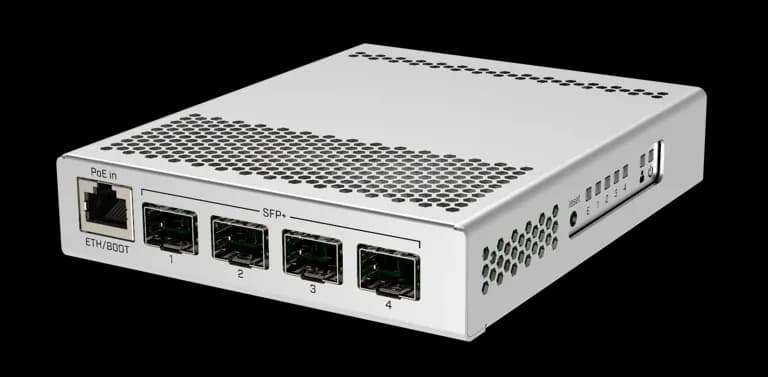
MikroTik CRS305-1G-4S+IN

MikroTik CRS305-1G-4S+IN

7.8/10verdict: buy

The MikroTik CRS305-1G-4S+IN is for homelabbers and sysadmins who need a few 10G SFP+ links on a small, silent switch. It suits anyone who wants to link a server, NAS or workstation at 10G and is happy to configure RouterOS or SwitchOS. It is not aimed at buyers who need many ports, PoE output or fast routing for a gigabit internet connection.

Typically about £121.19 in the UK when we researched itSearch Amazon UK (opens in a new tab, affiliate link)

Affiliate link. As an Amazon Associate I earn from qualifying purchases. Details

NETGEAR GS308E

NETGEAR GS308E

6.2/10verdict: good, not the best

The NETGEAR GS308E is for people who want a small, silent eight-port Gigabit switch with basic VLAN support. It suits homes, bedrooms and desks where a fan would be a nuisance and plug-and-play setup matters. It is a poor fit for anyone who needs PoE, faster than Gigabit ports or deep Layer 3 management.

Typically about £24.97 in the UK when we researched itSearch Amazon UK (opens in a new tab, affiliate link)

Affiliate link. As an Amazon Associate I earn from qualifying purchases. Details

Scores, criterion by criterion

CriterionWeightMikroTik CRS305-1G-4S+INNETGEAR GS308E
Port speeds30%9/106/10
Management20%9/107/10
Port count and uplinks15%6/105/10
Noise and efficiency15%8/109/10
PoE10%5/105/10
Firmware and support10%7/104/10
Overall7.8/106.2/10

Specifications

SpecMikroTik CRS305-1G-4S+INNETGEAR GS308E
PortsFour SFP+ ports plus one 10/100/1000 Ethernet port8 x Gigabit RJ45, no 10G port
Port speedsGigabit copper port; SFP+ cages support up to 10 Gbit per port; 1.25 Gbit SFP modules also supported8 x 1G ports, auto-negotiating; no 2.5G or 10G ports
ManagementRouterOS or SwitchOS selectable via dual boot; configurable through WebFig or WinBoxWeb-managed Easy Smart interface; VLAN, QoS, cable health check and loop prevention
PoE budgetNo published PoE output budget; accepts PoE (802.3af/at) input on its Gigabit port with 12–57 V input; maximum consumption 18 W, or 10 W without attachmentsNone (PoE ports and PoE budget N/A)
Uplinks (SFP/SFP+)Four SFP+ cages; modules not includednot listed
Switching capacity82 Gbps switching capacity; 41 Gbps non-blocking throughput16Gbps bandwidth
CoolingPassive, fanless, metal caseFanless (0 fans, 0 dBA at 25°C)

Strengths and weaknesses

MikroTik CRS305-1G-4S+IN

  • + Four SFP+ cages with up to 10 Gbit per port
  • + Fanless metal case; owners praise silent, low-power running
  • + Choice of RouterOS or SwitchOS via dual boot
  • − Only five ports, and SFP+ modules are not included
  • − Owners report weak routing for gigabit internet
  • − Copper SFP+ modules reportedly run hot in the fanless case

Skip it if:

  • Buyers who need PoE output to power cameras or access points
  • Anyone who wants to route a gigabit internet connection
  • Buyers who need many ports or copper multi-gig without SFP+ modules
Read the full MikroTik CRS305-1G-4S+IN review ›

NETGEAR GS308E

  • + Fanless, with 0 dBA listed
  • + Web-managed with VLAN, QoS and loop prevention
  • + Plug-and-play setup; maximum draw of 3.7W
  • − Gigabit only, with no 2.5G or 10G ports
  • − Owners criticise firmware update frequency and process
  • − Layer 2 only, modest web UI and no mobile app

Skip it if:

  • Buyers who need PoE for access points, cameras or phones
  • Anyone with 2.5GbE or 10GbE devices or who wants SFP uplinks
  • People who need advanced Layer 3 features or a polished management UI
Read the full NETGEAR GS308E review ›

More comparisons

Compare all network switches · Best network switches