UGREEN NASync DXP4800 Plus
Price unavailable right nowAffiliate link. As an Amazon Associate I earn from qualifying purchases. Details
UGREEN NASync DXP4800 Plus review
Researched, not hands-on tested.How we review ›
by SudoPicks Research · published 24 Oct 2026 · updated 24 Oct 2026
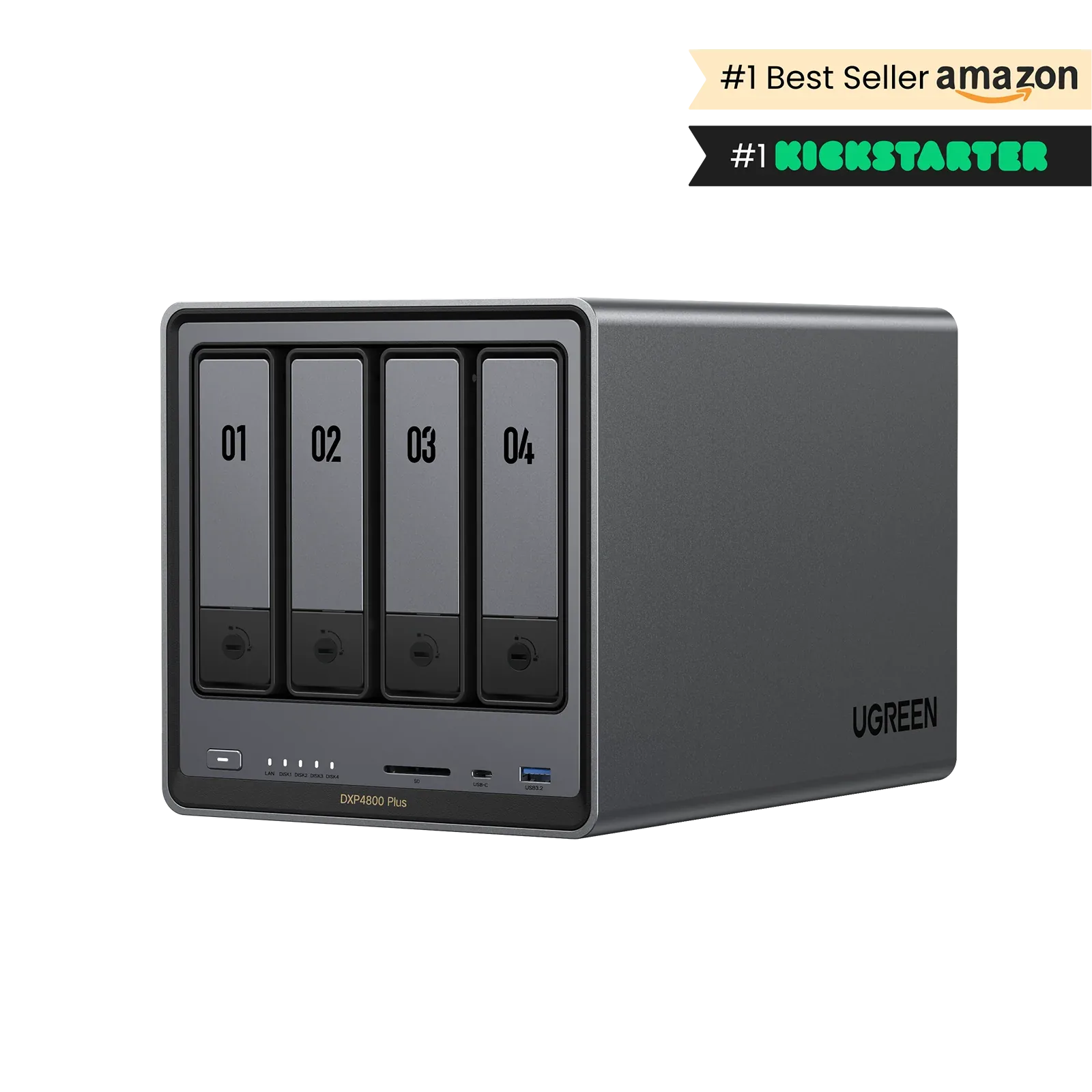
The UGREEN NASync DXP4800 Plus is for homelabbers and technical users who want four bays, two NVMe slots and 10GbE in one box. It suits people comfortable with a young operating system and some setup fiddling.
joint 2nd of 13 NAS we've reviewedAffiliate link. As an Amazon Associate I earn from qualifying purchases. Details
New to NAS? What they are and what to look for
A NAS (network-attached storage) is a small box of hard drives that sits on your home network. Every phone, laptop and TV in the house can save to it and play from it, and it can back up your computers automatically.
Do you need a NAS? Worth it if you have more photos and files than fit comfortably on one computer, want automatic backups, or want to run a media server like Plex. If you only need backups, a cloud service or an external drive is simpler.
What to look for
- Number of drive bays: two is enough for most homes and lets one drive copy the other
- The software: Synology's is the easiest; others give more hardware for the money
- Drives are usually sold separately, so budget for them
Unsure about a word? Jargon explained
How the 7.3 adds up
Our NAS rubric- Storage capacity (bays, M.2)20% of score
- CPU and transcoding20% of score
- Memory ceiling15% of score
- Networking20% of score
- Software and ecosystem15% of score
- Openness10% of score
Against the 13 NAS we've reviewed
bar = the range of all 13 · dot = this one · better →
- Overall score 7.3/10joint 2nd of 13
- Price £529.9811th cheapest
- Value for money 1.4 per £10010th of 13
Power use and running costs
Running 24/7 at idle, at 26.32p per kWh (the Ofgem price cap).
- Electricity per year
- £55.91
- 212 kWh
- 3 years, all in
- £697.71
- £529.98 to buy + £167.73 to run
- Against the others
- 9th of 11
- 1st = lowest idle power
- Synology DiskStation DS1243.44 W£7.93
- Synology DiskStation DS223j4 W£9.22
- UGREEN NASync DXP28007 W£16.14
- UGREEN NASync DH230010 W£23.06
- TERRAMASTER F2-42511.5 W£26.51
- Beelink ME Pro 2-Bay NAS Mini PC14.5 W£33.43
- UGREEN NASync DXP2800 GT17.5 W£40.35
- UGREEN NASync DH4300 Plus18.8 W£43.35
- UGREEN NASync DXP4800 Plus (this)24.25 W£55.91
- UGREEN NASync DXP4800GT25 W£57.64
- UGREEN NASync DXP4800 Pro26 W£59.95
Dashed bars use the maker's figure; solid bars were measured by reviewers or owners.
- Synology DiskStation DS124£163.79
- Synology DiskStation DS223j£194.67
- UGREEN NASync DH2300£244.12
- TERRAMASTER F2-425£331.54
- UGREEN NASync DXP2800£373.27
- UGREEN NASync DH4300 Plus£463.03
- UGREEN NASync DXP2800 GT£511.04
- Beelink ME Pro 2-Bay NAS Mini PC£519.29
- UGREEN NASync DXP4800 Plus (this)£697.71
- UGREEN NASync DXP4800GT£702.91
- UGREEN NASync DXP4800 Pro£799.83
Today's best price, or the typical price when researched. Drives and accessories not included.
Not shown, as no idle figure is published: Synology DiskStation DS423, Synology DiskStation DS225+.
Running costs and support
| Software updates | Secondhand blog claim that UGREEN says security updates last a maximum of five years after launch; no end date announced and not verified on UGREEN's site source |
|---|
- 10GbE
- 2.5GbE
- Hardware transcoding
- NVMe slots
- Docker
Featured in: Best NAS for Plex and Jellyfin · Best NAS with 10GbE · Best NAS for Docker and home servers · Best NAS with the lowest running costs
Security and compatibility
| Latest firmware or software | No release date found |
|---|---|
| Known security issues | None found in public advisories. That's a good sign, not a guarantee. |
| Update record | No release date was found for the UGOS version 1.4.0.2485 and no CVEs or UGREEN advisories were found, though one unconfirmed certificate and key-sharing report remains under investigation. |
| Linux | Partly works on Linux. A user got the US3000 UPS working through NUT on Unraid with usbhid-ups, but this was a custom build rather than UGOS, and UGOS's Linux base and drivers were not verified. source |
Pros and cons
+ pros
- 10GbE plus 2.5GbE networking
- Four SATA bays and two PCIe 4.0 NVMe slots
- Owners praise quiet running and build quality
− cons
- UGOS Pro is described as immature or clunky
- Drive trays feel flimsy to some owners
- No PCIe slot and no eSATA
Price history
Price history appears here once we have tracked this product for a few days.
The full review
Where it fits
The DXP4800 Plus is a four-bay desktop NAS built around an Intel Pentium Gold 8505. It pairs that chip with a 10GbE port, a 2.5GbE port and two NVMe slots. Owners praise the hardware value, and the 10GbE port gets particular mention. The same owners are less happy with the software.
Storage and expansion8/10
The four bays take 3.5-inch or 2.5-inch SATA drives. The file systems are EXT4 and BTRFS, and the RAID options are JBOD, Basic, RAID 0, 1, 5, 6 and 10. Two M.2 2280 slots run at PCIe 4.0 x4, so you can add NVMe storage alongside the four bays.
The sources disagree on maximum capacity. KitGuru gives 22TB per bay, while the UGREEN EU store says up to 32TB per bay. Total capacity is quoted as 88TB by TechPowerUp and Adorama, 136TB by PetaPixel and 144TB by the UGREEN EU store. Check the manufacturer's current figures before you plan around very large drives.
The case has two USB 3.2 Gen2 ports and one USB-C port on the front, plus two USB 2.0 ports, an HDMI 2.0b output and an SD card reader. There is no eSATA and no PCIe slot. Owners say the drive trays feel flimsy, though they are easy to fit.
CPU and memory7/10
The Pentium Gold 8505 is an Alder Lake chip with five cores and six threads. One P-core runs at up to 4.4 GHz and four E-cores run at up to 3.3 GHz, with 8MB of cache. The sources say hardware transcoding works through Intel graphics for Plex. They don't name Quick Sync explicitly, so check that detail if your media setup depends on it.
Docker engine 26.1 is supported, so containers are a natural use for this chip. Memory is 8GB of DDR5-4800 SO-DIMM. TechPowerUp, smarthomecompared and Android Central give a ceiling of 64GB, while Adorama states 32GB. With 8GB installed and the ceiling in dispute, plan on a memory upgrade if you want to run many containers, and confirm the supported limit first.
Networking9/10
The box has one 10GBASE-T port on RJ45 and one 2.5GbE port. That is the main reason owners rate its hardware value. The 2.5GbE port gives a second connection.
Software5/10
The NAS runs UGOS Pro, version 1.0.0.0556 in the research, which is based on Debian 12. It boots from a 128GB SSD. Owner feedback on the software is mixed. Some find the interface easy and beginner-friendly, while others call the software immature or clunky and say setup is awkward. One recurring view is that the NAS suits technical users more than people who want something that simply works. With a 1.0 version number and those complaints, expect the software to be the weakest part of the package.
Openness and build7/10
One reviewer reports no restrictions on drive brands, OS or the mobile app. That means you can choose your own drives rather than buying from a short list. The research doesn't say which alternative operating systems are supported, so check that before buying if you plan to replace UGOS.
The case measures 257.5 x 178 x 178 mm and weighs 3.9kg empty. A single 140mm fan cools it. Owners praise the build quality, the design and quiet operation.
Who it suits
The DXP4800 Plus suits someone who wants fast networking and flexible storage and doesn't mind working around an early-stage operating system. Four bays and two NVMe slots give room to grow, and owners single out the 10GbE port as a highlight of the hardware value. Buyers who value polished software above hardware should weigh the owner complaints carefully.
What owners report
Recurring themes from public owner feedback, summarised in our own words.
- Owners praise the build quality and design.
- Owners report quiet operation.
- Owners rate the hardware value highly, especially the 10GbE port.
- Some owners find the software immature or clunky and setup awkward, while others call it easy and beginner-friendly.
- Some owners find the drive trays flimsy, though easy to fit.
Who should skip it
- Buyers who want a NAS with mature software that simply works
- Anyone who needs a PCIe slot or eSATA port
- Buyers who need a firm, confirmed RAM and drive capacity limit
Full specifications
| Drive bays | 4 x SATA, 3.5" or 2.5" |
|---|---|
| CPU | Intel Pentium Gold 8505 (Alder Lake), 5 cores / 6 threads, 1 P-core at 4.4 GHz + 4 E-cores at 3.3 GHz, 8MB cache |
| Memory | 8GB DDR5-4800 SO-DIMM installed; upgrade ceiling 64GB per TechPowerUp, smarthomecompared and Android Central (Adorama states 32GB) |
| Networking | 1 x 10GbE (10GBASE-T, RJ45) + 1 x 2.5GbE |
| M.2 slots | 2 x M.2 2280, PCIe 4.0 x4 NVMe |
| Expansion | 2 x USB 3.2 Gen2 + 1 x USB-C (front), 2 x USB 2.0, 1 x HDMI 2.0b, SD card reader; no eSATA, no PCIe slot |
| Operating system | UGOS Pro 1.0.0.0556, based on Debian 12; boots from a 128GB SSD |
Sources
- UGREEN EU store product page
- Amazon UK listing B0DYCPV8M5
- CamelCamelCamel price history B0DYCPV8M5
- PriceSpy listing
- TechPowerUp review
- Android Central review
- KitGuru review
- PetaPixel review
- XDA Developers review
- MakeUseOf review
- AVForums long-term review
- Marius Hosting review
- SmartHomeCompared spec page
- CloudZat spec and bundle page
- Adorama US spec page
- Kevsrobots blog review
- TechRadar deal article
Alternatives
Compare head to head
- UGREEN NASync DXP4800 Plus vs UGREEN NASync DXP4800 Pro ›
- UGREEN NASync DXP4800 Plus vs UGREEN NASync DXP2800 GT ›
- UGREEN NASync DXP4800 Plus vs UGREEN NASync DXP4800GT ›
- UGREEN NASync DXP4800 Plus vs Beelink ME Pro 2-Bay NAS Mini PC ›
- UGREEN NASync DXP4800 Plus vs UGREEN NASync DXP2800 ›
- UGREEN NASync DXP4800 Plus vs TERRAMASTER F2-425 ›