Synology DiskStation DS225+
Price unavailable right nowAffiliate link. As an Amazon Associate I earn from qualifying purchases. Details
Synology DiskStation DS225+ review
Researched, not hands-on tested.How we review ›
by SudoPicks Research · published 23 Oct 2026 · updated 24 Oct 2026
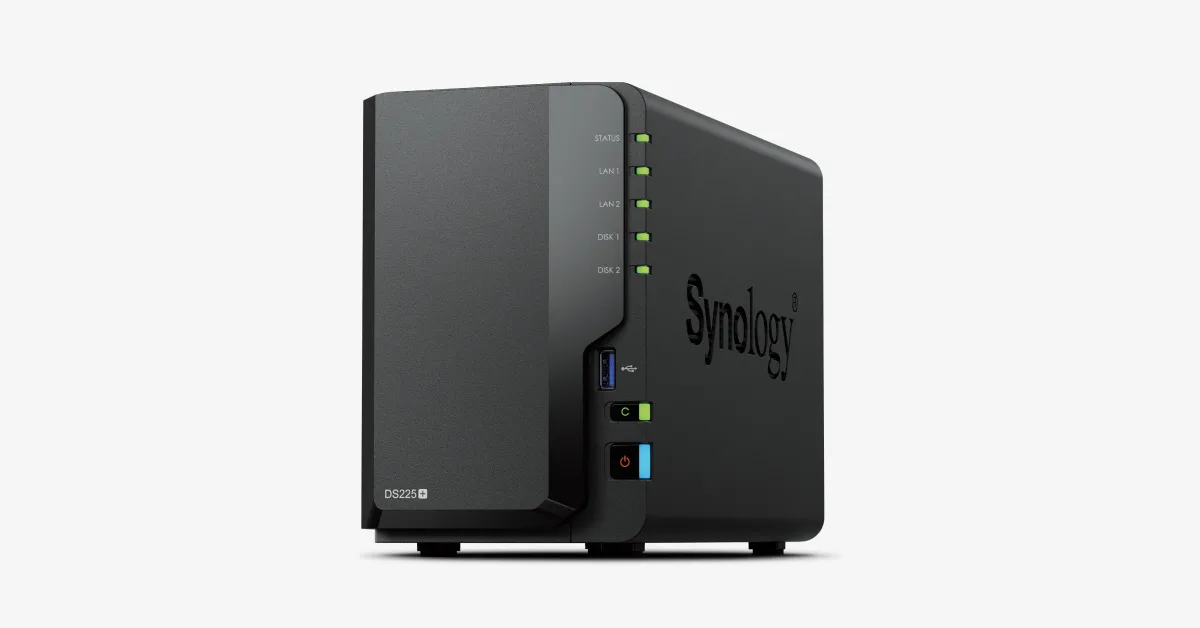
The DS225+ suits home and small-office buyers who want Synology's DSM software for file sharing, backups, photos and a few cameras on two drives. Its 2.5GbE port and mature app set fit light, dependable storage duties.
12th of 13 NAS we've reviewedAffiliate link. As an Amazon Associate I earn from qualifying purchases. Details
New to NAS? What they are and what to look for
A NAS (network-attached storage) is a small box of hard drives that sits on your home network. Every phone, laptop and TV in the house can save to it and play from it, and it can back up your computers automatically.
Do you need a NAS? Worth it if you have more photos and files than fit comfortably on one computer, want automatic backups, or want to run a media server like Plex. If you only need backups, a cloud service or an external drive is simpler.
What to look for
- Number of drive bays: two is enough for most homes and lets one drive copy the other
- The software: Synology's is the easiest; others give more hardware for the money
- Drives are usually sold separately, so budget for them
Unsure about a word? Jargon explained
How the 4.5 adds up
Our NAS rubric- Storage capacity (bays, M.2)20% of score
- CPU and transcoding20% of score
- Memory ceiling15% of score
- Networking20% of score
- Software and ecosystem15% of score
- Openness10% of score
Against the 13 NAS we've reviewed
bar = the range of all 13 · dot = this one · better →
- Overall score 4.5/1012th of 13
- Price £339.987th cheapest
- Value for money 1.3 per £10012th of 13
Running costs and support
| Power draw | 13W under load (measured by owners or reviewers, source) |
|---|---|
| Software updates | No end date announced source |
- 2.5GbE
Security and compatibility
| Latest firmware or software | No release date found |
|---|---|
| Known security issues |
|
| Update record | Notes show 2026 DSM fixes, but no confirmed DS225+ release date, and no advisory names the DS225+ specifically. |
| Linux | Partly works on Linux. Synology's UPS handling uses NUT, with the NAS usable as a NUT primary; upsrw is omitted, and drivers and kernel support were not checked. source |
Pros and cons
+ pros
- 2.5GbE port alongside a 1GbE port
- Mature DSM with SHR, snapshots and Hyper Backup
- Third-party drives supported again since DSM 7.3
− cons
- Quick Sync not enabled for Plex or Jellyfin
- Only 2 GB RAM installed, 6 GB maximum
- No M.2 slots, PCIe slot or expansion unit
Price history
Price history appears here once we have tracked this product for a few days.
The full review
Where it fits
Synology announced the DiskStation DS225+ on 23 July 2025. It is a two-bay NAS that runs Synology's DSM operating system and ships without drives. The box holds the unit, an accessory pack, the power adapter and cord, and two RJ-45 LAN cables.
The hardware is modest. It uses an Intel Celeron J4125, 2 GB of RAM and two SATA bays. The software is the main draw, and owner feedback reflects that split: praise for DSM, complaints about the hardware.
Storage3/10
The two hot-swappable bays take 3.5" SATA hard drives or 2.5" SATA SSDs. Synology quotes up to 40 TB raw capacity with 20 TB drives, and a maximum single volume of 108 TB.
There are no M.2 slots. SSD cache works only with selected compatible SATA SSDs in the main bays, so cache drives must go in one of the two bays that would otherwise hold data. There is no PCIe slot and no expansion unit support. The two USB 3.2 Gen 1 ports are the only other connections for storage. Owners list the missing M.2 cache among their recurring complaints.
Volume options include SHR, RAID 0, RAID 1 and JBOD, on Btrfs or ext4.
CPU and transcoding3/10
The Celeron J4125 has four cores and four threads, runs at 2.0 GHz base and 2.7 GHz turbo, and includes a hardware encryption engine. NASCompares describes it as a 2019-era 14nm Gemini Lake Refresh chip. It also recorded 60–70% CPU use under light Surveillance Station or Synology Drive sync work. Several reviewers and owners call the CPU old and slow.
The bigger issue for media users is transcoding. Synology did not enable Quick Sync, so Plex and Jellyfin cannot use hardware transcoding without user-installed drivers. Blackvoid links this to the Linux kernel 5.10 used on all 2025 models and publishes a workaround guide. Owners on SynoForum report conflicting answers from Synology support on the subject. If your Plex library relies on hardware transcoding, plan for that unofficial workaround or look elsewhere.
Memory3/10
The unit ships with 2 GB of non-ECC DDR4 and has one slot. Synology lists the maximum as 6 GB, made up of 2 GB plus 4 GB. Synology does not give full warranty or support if non-Synology RAM is used.
That ceiling shapes what the box can run. Virtual Machine Manager is rated for two recommended VMs, plus two Virtual DSM instances with one licence free. Synology Photos object recognition needs at least 4 GB, so the stock 2 GB falls short of that feature's requirement. With one slot and a 6 GB limit, it suits a few light containers better than several VMs. Owners repeatedly flag the small amount of RAM.
Networking6/10
There is one 2.5GbE port and one 1GbE port. Owners and reviewers describe the 2.5GbE port as a welcome upgrade. The 1GbE port's maximum packet size (MTU) is 1,500 bytes.
There is no 10GbE port, and Dong Knows Tech states there is no upgrade path for it. truthful.reviews reports that SMB multichannel appeared non-functional in its testing, so combining the two ports for faster single-client SMB transfers may not work.
Software and drive policy8/10
DSM brings snapshots, Hyper Backup and Synology High Availability. Surveillance Station includes two free camera licences and supports up to 25 cameras, though the CPU figures above suggest keeping camera loads light. Owners praise the software, ease of use and app ecosystem.
Drive support has changed since launch. At launch the DS225+ officially supported only Synology-branded drives. DSM 7.3 restored support for third-party 3.5" and 2.5" SATA hard drives and SSDs, which resolves the main openness complaint for anyone running current firmware. The RAM warranty restriction remains. Synology lists DSM as the operating system and does not list support for others.
Hardware warranty is three years, extendable to five.
Verdict
The DS225+ is a software-led purchase. Its strengths are DSM's backup and snapshot tools, which owners praise for ease of use, and a 2.5GbE port that owners call a welcome upgrade. The hardware limits what else it can do. The 2019-era CPU, disabled Quick Sync, 6 GB RAM ceiling and lack of M.2 slots rule it out as a transcoding media server or a host for several VMs. Buy it for simple, managed storage on two drives. Beyond one RAM slot that tops out at 6 GB, the specification lists no M.2 slots, no PCIe slot and no expansion unit.
What owners report
Recurring themes from public owner feedback, summarised in our own words.
- Plex and Jellyfin cannot use Quick Sync hardware transcoding out of the box, and owners report conflicting answers from Synology support.
- Owners and reviewers describe the Celeron J4125 as old and slow, with high CPU use under light Surveillance Station or Drive sync work.
- The 2 GB of installed RAM and 6 GB maximum are a frequent complaint, as is the lack of M.2 NVMe cache.
- DSM's ease of use and app ecosystem draw praise, and the 2.5GbE port is seen as a welcome upgrade.
Who should skip it
- Plex or Jellyfin users who need supported hardware transcoding
- Homelabbers wanting several VMs or many containers within a 6 GB limit
- Buyers who want M.2 cache, PCIe expansion or a path to 10GbE
Full specifications
| Drive bays | 2 × 3.5" SATA HDD / 2.5" SATA SSD, hot-swappable |
|---|---|
| CPU | Intel Celeron J4125, 4 cores / 4 threads, 64-bit, 2.0 GHz base / 2.7 GHz turbo, hardware encryption engine |
| Memory | 2 GB DDR4 non-ECC installed, 1 slot, max 6 GB (2 GB + 4 GB) |
| Networking | 1 × 1GbE RJ-45 + 1 × 2.5GbE RJ-45 |
| M.2 slots | None |
| Expansion | No expansion unit or PCIe slot; 2 × USB 3.2 Gen 1 |
| Operating system | Synology DSM |
Sources
- Synology DS225+ Product Specifications PDF
- Synology DS225+ product page
- Synology DS225+ launch news
- Synology comparison page
- Dong Knows Tech review
- NASCompares review
- NASCompares DSM 7.3 drive policy news
- Android Central long-term review
- Blackvoid review
- Blackvoid Plex HW transcoding guide
- SynoForum Plex HW transcoding thread
- SynoForum Plex HW transcoding thread page 2
- reddb Reddit summary
- Logicity review
- truthful.reviews review
- Particle news on DSM 7.3
- Galaxus Q&A on third-party disks
- eBay.de bundle listing
Alternatives
Compare head to head
- Synology DiskStation DS225+ vs UGREEN NASync DH2300 ›
- Synology DiskStation DS225+ vs Synology DiskStation DS423 ›
- Synology DiskStation DS225+ vs Synology DiskStation DS124 ›
- Synology DiskStation DS225+ vs Synology DiskStation DS223j ›
- Synology DiskStation DS225+ vs UGREEN NASync DH4300 Plus ›
- Synology DiskStation DS225+ vs TERRAMASTER F2-425 ›