Synology DiskStation DS423
Price unavailable right nowAffiliate link. As an Amazon Associate I earn from qualifying purchases. Details
Synology DiskStation DS423 review
Researched, not hands-on tested.How we review ›
by SudoPicks Research · published 24 Oct 2026 · updated 24 Oct 2026
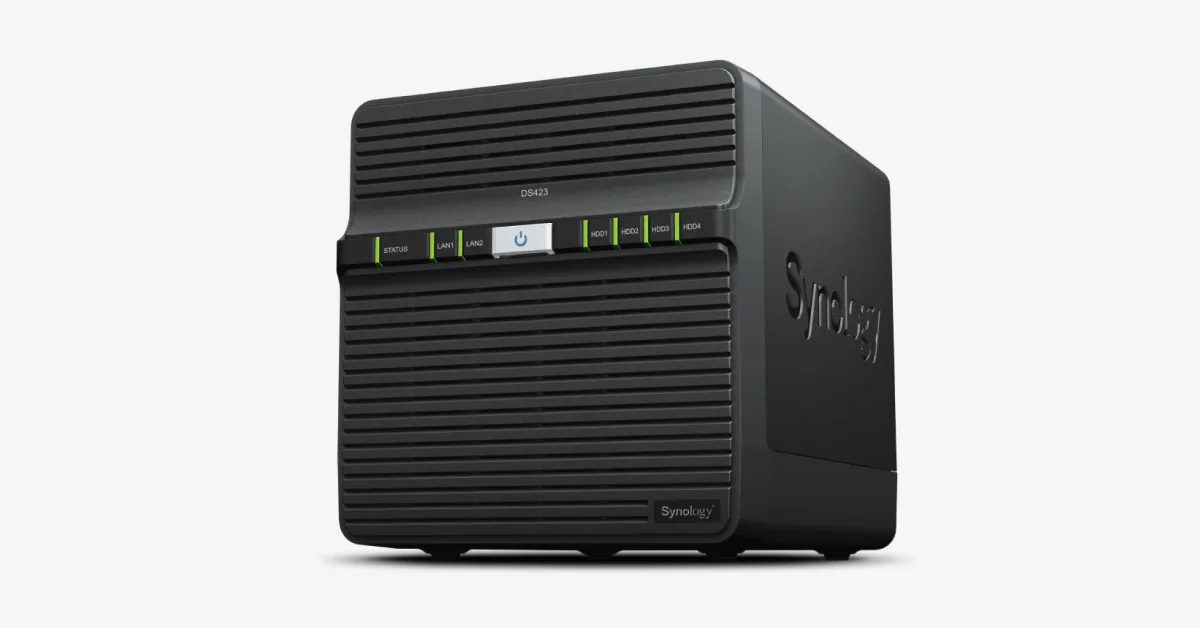
The DS423 is for people who want a four-bay Synology NAS for file storage, shared folders and backups. It suits those who value DSM and Btrfs more than raw hardware power.
11th of 13 NAS we've reviewedAffiliate link. As an Amazon Associate I earn from qualifying purchases. Details
New to NAS? What they are and what to look for
A NAS (network-attached storage) is a small box of hard drives that sits on your home network. Every phone, laptop and TV in the house can save to it and play from it, and it can back up your computers automatically.
Do you need a NAS? Worth it if you have more photos and files than fit comfortably on one computer, want automatic backups, or want to run a media server like Plex. If you only need backups, a cloud service or an external drive is simpler.
What to look for
- Number of drive bays: two is enough for most homes and lets one drive copy the other
- The software: Synology's is the easiest; others give more hardware for the money
- Drives are usually sold separately, so budget for them
Unsure about a word? Jargon explained
How the 4.8 adds up
Our NAS rubric- Storage capacity (bays, M.2)20% of score
- CPU and transcoding20% of score
- Memory ceiling15% of score
- Networking20% of score
- Software and ecosystem15% of score
- Openness10% of score
Against the 13 NAS we've reviewed
bar = the range of all 13 · dot = this one · better →
- Overall score 4.8/1011th of 13
- Price £3518th cheapest
- Value for money 1.4 per £10011th of 13
Running costs and support
| Power draw | 32.41W under load (manufacturer's figure, source) |
|---|---|
| Software updates | No official software support end date found for the DS423 |
Security and compatibility
| Latest firmware or software | July 2026updated in the last year source |
|---|---|
| Known security issues |
|
| Update record | Synology's DSM release and advisories are found, but none were confirmed specifically for the DS423, and no source states whether it needs a Synology account. |
| Linux | Not confirmed. No DS423-specific Linux driver, Synology Linux tool, or mainline kernel support was found; the NUT material covers Synology generally. |
Pros and cons
+ pros
- Four hot-swappable bays for 3.5-inch HDDs or 2.5-inch SSDs
- Runs DSM with the Btrfs file system
- Lists 4.97 W power draw with drives hibernating
− cons
- Only 2 GB of RAM, and no maximum listed
- 1GbE ports only, with nothing faster listed
- No M.2 slot or hardware transcoding listed
Price history
Price history appears here once we have tracked this product for a few days.
The full review
Where it fits
The DS423 is a four-bay Synology NAS that runs DiskStation Manager (DSM) with the Btrfs file system. It takes 3.5-inch SATA hard drives or 2.5-inch SATA SSDs, and all four bays are hot-swappable. The box ships without drives, so you buy those separately.
The hardware list is modest: a four-core Realtek processor, 2 GB of RAM and two 1GbE ports. That points towards file storage, shared folders and backups rather than heavy workloads.
Storage6/10
Four hot-swappable bays give you room for a multi-disk volume. Because the bays accept both 3.5-inch hard drives and 2.5-inch SATA SSDs, you can fit large-capacity disks or flash, depending on what you need.
The unit also has two USB 3.2 Gen 1 ports. No M.2 slot appears in the specifications, so the SSD support described here is for SATA SSDs in the drive bays. If you want a dedicated cache drive that leaves all four bays free for data, the listed hardware does not offer it.
Processor and memory3/10
The processor is a Realtek RTD1619B with four cores, four threads, 64-bit support and a 1.7 GHz clock. Synology lists a hardware encryption engine alongside it. The specifications don't list hardware transcoding. If on-the-fly video conversion for a media library matters to you, that gap is a reason to look at other models.
Memory is 2 GB of DDR4 non-ECC. The research gives no maximum supported RAM, so it doesn't say whether that figure can grow. With 2 GB installed and no stated ceiling, the DS423 suits file serving more than a stack of containers or several virtual machines.
Networking4/10
There are two RJ-45 1GbE LAN ports, and Synology includes two LAN cables in the box. No faster port is listed, and the only other expansion is the pair of USB 3.2 Gen 1 ports. That is fine for backups and everyday file access. It is less comfortable if you expect to move large files between several fast clients.
Software and support7/10
DSM and the Btrfs file system are the software basis of the DS423. Synology backs the hardware with a two-year warranty. In Europe and North America you can extend that to four years with Extended Warranty Plus.
The research doesn't state how long Synology will provide DSM updates for this model, so check that before you commit to a long-term deployment.
Openness5/10
The DS423 runs Synology's own operating system. The research doesn't say whether the unit restricts which drives you can fit, or whether it supports installing another OS. Both the 3.5-inch HDD and 2.5-inch SATA SSD options are confirmed, which gives some freedom in what you put in the bays.
Power use
Synology's figures are 32.41 W in Access mode and 4.97 W with the hard drives hibernating. The hibernation figure is the one that applies when the drives are idle, as on a backup target that sits unused for long stretches. The research gives no power figures for other models to compare against.
Verdict
The DS423 is a plain four-bay NAS. Its strengths are the four hot-swappable bays, the DSM software and the extendable warranty. Its limits are 2 GB of RAM with no stated ceiling, 1GbE-only networking, and no listed M.2 slot or hardware transcoding. It fits storage and backup duties best. It is a weaker fit for container-heavy, virtualisation or media-transcoding setups, given those specifications.
Who should skip it
- Buyers who want hardware video transcoding for a media server
- Anyone planning several containers or virtual machines on limited RAM
- Users who need faster-than-1GbE networking or M.2 cache slots
Full specifications
| Drive bays | 4 x 3.5-inch SATA HDD or 2.5-inch SATA SSD, hot-swappable |
|---|---|
| CPU | Realtek RTD1619B, 4 cores, 4 threads, 64-bit, 1.7 GHz, with hardware encryption engine |
| Memory | 2 GB DDR4 non-ECC |
| Networking | 2 x RJ-45 1GbE LAN ports |
| Expansion | 2 x USB 3.2 Gen 1 ports |
| Operating system | Synology DiskStation Manager (DSM), Btrfs file system |
Alternatives
Compare head to head
- Synology DiskStation DS423 vs Synology DiskStation DS124 ›
- Synology DiskStation DS423 vs Synology DiskStation DS223j ›
- Synology DiskStation DS423 vs UGREEN NASync DH4300 Plus ›
- Synology DiskStation DS423 vs Synology DiskStation DS225+ ›
- Synology DiskStation DS423 vs UGREEN NASync DH2300 ›
- Synology DiskStation DS423 vs TERRAMASTER F2-425 ›