TP-Link TL-WA1201
~£46.99typical UK price when we researched itAffiliate link. As an Amazon Associate I earn from qualifying purchases. Details
TP-Link TL-WA1201 review
Researched, not hands-on tested.How we review ›
by SudoPicks Research · editor Paul HR · published 24 Oct 2026 · updated 24 Oct 2026
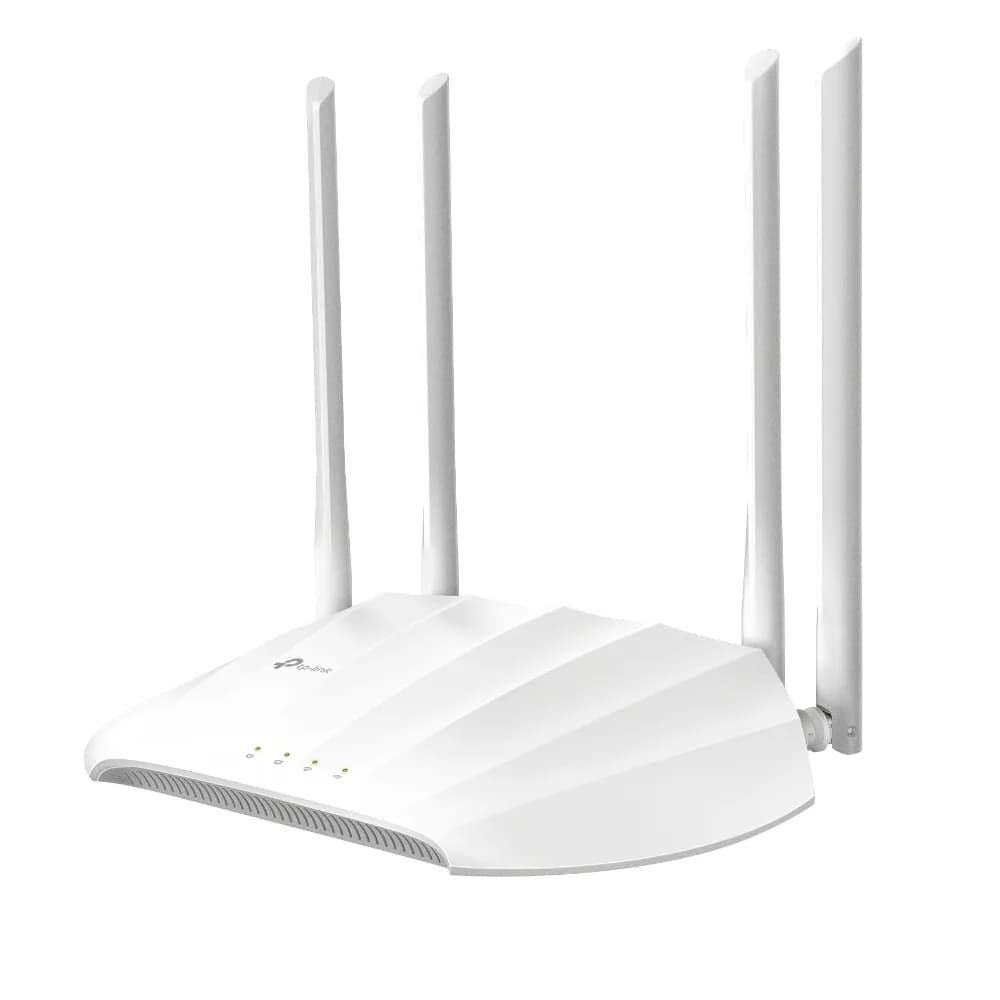
The TL-WA1201 is a Wi-Fi 5 desktop or wall access point for small offices, home labs and flats that want a local web interface for management. It suits buyers who need tagged SSIDs on separate VLANs and want a PoE injector supplied.
5th of 8 Wi-Fi access points we've reviewedAffiliate link. As an Amazon Associate I earn from qualifying purchases. Details
New to Wi-Fi access points? What they are and what to look for
An access point is a Wi-Fi transmitter that connects to your network with a cable, usually mounted on a ceiling or wall. Several of them give fast, even Wi-Fi throughout a building.
Do you need a Wi-Fi access point? Worth it if you can run Ethernet cables to where you need Wi-Fi. If you can't, a mesh router system is easier.
What to look for
- Wi-Fi 6 or newer
- Power over Ethernet (PoE), so it doesn't need a plug socket
- Whether it can be managed without the maker's cloud account
Unsure about a word? Jargon explained
How the 5.8 adds up
Our Wi-Fi access points rubric- Wi-Fi standard and bands25% of score
- Uplink and power20% of score
- Management20% of score
- Software and security20% of score
- Value15% of score
Against the 8 Wi-Fi access points we've reviewed
bar = the range of all 8 · dot = this one · better →
- Overall score 5.8/105th of 8
- Price £46.992nd cheapest
- Value for money Better value than most2nd best of 8
Support and features
| Software updates | No manufacturer end-of-support date is published; a UK reseller lists the product as end of life. |
|---|
- Works without the cloud
Security and compatibility
| Latest firmware or software | September 2026updated in the last year source |
|---|---|
| Known security issues |
|
| Open firmware | Supported by OpenWrt |
| Update record | Sources disagree on whether the CVE is fixed and on its score (9.8 NVD-derived vs 8.8 ZDI); no TP-Link advisory was found, and the V3 date looks inconsistent with its build tag. |
Pros and cons
+ pros
- Up to four SSIDs and VLANs on each band
- Local web UI at tplinkap.net
- PoE injector included in the box
− cons
- Wi-Fi 5 only, 867 Mbps on 5 GHz
- Single gigabit port, passive PoE
Price history
Price history appears here once we have tracked this product for a few days.
The full review
Where it fits
The TL-WA1201 is a compact 802.11ac Wave 2 access point. TP-Link markets it as a business desktop access point, and it can sit on a desk or mount on a wall. It has one Ethernet port, two bands and a local web interface. That makes it a simple add-on for a network that already has a router and switch doing the heavy lifting.
Wi-Fi standard and speeds4/10
This is a Wi-Fi 5 device. The 2.4 GHz band is rated at 300 Mbps and the 5 GHz band at 867 Mbps. Those are the manufacturer's link-rate figures, not throughput you should expect on a real network. With no Wi-Fi 6 radio, it suits light to moderate use: browsing, streaming, video calls, IoT devices on 2.4 GHz. If you plan to have many clients pulling data at once, the single 5 GHz band at 867 Mbps is the limit to check against your needs.
Uplink and power5/10
The single Ethernet port runs at 10/100/1000 Mbps and accepts passive PoE. A PoE injector comes in the box, so you can power the access point from a cable run without a nearby socket at the device end. The listing also mentions an external power supply rated 12V/1.5A, so you have two ways to feed it. If your switch supplies standard PoE, check compatibility before you rely on it. With one gigabit port, the uplink also caps what the wired side can carry, though that sits above the rated wireless speeds listed here.
Management and VLANs8/10
The strongest part of the spec is the management side. You reach a local web UI at tplinkap.net. The operating modes include access point, range extender, client and multi-SSID.
The device supports up to four separate SSIDs and VLANs on each band. For a homelab or a small office, that means you can put guests, IoT gear and trusted devices on different tagged networks from one box. A captive portal feature is also listed, which helps if you want a login or splash page for visitors. Because VLAN support is stated per band, you can plan which networks go on 2.4 GHz and which on 5 GHz.
Software and security7/10
The device supports WPA3. Firmware releases are dated 2020-08-18 (V2), 2022-01-10 (EU/US V2, noted as enhancing device security), 2024-03-29 (V2 build 20240119) and 2026-09-20 (V3.6, 1.15.0, noted as improving stability and security). That is a record of releases across several years, with the latest entries citing security and stability work. TP-Link doesn't state a support end date in the material provided.
The two user guide revisions, REV2.0.1 and REV3.0.0, show that more than one hardware version exists. Check which version you are buying, as the firmware entries refer to both V2 and V3.
Owner feedback
There is nothing here on real-world range, stability, or how the web UI behaves day to day. This review rests on the manufacturer's pages, datasheet, user guides and retailer listings.
Verdict
The TL-WA1201 is a plain, practical access point. Its Wi-Fi 5 radios and single gigabit port limit it on speed. Its local web UI, four VLAN-tagged SSIDs per band, WPA3 and included injector make it more useful to a sysadmin or homelabber than the headline speeds suggest. It suits a small network that needs segmented Wi-Fi managed through a local web interface. Buyers who need Wi-Fi 6 or better, or a faster uplink, should look at other models.
Who should skip it
- Buyers who want Wi-Fi 6 or newer radios
- Anyone needing a 2.5GbE uplink or standard PoE+ powering
- People who want owner reviews on reliability before buying
Full specifications
| Wi-Fi standard | Wi-Fi 5 (802.11ac), 802.11ac Wave 2 AP |
|---|---|
| Bands and speed class | Dual-band 2.4 GHz and 5 GHz; 300 Mbps on 2.4 GHz and 867 Mbps on 5 GHz |
| Uplink port | 1x 10/100/1000 Mbps Ethernet port with passive PoE support |
| Power (PoE class) | Passive PoE on Ethernet port; PoE injector in the box; external power supply rated 12V/1.5A |
| Management | Local web UI reached at tplinkap.net; modes include access point, range extender, client and multi-SSID |
| Mounting | Wall or desktop mounting |
Sources
- TP-Link TL-WA1201 product page (US)
- TP-Link TL-WA1201 product page (UAE)
- TP-Link TL-WA1201 product page (Baltic)
- TP-Link TL-WA1201 business desktop access point page
- TP-Link TL-WA1201 download page (US)
- TL-WA1201 V2 download page (South Africa)
- TL-WA1201 datasheet (EU&US 2.0)
- TL-WA1201 user guide REV2.0.1
- TL-WA1201 user guide REV3.0.0
- Amazon UK listing TP-LINK TL-WA1201
- Coolblue TL-WA1201
- PriceSpy TL-WA1201
- Farnell TL-WA1201