Yodoit PTM15
Price unavailable right nowAffiliate link. As an Amazon Associate I earn from qualifying purchases. Details
Yodoit PTM15 review
Researched, not hands-on tested.How we review ›
by SudoPicks Research · published 24 Oct 2026 · updated 24 Oct 2026
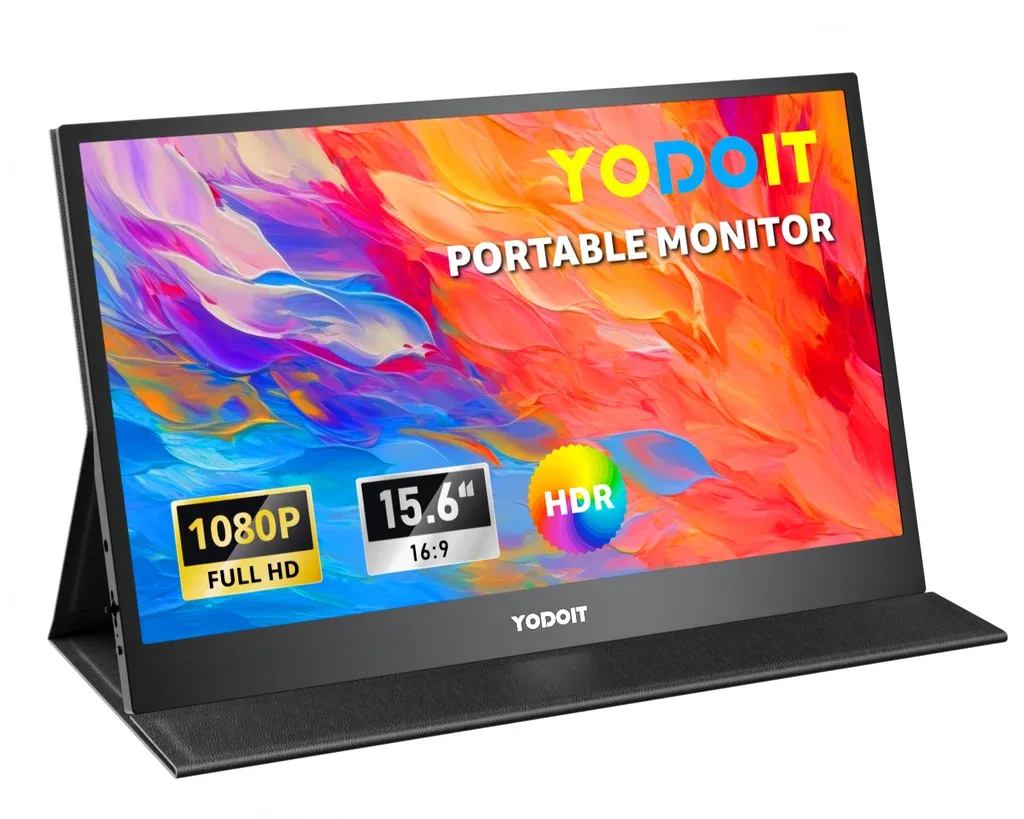
The Yodoit PTM15 is a 15.6-inch portable second screen for people who want to add a display to a laptop with a single USB-C cable. It suits anyone who reads terminals, logs, documents or dashboards and values a light, slim screen that is easy to carry.
7th of 8 monitors we've reviewedAffiliate link. As an Amazon Associate I earn from qualifying purchases. Details
New to monitors? What they are and what to look for
A screen for a desktop computer, or a second screen for a laptop.
Do you need a monitor? A bigger second screen makes laptop work much more comfortable.
What to look for
- 27 inches at 1440p is a sweet spot for desks
- USB-C with power delivery can charge a laptop with one cable
- A height-adjustable stand for comfort
Unsure about a word? Jargon explained
How the 5.3 adds up
Our monitors rubric- Sharpness for text20% of score
- Panel quality25% of score
- Connectivity and docking20% of score
- Ergonomics15% of score
- Refresh rate and motion10% of score
- Build and warranty10% of score
Against the 8 monitors we've reviewed
bar = the range of all 8 · dot = this one · better →
- Overall score 5.3/107th of 8
- Price £49.97cheapest
- Value for money 10.6 per £1002nd of 8
Running costs and support
- USB-C with charging
Featured in: Best monitors with USB-C charging
Pros and cons
+ pros
- About 141 PPI gives fine detail on a small screen
- One USB-C cable carries video and power on compatible devices
- Owners describe it as light, slim and well built
− cons
- 60 Hz cap with no adaptive sync
- Kickstand offers limited angles
- Flicker or black screen without DP Alt Mode or power
Price history
Price history appears here once we have tracked this product for a few days.
The full review
Where it fits
The Yodoit PTM15 is a 15.6-inch portable monitor, released in March 2023. It uses a 1920×1080 IPS panel running at 60 Hz. It connects over USB-C or Mini HDMI. It has no internal battery, so it takes all its power from the connected device or an external supply. That makes it a second screen for a laptop on a desk or in a bag, not a main display.
Sharpness and panelSharpness for text 7/10Panel quality 6/10
The 15.6-inch size and 1080p resolution work out at about 141 PPI. At that density, terminal output, logs and documents should be easy to read at a small size.
The panel is rated at 300 nits, 1000:1 contrast, a 178° viewing angle and a 2 ms response time. The research gives no colour coverage figure, so nothing here confirms it for colour-sensitive work. There is a power limit on brightness too. Brightness or volume above 80% needs an external supply, so running the screen from a laptop port alone means staying at or below that level.
Connections and power
The PTM15 has two USB-C ports, one of them full-featured for video and power. It also has a Mini HDMI input and a 3.5 mm audio jack. Owners like the plug-and-play setup: no driver is needed, and one cable handles video and power on compatible devices.
That last phrase matters. Owners report flicker or a black screen when the source lacks a DP Alt Mode port, when the included video cable isn't used, or when no external power is connected. Before buying, check that your laptop's USB-C port supports DisplayPort Alt Mode. The monitor needs a 5V/2.4A or higher supply. The research doesn't say what the second USB-C port does.
No USB hub, built-in KVM, Ethernet or daisy-chaining is listed. This is a plain display input device, not a dock.
Stand and ergonomics3/10
The stand is an integrated kickstand, and the smart cover folds into stand positions. Owners report limited stand angles. The research lists no height, swivel or pivot adjustment and no VESA mount. With a fixed kickstand as the only support, it suits a flat desk or a travel setup more than a layout where you need to fine-tune screen position.
Refresh rate and motion4/10
The panel is capped at 60 Hz, and owners say the lack of adaptive sync limits gaming. For terminals, documentation, monitoring dashboards and other static content, nothing in the specifications calls for more. The rated 2 ms response time is the only motion figure listed. If you want smooth gameplay, the 60 Hz ceiling is the clearest limit.
Build and support5/10
Owners describe it as light and slim for a 15.6-inch screen, and as well built with a premium feel. That fits a monitor meant to be carried around.
The research doesn't list a warranty length or a dead-pixel policy. No end-of-support date has been announced, and Yodoit gives support@yodoit.com as the contact. Check the seller's terms for warranty and returns before buying.
Who it suits
This is a monitor for adding screen space to a USB-C laptop with minimal fuss. Its 141 PPI density and single-cable connection are its main strengths. Its 60 Hz cap, limited stand angles and sensitivity to port and cable choice are the main limits. Check your laptop's USB-C video support first, and keep an external supply handy for brightness above 80%.
What owners report
Recurring themes from public owner feedback, summarised in our own words.
- Owners find it light and slim for a 15.6-inch screen.
- Owners like the plug-and-play USB-C setup, with one cable for video and power on compatible devices.
- Owners describe the build as solid with a premium feel.
- Owners say the 60 Hz cap and lack of adaptive sync limit gaming.
- Owners report flicker or a black screen without a DP Alt Mode port, the included cable or external power.
- Owners say the stand angles are limited.
Who should skip it
- Gamers who want high refresh rates or adaptive sync.
- Buyers who need height, swivel, pivot or VESA mounting.
- Laptop users without a USB-C port that supports DisplayPort Alt Mode and no spare external power supply.
Full specifications
| Screen size | 15.6 inches |
|---|---|
| Resolution | 1920×1080 (FHD) |
| Panel type | IPS |
| Refresh rate | 60 Hz |
| Inputs and USB-C | 2× USB-C (one full-featured port for video and power), 1× Mini HDMI, 3.5 mm audio |
| Stand adjustment | Integrated kickstand; smart cover folds into stand positions |
Sources
- Yodoit product page
- Yodoit manual
- Yodoit 15.6 4K UHD page
- Yodoit PTM15 user manual (device.report)
- Yodoit PTM15 manual summary (manuals.plus)
- Yodoit PTM15 (device.report)
- Amazon UK listing
- Amazon US listing
- Vivid Repairs PTM15 review
- Best Portable Monitor for Prices PTM15
- Screen Extenders Hub Yodoit review
- Bookbrewer Yodoit review
- Home Gear Insider Yodoit 144Hz review
- Jared Heinrichs Substack owner review
- Review Rating Yodoit PTM15
- eBay UK ex-display listing