Skip to content
sudopicks
esc

MikroTik CRS310-8G+2S+IN vs NETGEAR MS305 5-Port Multi-Gigabit (2.5G) Unmanaged Switch

Researched, not hands-on tested.How we review ›

all judged against network switches at a similar price

The MikroTik CRS310-8G+2S+IN scores 7.2/10 overall, ahead of the NETGEAR MS305 5-Port Multi-Gigabit (2.5G) Unmanaged Switch at 6.1/10.

The MikroTik CRS310-8G+2S+IN leads on port speeds, management and port count and uplinks.

The NETGEAR MS305 5-Port Multi-Gigabit (2.5G) Unmanaged Switch leads on noise and efficiency and firmware and support.

They score the same on poE.

The biggest difference is noise and efficiency, where the NETGEAR MS305 5-Port Multi-Gigabit (2.5G) Unmanaged Switch scores 9/10 to the MikroTik CRS310-8G+2S+IN's 3/10.

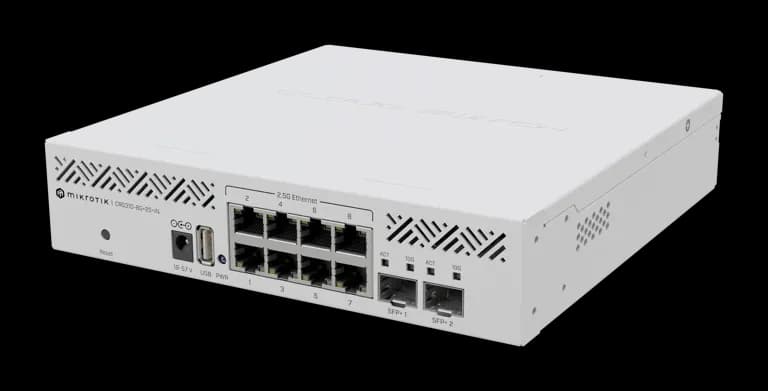
MikroTik CRS310-8G+2S+IN

MikroTik CRS310-8G+2S+IN

7.2/10verdict: buy

The MikroTik CRS310-8G+2S+IN is for homelabbers and small-office admins who want 2.5GbE access ports with 10G SFP+ uplinks. It suits people who are happy to configure VLANs, link aggregation and ACLs in RouterOS. It is a poorer fit for anyone who needs PoE or wants a low-power, set-and-forget switch.

Typically about £185.57 in the UK when we researched itSearch Amazon UK (opens in a new tab, affiliate link)

Affiliate link. As an Amazon Associate I earn from qualifying purchases. Details

NETGEAR MS305 5-Port Multi-Gigabit (2.5G) Unmanaged Switch

NETGEAR MS305 5-Port Multi-Gigabit (2.5G) Unmanaged Switch

6.1/10verdict: good, not the best

The NETGEAR MS305 is for anyone who wants to move a small wired network to 2.5GbE without configuring anything. It suits a desk, a home office or a homelab shelf where five ports and silence matter more than VLANs or PoE. Buyers who need segmentation, powered devices or fibre uplinks should look at other models.

Typically about £127.77 in the UK when we researched itSearch Amazon UK (opens in a new tab, affiliate link)

Affiliate link. As an Amazon Associate I earn from qualifying purchases. Details

Scores, criterion by criterion

CriterionWeightMikroTik CRS310-8G+2S+INNETGEAR MS305 5-Port Multi-Gigabit (2.5G) Unmanaged Switch
Port speeds30%9/107/10
Management20%9/104/10
Port count and uplinks15%8/105/10
Noise and efficiency15%3/109/10
PoE10%5/105/10
Firmware and support10%5/106/10
Overall7.2/106.1/10

Specifications

SpecMikroTik CRS310-8G+2S+INNETGEAR MS305 5-Port Multi-Gigabit (2.5G) Unmanaged Switch
Ports8 x 2.5GbE RJ45 plus 2 x SFP+, and one USB type-A port5 copper RJ-45 ports
Port speedsRJ45 ports 2.5G; SFP+ cages support 1G, 2.5G and 10G100M/1G/2.5G on each port
ManagementRouterOS v7 or SwitchOS; VLANs, link aggregation and ACL rules on RouterOSUnmanaged
PoE budgetnot listedNone (non-PoE switch)
Uplinks (SFP/SFP+)2 x SFP+not listed
Switching capacityNon-blocking Layer 1 capacity 80000 Mbps; Layer 2 about 78,959.7 Mbps at 1518-byte frames25 Gbps switching capacity; 16K MAC entries; 1 MB buffer
Cooling1 fanFanless

Strengths and weaknesses

MikroTik CRS310-8G+2S+IN

  • + Eight 2.5GbE ports plus two 10G-capable SFP+ cages
  • + RouterOS offers VLANs, link aggregation and ACL rules
  • + Wide 18–57 V DC input and -40°C to +60°C range
  • − One fan, and owners report higher power draw than expected
  • − Owners report 2.5G link negotiation problems
  • − No PoE listed

Skip it if:

  • Buyers who need PoE for access points, cameras or phones
  • Anyone who wants a quiet, low-power switch for a living space
  • Buyers who want a simple unmanaged switch with no configuration
Read the full MikroTik CRS310-8G+2S+IN review ›

NETGEAR MS305 5-Port Multi-Gigabit (2.5G) Unmanaged Switch

  • + 2.5G on all five ports with 1G fallback
  • + Fanless and silent, according to owners
  • + 3-year hardware warranty
  • − Unmanaged, so no VLAN support
  • − No PoE on any port
  • − No SFP or SFP+ uplink ports

Skip it if:

  • Buyers who need VLANs or any switch management features
  • Anyone planning to power access points or cameras over PoE
  • People who want SFP or SFP+ uplinks or more than five ports
Read the full NETGEAR MS305 5-Port Multi-Gigabit (2.5G) Unmanaged Switch review ›

More comparisons

Compare all network switches · Best network switches